
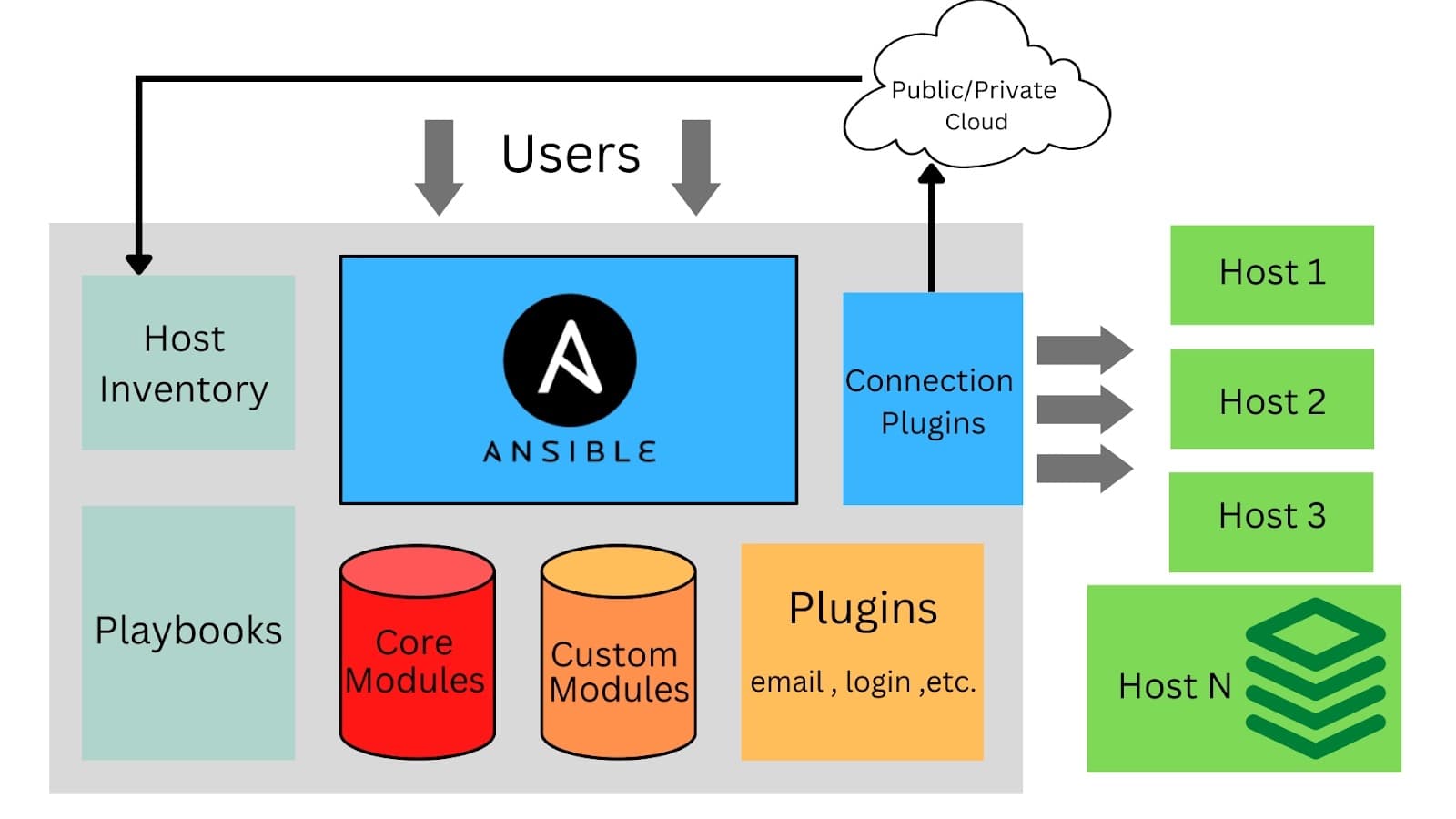
Ansible infrastructure automation turns repetitive server setup tasks into repeatable, version-controlled code. Instead of SSHing into each server and running commands manually, you write playbooks — YAML files that describe the desired state of your infrastructure. Ansible then connects over SSH, runs the necessary steps idempotently, and leaves your servers in exactly the state you specified. No agent to install, no complex control plane — just Python on the remote host and SSH access.
How Ansible Works
Ansible's architecture is intentionally simple. Your local machine (or a CI server) is the control node. You describe which remote hosts to manage in an inventory file, and what to do to them in playbooks. When you run 'ansible-playbook site.yml', Ansible connects to each host over SSH in parallel, uploads small Python modules, executes them, streams the results back, and cleans up — leaving nothing persistent on the remote host.
Inventory: Defining Your Infrastructure
The inventory file maps hostnames or IP addresses to groups. Groups let you target specific sets of hosts with different plays — for example a '[webservers]' play installs Nginx and your app, while a '[dbservers]' play installs PostgreSQL. Inventory can be static (an INI or YAML file) or dynamic (a script or plugin that queries AWS EC2, GCP, or any API).
Variables and Templates
Ansible variables allow you to parameterize playbooks. Set variables at the inventory level, group level, host level, or inline in the play. The Jinja2 templating engine powers both variable interpolation and file templates (templates/*.j2). A common pattern is to keep a 'group_vars/all.yml' file with shared defaults and override specific values in 'host_vars/<hostname>.yml'.
Use 'ansible-playbook site.yml --check' (dry-run mode) to preview what Ansible would change without making any actual modifications. Combine with '--diff' to see the exact content changes for file tasks. This is invaluable for reviewing infrastructure changes before applying them to production.
Writing Production Playbooks
A good playbook is idempotent — running it twice produces the same result as running it once. Ansible modules are designed for idempotency: 'apt: state=present' only installs a package if it is not already installed, 'file: state=link' only creates a symlink if it does not exist. Write custom tasks with 'creates:' or 'when:' conditions to preserve idempotency for shell commands.
Full Web Server Playbook (Node.js + Nginx)
The playbook below provisions a complete web server environment: installs system packages, sets up Node.js via the NodeSource repository, deploys application code using rsync, installs npm dependencies, configures Nginx as a reverse proxy from an Jinja2 template, and ensures all services are started and enabled. Handlers decouple the 'reload nginx' action from the task that triggers it.
# inventory.ini
[webservers]
web1.example.com ansible_user=ubuntu
web2.example.com ansible_user=ubuntu

[dbservers]
db1.example.com ansible_user=ubuntu

# site.yml — master playbook
---
- name: Provision web servers
  hosts: webservers
  become: yes
  vars:
    node_version: "20"
    app_port: 3000

  tasks:
    - name: Install system dependencies
      apt:
        name:
          - curl
          - git
          - nginx
        state: present
        update_cache: yes

    - name: Install Node.js {{ node_version }}
      shell: |
        curl -fsSL https://deb.nodesource.com/setup_{{ node_version }}.x | bash -
        apt-get install -y nodejs
      args:
        creates: /usr/bin/node

    - name: Copy application code
      synchronize:
        src: ./app/
        dest: /opt/myapp/
        delete: yes
        rsync_opts:
          - "--exclude=node_modules"

    - name: Install npm dependencies
      npm:
        path: /opt/myapp
        production: yes

    - name: Configure nginx reverse proxy
      template:
        src: templates/nginx.conf.j2
        dest: /etc/nginx/sites-available/myapp
      notify: Reload nginx

    - name: Enable nginx site
      file:
        src: /etc/nginx/sites-available/myapp
        dest: /etc/nginx/sites-enabled/myapp
        state: link

    - name: Ensure app service is running
      systemd:
        name: myapp
        state: started
        enabled: yes
        daemon_reload: yes

  handlers:
    - name: Reload nginx
      service:
        name: nginx
        state: reloaded
Using Roles for Reusability
Roles are the primary unit of reusability in Ansible. A role encapsulates tasks, variables, defaults, templates, and handlers for a specific concern — 'common', 'nginx', 'nodejs', 'docker'. The Ansible Galaxy community hosts thousands of pre-built roles. Use 'ansible-galaxy install geerlingguy.docker' to add a battle-tested Docker role to your project in seconds.
Secrets Management with Ansible Vault
Ansible Vault encrypts sensitive data — database passwords, API keys, TLS private keys — directly inside your YAML files using AES-256. Encrypted files are safe to commit to version control. Decrypt at runtime with '--ask-vault-pass' or by pointing Ansible to a vault password file stored outside the repository.
Encrypting Variables
You can encrypt entire files ('ansible-vault encrypt vars/secrets.yml') or individual string values ('ansible-vault encrypt_string mypassword --name db_password'). The latter lets you keep most of your variable file readable while only encrypting the sensitive values. In CI pipelines, store the vault password as an encrypted CI secret and write it to a temporary file before running the playbook.
Storing the vault password file in your Git repository defeats the entire purpose of encryption. Keep it in a CI secrets store (GitHub Actions Secrets, GitLab CI variables, HashiCorp Vault) and write it to a temp file only during playbook execution. Also rotate your vault password periodically and re-encrypt files using 'ansible-vault rekey'.
Deploying Docker Containers with Ansible
Ansible's 'community.docker' collection provides modules for managing containers, images, networks, and volumes. Combined with a playbook that templates a docker-compose.yml and runs 'docker compose up -d', you get a fully automated container deployment without a dedicated orchestrator. This approach is popular for single-node or small multi-node Docker deployments.
Rolling Container Updates
Use 'docker_image' to pull the latest image, then 'docker_container' with 'recreate: yes' and 'pull: yes' to restart the container with the new image. For zero-downtime updates on a single host, implement a simple blue-green swap in Ansible: start the new container on an alternate port, verify it is healthy, update the Nginx upstream, then stop the old container.
Using 'serial' for Rolling Server Updates
The 'serial:' keyword in a play controls how many hosts Ansible updates at once. Setting 'serial: 1' means Ansible fully completes the play on the first server before moving to the second — a rolling update at the server level. Use a percentage like 'serial: 25%' to update a quarter of your fleet at a time. Combine with 'max_fail_percentage: 0' to abort the entire play if any host fails.
Use the 'delegate_to' directive to run a task on a different host than the current inventory host. This is useful for draining a server from a load balancer (run the API call on the load balancer host), updating a DNS record (run on the DNS management host), or sending a Slack notification from the control node before starting a deployment.
Testing and CI Integration
Ansible playbooks should be tested before they reach production. Molecule is the standard testing framework for Ansible roles — it uses Docker to spin up temporary containers, runs the playbook, verifies the expected state, and tears down. Integrating Molecule into your GitHub Actions pipeline gives you automated role testing on every pull request.
Linting with ansible-lint
ansible-lint enforces Ansible best practices and catches common mistakes: deprecated module names, missing 'name:' on tasks, 'command:' used where a module exists, and risky file permissions. Add 'ansible-lint' to your pre-commit hooks or CI pipeline to catch issues before code review. The 'profile: production' ruleset is the strictest and recommended for production playbooks.
Core Ansible concepts to know: playbook, inventory, role, idempotency, Ansible Vault, and handler.