DevOps
Running the Hermes Agent as an Autonomous Coder on a VPS
August 202613 min read
Four things: a committing identity with a narrowly scoped token, a workspace it owns and that is reset before every run, a fixed schedule chosen around the model provider's quota reset, and a way to stop — turn limits, a wall-clock cap and a watchdog. The failure mode of an unattended agent is not crashing, it is running forever.
Because it converts container isolation into root on the host. An agent that runs shell commands from model output is an untrusted workload with legitimate access, so it should get a filesystem, a network and a memory limit — and nothing that lets it reach the host. If it must build images, give it a rootless builder inside its own container.
Many agent runtimes sanitise the environment handed to shell subprocesses, stripping variables whose names look like secrets. That is correct behaviour for a tool running model-authored commands, but it makes environment-variable authentication invisible to the agent. Persist credentials to disk at boot with tight permissions instead, and verify with the variable explicitly unset.
Just after the provider's daily quota reset, which is usually a fixed UTC time. A run that starts then gets a full allowance; the same run in the evening gets whatever is left. Space heavy jobs apart too, because two of them in the same window will rate-limit each other more effectively than any external load.
A hard wall-clock cap per run so a hung job cannot block the scheduler, a clean-start step that resets the workspace and removes untracked files, a watchdog with no model access that reaps stuck processes and prunes disk, and split alerting so routine reports and real failures do not arrive on the same channel.
Key Takeaway
Running a coding agent unattended on a small VPS needs four things: a locked-down container with no Docker socket, credentials persisted to disk rather than environment variables, cron jobs scheduled around the model provider's quota reset, and a watchdog that reaps stuck runs before they fill the disk.
In July I put an open-source coding agent on a two-gigabyte VPS and gave it a job: every morning, improve one of my libraries, open a pull request, and merge it if the tests pass. It has been running since, and the interesting part has not been the model at all. It has been everything around it — the container, the credentials, the schedule and the failure handling.
This is the infrastructure half of that project, written as the notes I wish I had on day one. The names are generic because the same shape applies to any agent runtime you might run this way.
An agent you supervise needs a terminal. An agent you do not supervise needs four things you would give a junior colleague, and they are all infrastructure rather than prompting.
Three of those four are things I got wrong first and fixed later, which is why they get most of the space below.
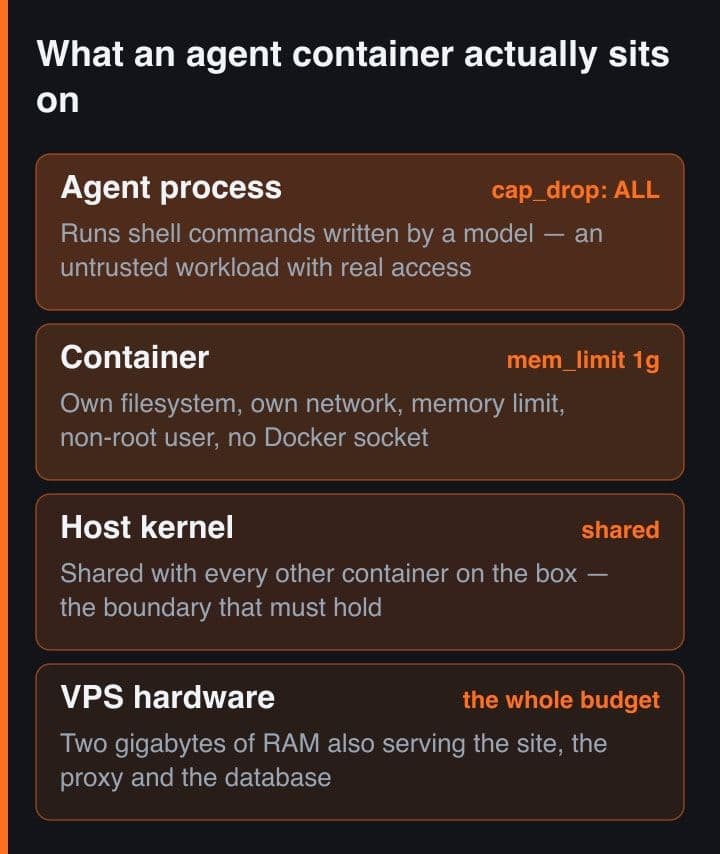
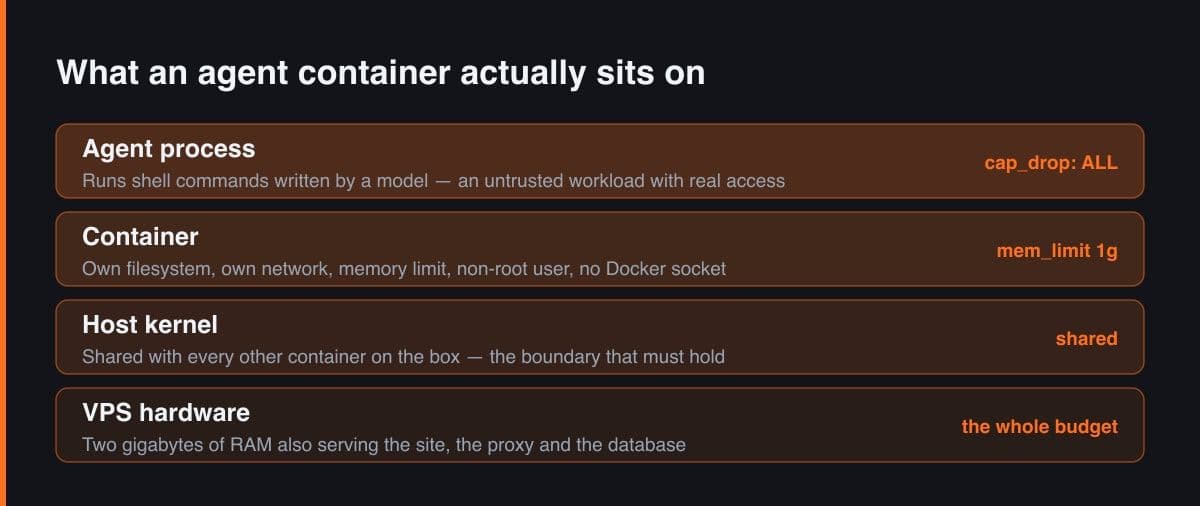
The hardening here is unremarkable and worth doing anyway, because an agent that runs shell commands from model output is the definition of an untrusted workload with legitimate access.
# docker-compose.yml — the hardening that costs nothing and matters
services:
  agent:
    image: agent:local
    container_name: agent
    env_file: .env              # chmod 600, never committed
    cap_drop: [ALL]             # no capabilities at all
    security_opt: [no-new-privileges:true]
    mem_limit: 1g               # a 2 GB box cannot afford a runaway
    read_only: false            # the workspace needs writes; the host does not
    user: "1000:1000"           # never root
    volumes:
      - agent-state:/home/agent/state   # one volume, all persistence
    networks: [agent-net]                # its own network
    # deliberately absent: /var/run/docker.sock

volumes: { agent-state: }
networks: { agent-net: }
Two choices are worth calling out. A memory limit is not optional on a small box: without it, one runaway build takes the whole machine down, including whatever else you are hosting. And all persistence goes into a single named volume, which means a rebuild is safe and a restore is one volume copy rather than an archaeology exercise.
Never mount the host Docker socket into an agent container. It is the single grant that converts container isolation into root on the host, and no amount of prompt-level instruction compensates for it. If the agent genuinely needs to build images, give it a rootless builder inside its own container instead.
The most confusing failure of the whole project: the agent could not push to GitHub, while the exact same command run by hand inside the same container worked perfectly. Not a token problem, not a network problem — the token was valid and the network was fine.
# The failure that cost me two days: the agent could not push, while an
# identical command run by hand worked perfectly.
#
# Cause: the runtime sanitises its subprocess environment and strips
# variables matching *_TOKEN and *_API_KEY before handing the shell to
# the agent. Environment-variable auth is therefore invisible to it.

# Fix: persist credentials to DISK at boot, not to the environment.
git config --global credential.helper store
printf 'https://%s:x-oauth-basic@github.com\n' "$GITHUB_TOKEN" \
  > ~/.git-credentials && chmod 600 ~/.git-credentials

mkdir -p ~/.config/gh && cat > ~/.config/gh/hosts.yml <<YAML
github.com:
  oauth_token: $GITHUB_TOKEN
  git_protocol: https
YAML
chmod 600 ~/.config/gh/hosts.yml

# Verified the right way: unset the variable, then try.
env -u GITHUB_TOKEN gh auth status && env -u GITHUB_TOKEN git push
The cause is a security feature. The runtime sanitises the environment it hands to shell subprocesses, stripping variables whose names look like secrets, which is exactly right for a tool that runs model-authored commands. The consequence is that environment-variable authentication is invisible to the agent even though it is visible to you. The fix is to persist credentials to disk at boot, with tight permissions, so the tools find them without needing the environment. The same trap bit me a second time with model provider keys, and the same fix applied.
Test credential fixes by explicitly unsetting the variable first. Running the command with the environment variable still present proves nothing, because that is the path that already worked; unsetting it is what proves the on-disk credential is doing the work.
With a free or cheap model tier, the schedule is a budget decision. Daily quotas usually reset at a fixed UTC time, and a job that runs just after that reset gets a full allowance, while the same job in the evening gets whatever is left.
| Job | Cadence | Why that slot |
|---|---|---|
| Main improvement run | Daily, shortly after the quota reset | The most expensive job gets the freshest budget and the least contention |
| Second improvement run | Daily, early afternoon | Starts from a main branch the morning run already advanced, so it does not duplicate work |
| Watchdog | Every few hours, no model involved | Reaps stuck processes and prunes disk before either becomes an outage |
| Daily report | Evening | Summarises the day's commits and merges, and is the only thing I read routinely |
The report matters more than it sounds. An unattended agent with no daily summary is a system you will stop trusting within a week, because you have no evidence it did anything. One email a night with commit counts and merged pull requests is the difference between an experiment and a colleague.
An unattended agent fails in ways an interactive one never does, because nobody presses escape. Four mechanisms cover almost all of it.
The clean-start step is the one I would add first in any rebuild. A single untracked test file left behind by a crashed run made three consecutive days of results look like regressions, and the code was fine the whole time.
Five steps, and the first two are the ones people skip.
If your installer pulls the latest version of the agent at build time rather than a pinned one, add a cache-busting build argument you bump deliberately. Otherwise your version is whatever happened to be current the last time an unrelated change forced a rebuild, which is not a property you want in something that merges its own code.
An autonomous coding agent on a small VPS is ninety per cent ordinary operations engineering and ten per cent model configuration. Contain it properly, give it credentials it can actually use, schedule it around the quota it depends on, and watch it with something dumber than itself — and it becomes a genuinely useful daily contributor rather than a demo that worked once.