AI
Claude Code Context Window: Compaction and Token Control
August 202612 min read
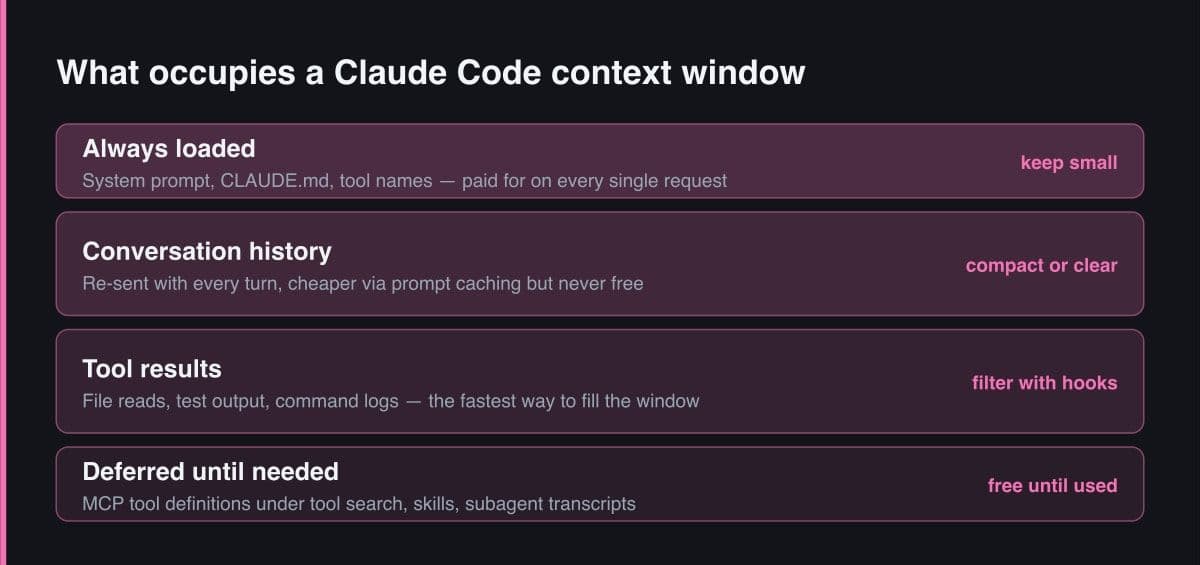
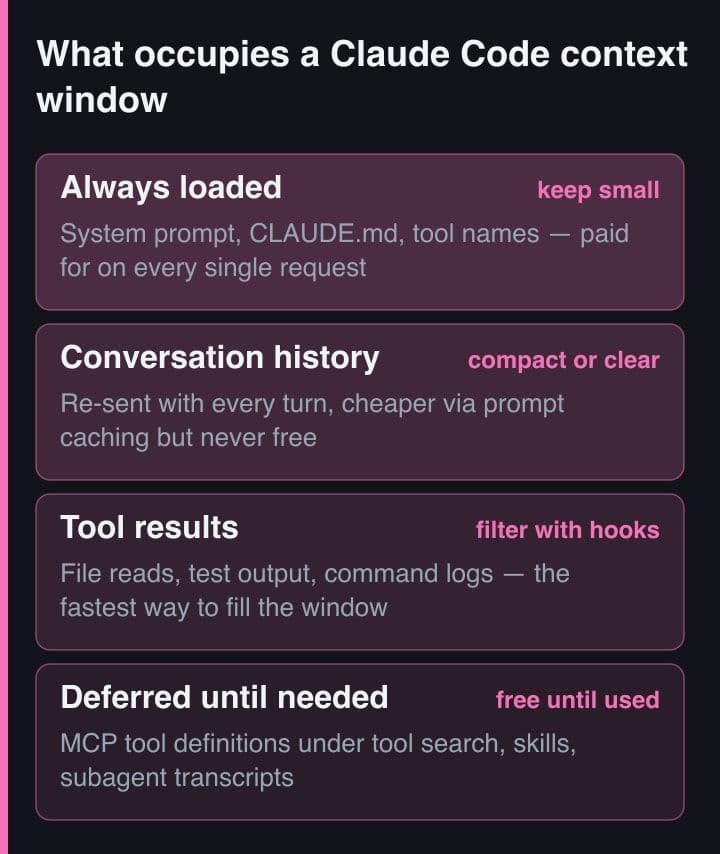
Because every request carries the full conversation, and every tool call is another request carrying another batch of results. Prompt caching makes re-reading that history cheaper but not free, so a one-line question in a session that has been open all day still draws usage for the whole conversation.
Clear when you are switching to unrelated work, because it costs nothing and starts fresh. Compact when you are still on the same long task and need continuity — but remember that compaction reads the conversation it summarises, so compacting a very large context is itself a large request.
Yes. Pass instructions with the compact command, for example asking it to focus on test output and the files already edited, or add a standing compact-instructions section to your project's CLAUDE.md so every compaction in that repository preserves the same things.
Put less into context in the first place. Keep the always-loaded memory file short — the guidance is roughly under two hundred lines — move procedures into skills that load on demand, filter verbose command output with hooks before Claude sees it, and delegate high-volume work to subagents so only a summary returns.
Around seven times the tokens of a standard session when teammates run in plan mode, because each teammate is a separate instance with its own context window. Keeping teams small, using a cheaper model for teammates, and shutting them down when their work is finished are the main controls.
Key Takeaway
Claude Code sends the whole conversation with every request, so a session left open all day keeps drawing usage even for a one-line question. Compaction summarises older history to free space, clearing costs nothing, and the biggest savings come from moving instructions out of context into skills, hooks and subagents.
There is a moment in every long Claude Code session where things get slower and more expensive for no visible reason. You asked a small question, you got a good answer, and somehow that turn cost more than the refactor you did an hour ago. Nothing is broken — you are simply paying for the conversation, not the question.
Understanding why makes the fix obvious, and most of the fixes are habits rather than settings. Anthropic publishes real numbers here, and they are worth reading before optimising anything.
The mental model that matters: each request carries the full conversation, and each tool call is another request carrying another batch of results. Several distinct effects compound on top of that.
For calibration, Anthropic reports an average of around thirteen dollars per developer per active day across enterprise deployments, with ninety per cent of users under thirty dollars per active day. If you are far outside that, the cause is usually a session that was never cleared or a model left on the most expensive tier.
These get used interchangeably in conversation and they do genuinely different things. Choosing the wrong one is how people either lose work or pay for a summary they did not need.
| Action | What it does | When it is the right choice |
|---|---|---|
| Auto-compaction | Summarises older history automatically as the session approaches its compaction window | The default safety net; you notice it as a warning, not as a decision |
| The compact command | Compacts on demand, and accepts instructions about what to preserve | Long task, still the same task, and you want continuity across the summary |
| The clear command | Starts a fresh session with no history at all | Switching to unrelated work — and it costs nothing, unlike compaction |
| Rewind | Restores the conversation and code to an earlier checkpoint | Claude went down the wrong path and you want the tokens and the files back |
The non-obvious one is the cost asymmetry. Compaction reads the conversation it summarises, so compacting a very large context is itself a large request, while clearing is free. If you do not need continuity, clear.
A generic summary keeps the wrong things. You can tell it what matters, either per invocation or as a standing instruction in the project's memory file.
# Steer what a compaction keeps, instead of accepting a generic summary
/compact Focus on the failing test output and the files we already edited

# Or make it the default for this repository, in CLAUDE.md:
#
#   # Compact instructions
#   When you are using compact, please focus on test output and code changes

# Starting unrelated work? Clearing is free; compacting is not.
/clear

# See where the context actually went before deciding
/context
In my own work the instruction that helps most is to preserve test output and the list of files already edited. Those are exactly the details a summary tends to drop, and losing them means the next turn re-reads files it had already understood.
Watch for the compaction loop: a session so large that compacting it is expensive, immediately grows again, and compacts again. If you are compacting more than once or twice on the same task, the real problem is that too much is entering context in the first place — usually verbose command output that a hook should be filtering.
The highest-leverage change is not managing context better; it is putting less into it. Four moves, in rough order of payoff.
The pattern behind all four is the same: context should hold what the current task needs, and nothing that merely might be useful. Everything else should be retrievable on demand.
A concrete example is worth more than the principle. The single highest-return hook I run filters test output so only failures reach the model, because test runs are both frequent and enormously verbose.
// settings.json — a PreToolUse hook that filters test output before it
// ever reaches the model. Tens of thousands of tokens become hundreds.
{
  "hooks": {
    "PreToolUse": [
      {
        "matcher": "Bash",
        "hooks": [
          { "type": "command", "command": "~/.claude/hooks/filter-test-output.sh" }
        ]
      }
    ]
  }
}

// The same idea in three other shapes:
//   a skill  -> domain knowledge on demand instead of exploration
//   a subagent -> verbose work in its own window, a summary comes back
//   a CLI tool -> gh, aws and psql add no per-tool listing to context
Two related habits are worth adopting at the same time. Prefer command line tools over integrations where both exist, because a CLI adds no per-tool listing to context. And install code intelligence for typed languages, so a jump-to-definition replaces a search followed by reading four candidate files.
Put context usage in your status line so it is always visible, and check where it went with the context command before optimising. Guessing which files or tools filled the window is remarkably unreliable; the breakdown usually surprises you.
This is the loop I actually follow, and it takes no discipline once it is habit.
None of this is about being frugal for its own sake. A smaller context is a sharper one: the model spends its attention on the files that matter instead of on a transcript of everything you have done since breakfast.
Context is the one resource in an agentic session that you control completely, and almost every cost complaint traces back to letting it grow unattended. Clear between tasks, keep the always-loaded instructions short, filter verbose output before it arrives, and compaction becomes a rare event rather than a recurring tax.