

Key Takeaway
Context engineering in a monorepo comes down to two decisions: which instruction files load with which directories, and which searches run somewhere other than your own context window. Claude Code loads a root CLAUDE.md at launch and a package CLAUDE.md only when it reads that package, and a subagent's file reads never enter the main window.
The change was about four hundred lines and it lived in six packages: a shared type, two call sites that imported it, a migration, a fixture, and a generated client nobody should have been editing. I asked for it in one session, started at the repository root, and spent the first ten minutes watching the window fill with files that had nothing to do with any of them.
That is the monorepo shape of the context problem, and it is not the same problem as a long session. This post covers the mechanisms that address it — directory-scoped instruction files, glob-activated skills, delegated search, structural lookup, and a short list of things that should never reach the window at all — and for each one, the part readers misjudge: when it actually loads. The loading behaviour is from Claude Code's own documentation. The ordering is what I settled on after doing it badly.
Why a monorepo defeats a naive agent
A monorepo does not make context management harder in general. It breaks one specific assumption. Outside a monorepo the files a task touches tend to sit near each other, so reading around the change is cheap and mostly relevant. In a monorepo the four hundred lines that matter are spread across packages that share a repository and very little else, and the cheapest way to find them — open files until something looks related — is also the fastest way to fill the window with things that turn out not to be.
The cost is not the reading. It is that everything read stays. The context window holds the entire conversation, including every message, every file the agent reads and every command output, and all of it is sent again with the next message. A wrong file opened in minute three is therefore still being paid for in minute forty, and by then you are paying the second penalty the documentation is blunt about: performance degrades as the window fills. Earlier instructions get forgotten, mistakes go up, and the fix arrives after the degradation rather than before it.
Four occupants, and the two you pay for every turn
Name the four things in the window before trying to shrink any of them. Always-loaded instructions arrive before your first prompt: the system prompt, memory files, tool names, and every discovered skill's name and description. Conversation history is everything said since. Tool results are file reads, search output and command output. The current task is your prompt. Two of the four deserve an audit and two do not, and the dividing line is whether you pay for them once or on every single request.
| Occupant | When it enters | Re-sent every turn | The lever you have |
|---|---|---|---|
| Always-loaded instructions | Before your first prompt | Yes, and re-injected after compaction | Scope it by directory or by glob |
| Conversation history | As the session goes on | Yes, all of it, until compaction | Clear between unrelated tasks |
| Tool results | Every read, search and command | Yes, for the rest of the session | Delegate the reading to a subagent |
| The current task | When you press enter | No, this is the cheap one | Name the files, not the module |
The documentation ships an interactive walkthrough of a session filling up, and it is worth clicking through once with the caveat it states itself: the token counts are representative rather than measured. The shape is the useful part. Startup content is small and permanent. Tool results are large and permanent. Conversation history is the only category that leaves, and it leaves by being summarised, which is a lossy trade whose terms you do not set. Auditing the always-loaded half is a job you do once. Keeping tool results out is a decision you make several times an hour.
Directory-scoped instruction files, and when they arrive
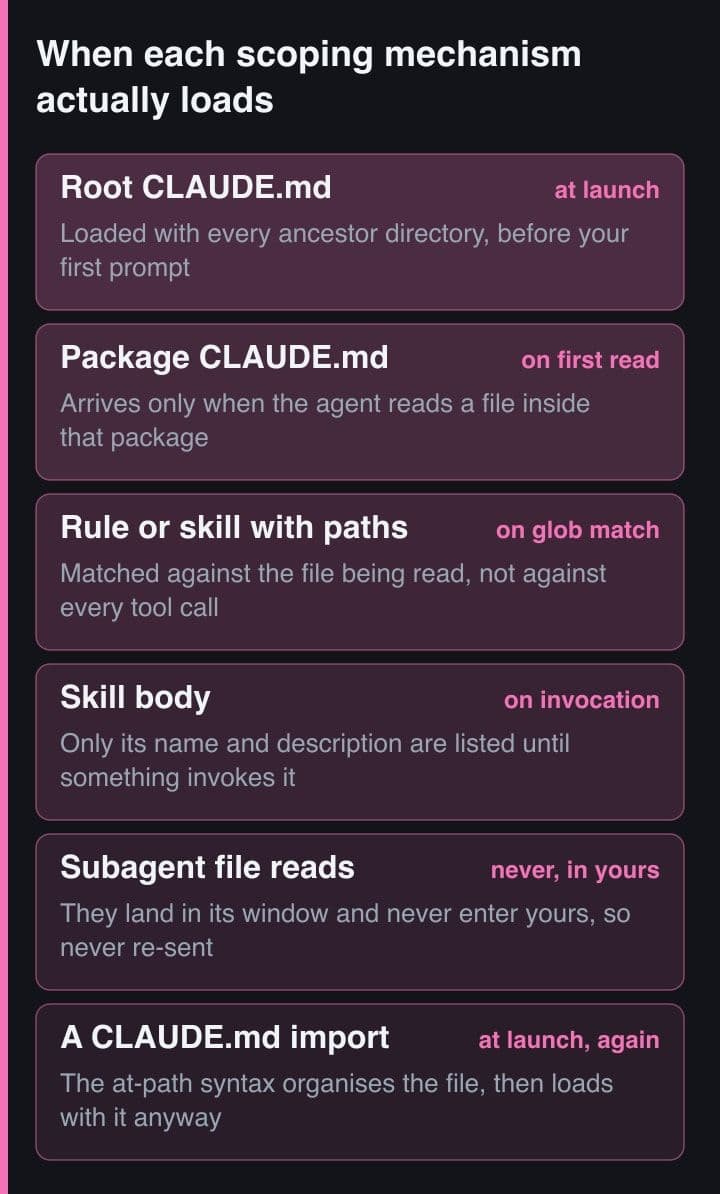
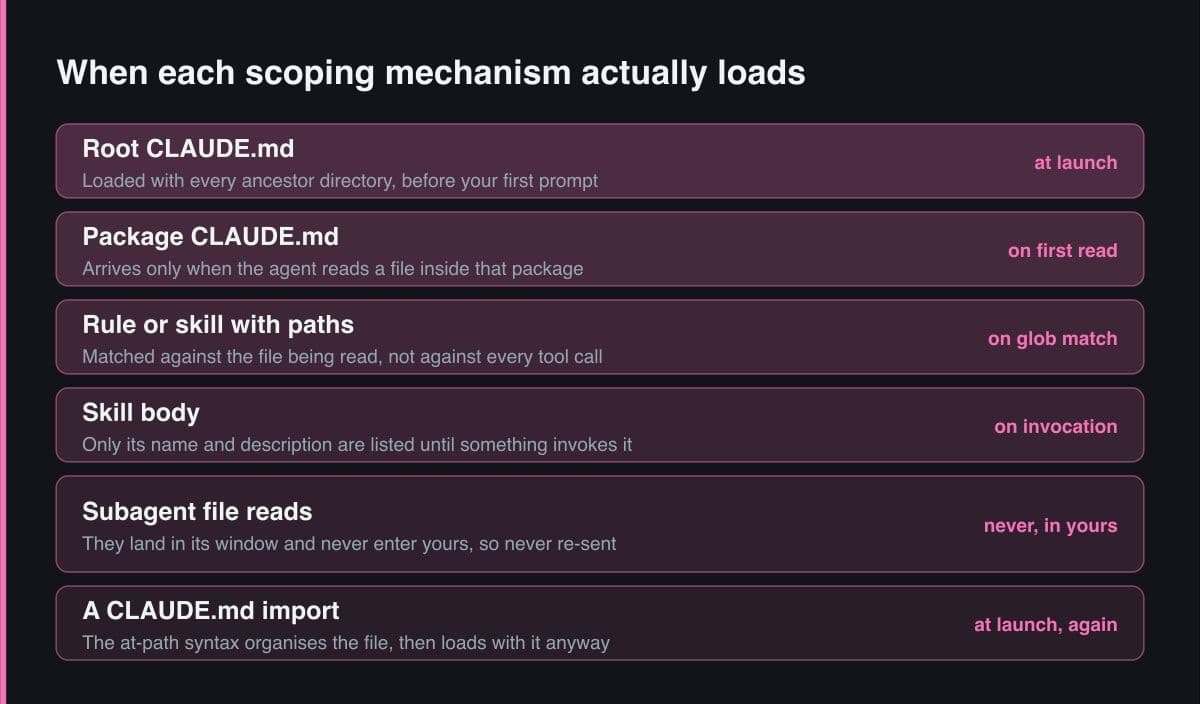
Split the instructions by directory and the loading rule does the scoping for you. Claude Code loads CLAUDE.md from the working directory and every directory above it at launch, then loads a subdirectory's file on demand when it reads a file there. So a root file carries what is true everywhere — commit conventions, which directories are generated, how to run a package script — and each package's file carries only its own stack. Aim under two hundred lines per file; the documentation notes that longer files cost more context and reduce adherence, which is the worst of both.
# The layout. Three packages, three sets of conventions, one root file.
monorepo/
  CLAUDE.md                  # loaded at launch, from any starting directory
  packages/
    api/CLAUDE.md            # loaded when Claude first reads a file in api/
    web/CLAUDE.md            # never loaded during an api-only session
    shared/CLAUDE.md

# Root CLAUDE.md — only what is true in every package.
Run package scripts from the package directory, not the monorepo root.
Prefix commit subjects with the package name, for example: api: add rate limiting.
Never edit files under packages/*/generated/. Run npm run codegen in the package.

# packages/api/CLAUDE.md — nothing in here is true of the frontend.
Copy .env.example to .env before running anything. Tests fail without it.
Write database queries with the Knex query builder, never raw SQL in handlers.
Never edit a migration after it has merged. Add a new migration instead.
Two details decide whether this saves anything. The first is where you start the session. From the repository root you get the root file plus every subdirectory's file as the session touches it; from packages/api you get that package and its ancestors, and the frontend's conventions never load at all. The second is the trap: an import does not help. Imported files are expanded and loaded at launch alongside the file that references them, up to four hops deep, so breaking a long CLAUDE.md into imports organises it and saves nothing.
// .claude/settings.local.json — for packages you never work in.
// Patterns are globs matched against ABSOLUTE paths, so a relative-looking
// pattern needs the leading two-star segment or it matches nothing at all.
{
  "claudeMdExcludes": [
    "**/packages/web/**",
    "**/packages/legacy-*/**"
  ]
}

// This is a static list, not a per-task switch. To focus on one package
// today and a different one tomorrow, do not edit this file — start the
// session inside that package instead, which scopes the instruction
// files, the project settings and the in-scope skills in one move.

// And the thing that looks like scoping but is not: an @path import.
// CLAUDE.md
//   @docs/api-conventions.md      -> expanded and loaded AT LAUNCH
//   @docs/testing-guide.md        -> the same, four hops deep at most
// Splitting a 600-line CLAUDE.md into imports organises the file. It
// does not remove one token from what you pay for on every request.
If a task lives in one package, start the session in that package's directory rather than at the repository root. It is the only scoping decision that costs nothing to make, and it applies to instruction files, project settings and which skills are in scope, all at once. Keep claudeMdExcludes for packages you never work in — it is a static list, not a per-task switch.
Glob-activated skills: the same trick for a procedure
A convention belongs in an instruction file. A procedure belongs in a skill, because a skill's body loads only when it is used, and until then it costs a name and a description. In a monorepo you can scope one two ways. Put it in the package, where a SKILL.md under packages/api/.claude/skills/ becomes available once Claude reads a file in that package. Or keep it at the repository root and give the frontmatter a paths field of glob patterns, which limits automatic activation to files that match. The second is the right shape for a procedure whose files are scattered — every migrations folder in the tree, wherever those folders happen to be.
---
# .claude/skills/migration-review/SKILL.md at the REPOSITORY ROOT, but
# scoped by pattern rather than by placement. Use this shape when the
# files a procedure applies to are scattered across packages.
name: migration-review
description: Review a database migration before it merges. Use when writing or editing files under any migrations directory.
paths:
  - "packages/*/migrations/**"
  - "services/*/db/migrations/**"
---

## Checks, in order
1. Is the change additive? A merged migration is never edited.
2. Does the down migration actually reverse it, including the index?
3. Does any package still read the dropped column? Ask the language server.

# --- The other shape: put the skill IN the package ---
# packages/api/.claude/skills/api-testing/SKILL.md
#
# It becomes available when Claude reads a file in packages/api/. If the
# repository root also has an api-testing skill, BOTH stay available and
# the nested one appears as /packages/api:api-testing. Typing the plain
# /api-testing runs the root one, and Claude Code appends the qualified
# variants with an instruction to also invoke the one whose directory
# holds the files it is working on.
The failure mode here is discoverability, not cost. Claude picks a skill by reading every discovered skill's name and description, and from the repository root that set grows as the session touches directories; the documentation warns it can accumulate into the hundreds. Descriptions are shortened when there are many of them, and the combined description and when_to_use text is capped at 1,536 characters in the listing, so a skill whose distinguishing words sit in its second sentence can lose them at exactly the moment it is competing with the most siblings. Lead with the words a request would contain, and name the directory in the description.
Scoping decides what arrives alongside the files. It does nothing about the reading itself, which in a monorepo is the larger half of the bill, and the mechanism for that half is a subagent.
Delegate the fan-out search, not the answer
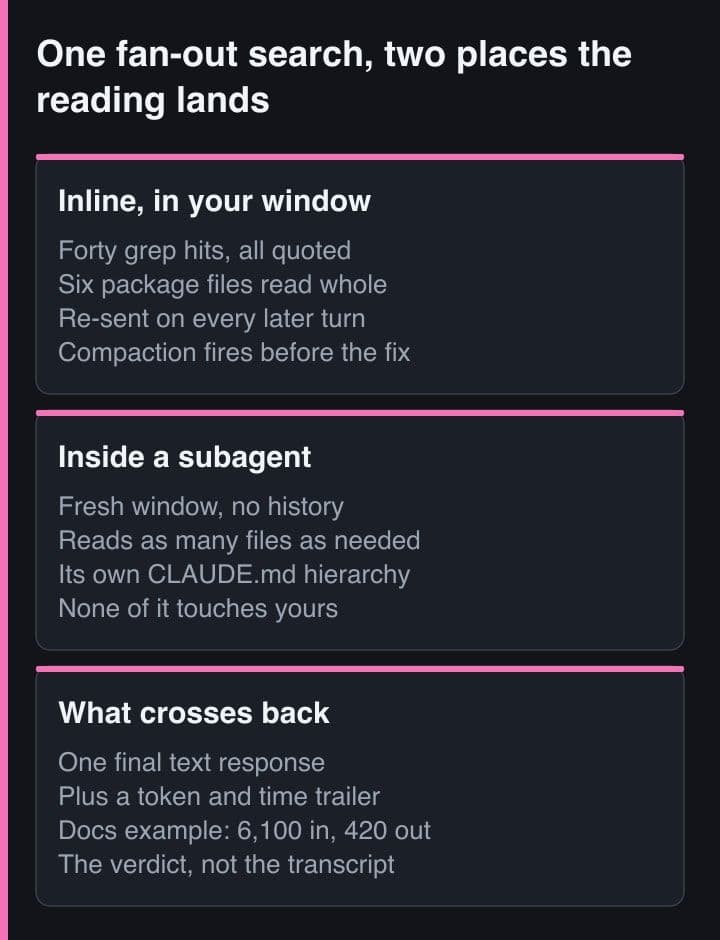
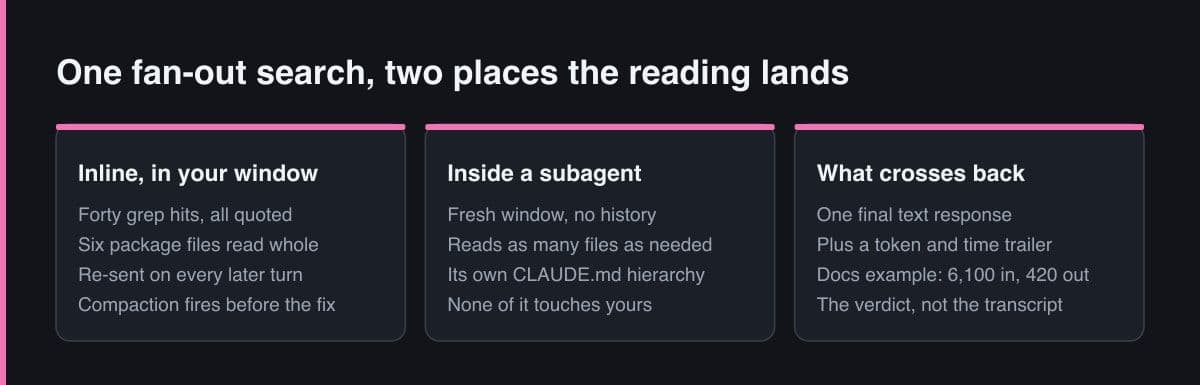
This is the highest-leverage move in a monorepo and the one I see used least. A subagent starts with a fresh, isolated context window: it does not see your conversation history, the skills you have already invoked, or the files already read. It gets its own system prompt, the delegation message the main session writes, the CLAUDE.md hierarchy, and the full content of any skill its definition preloads. It can then read as many files as the question needs, and only its final text response comes back to you, plus a small metadata trailer with token counts and duration.
---
# .claude/agents/monorepo-scout.md
# A read-only searcher. The tools allowlist is the point: it cannot edit,
# so a research errand can never quietly become a change you did not
# review, and it has no reason to open a file it will not report on.
name: monorepo-scout
description: Find every package that depends on a symbol, type or endpoint, and report the call sites with the assumption each one makes. Use before any cross-package change.
tools: Read, Glob, Grep, Bash
model: sonnet
---

You answer ONE question about a monorepo and then stop.

Return, in this order and nothing else:
1. The answer, in at most three sentences.
2. The paths that support it, one per line, with a line number.
3. Anything you could not determine, named as an open question.

Do not paste file contents. The session that called you can open any path
you name; it cannot un-read an excerpt you sent it.
The documentation's walkthrough puts representative numbers on the trade: its research subagent reads 6,100 tokens of files and returns a 420-token result. Do not treat those figures as a benchmark — treat the ratio as the selection criterion. A question with a long search and a short answer is the ideal candidate, and which packages import this type and which of them assume it is non-null is precisely that shape. A question whose answer is itself long is not, and delegating it only moves the tokens one hop.
# The delegation, from the main session. Name the agent, bound the
# question, and say what shape the answer takes. An unbounded
# "investigate the auth flow" is how a subagent returns a transcript.

Use the monorepo-scout subagent: which packages import OrderStatus from
packages/shared, and which of them assume the value is non-null? Answer
with the verdict and the paths. Do not include file contents.

# What crosses back into your window is the subagent's final text
# response plus a small metadata trailer with token counts and duration.
# Its own file reads stay in its window. A fresh subagent also does not
# see your conversation history, the skills you already invoked, or the
# files already read — so the question has to be self-contained.

# Wrong, and it took me two sessions to notice:
#   "Use a subagent to read every call site of OrderStatus and show me
#    what it found, so I can check it."
# That pays for the reading twice and lands the transcript in your
# window anyway. Ask for a conclusion and the paths behind it.
I got this wrong in the obvious way first: I delegated the reading but asked for the evidence. A subagent that returns forty file excerpts so the main session can check its work has moved nothing — you paid for the reading twice and the transcript landed in your window anyway. Ask for a conclusion plus the paths that support it, say so in the delegation prompt, and put the same instruction in the agent definition so you stop having to remember.
Ask the language server, not forty grep hits
Where a language server exists, structural lookup replaces the search rather than trimming it. Text search answers which files contain a string. The monorepo question is almost always where a symbol is defined and who calls it, and those two answers diverge on every re-export, alias and identically named type in another package. A code intelligence plugin connects the agent to a language server so it can jump to a definition, list references and surface type errors after an edit instead of scanning the tree: one precise answer where grep hands back forty hits ranked by nothing.
It is not free, and the costs are worth stating plainly. The plugin needs the language's server binary on every developer's machine, and installing from the official marketplace needs network access to GitHub, which is where that marketplace is hosted; on a restricted network you add the marketplace from an internal Git host or a local path instead. Set against that, this is the one technique here that reduces reads without asking you to decide anything in the moment.
Install code intelligence per language rather than per repository: run the plugin install for typescript-lsp from the official marketplace inside a session, or add it to the enabledPlugins project setting so everyone working in the repository gets it without installing anything themselves. The official marketplace publishes plugins for TypeScript, Python, Go, Rust and other common languages.
What should never reach the window
Content searches respect .gitignore by default, so node_modules, dist and build stay out of results with no configuration at all. The expensive cases are the ones somebody checked in, plus one habit.
- Committed generated code. A generated client is derived output, so reading it teaches nothing the schema does not, and any edit to it is reverted by the next codegen run.
- Vendored dependencies. A vendored SDK is somebody else's code wearing your repository's path prefix, and it is often the largest directory in the tree.
- Committed lockfiles and build output. Large, uninformative, and re-sent on every turn for the rest of the session the moment something opens one.
- A whole module handed over for context. This is the habit to break: it costs exactly what the file costs, carries none of the question, and is how a monorepo session runs out of window before it runs out of task.
Block the checked-in cases with Read deny rules rather than trusting judgement in the moment. Deny rules cover the built-in file tools and the recognised Bash file commands — cat, head, grep and find — when a denied path is passed as an argument, and Claude Code makes a best-effort attempt to keep denied paths out of Grep and Glob results as well.
// .claude/settings.json at the repository root, committed.
// .gitignore already keeps node_modules, dist and build out of search
// results. These rules are for the paths somebody CHECKED IN.
{
  "permissions": {
    "deny": [
      "Read(./**/generated/**)",
      "Read(./**/*.generated.*)",
      "Read(./vendor/**)",
      "Read(./**/pnpm-lock.yaml)"
    ]
  }
}

// Relative patterns anchor at the session's working directory, not at
// the repository root. If you start sessions inside packages, write them
// as double-slash absolute paths instead:
//   "Read(//home/me/monorepo/vendor/**)"

// A worktree session loads project settings from the worktree root,
// which is the checked-out copy of THIS file — so these rules belong in
// the repository root's settings.json, not only in a package's.
Deny rules are a budget control, not an enforcement boundary. A denied path still shows up in the output of a Bash search such as grep -r or find, and the rules do not cover a subprocess that opens files by itself. They remove the accidental read and the temptation; they do not guarantee a file is never seen. If something must never be read, it does not belong in the repository.
See where your own budget goes
Stop guessing which half is expensive. Run the context command after a session has done some real work rather than at startup: it prints a live breakdown by category with optimisation suggestions, including which CLAUDE.md and auto memory files actually loaded. Startup is the part you already know. What you want is the state twenty tool calls in, when the session has wandered.
// .claude/settings.json — log every instruction file as it loads.
// The matcher runs against load_reason, so this one fires ONLY for the
// lazy loads: the nested CLAUDE.md files and the path-scoped rules a
// monorepo session picks up as it wanders across packages.
{
  "hooks": {
    "InstructionsLoaded": [
      {
        "matcher": "path_glob_match|nested_traversal",
        "hooks": [
          {
            "type": "command",
            "command": "jq -r '[.load_reason, .memory_type, .file_path] | @tsv' >> /tmp/loaded.tsv"
          }
        ]
      }
    ]
  }
}

# After a real session, ask which packages it actually reached.
cut -f3 /tmp/loaded.tsv | sort | uniq -c | sort -rn
#   9 /home/me/monorepo/packages/web/CLAUDE.md      <- an api-only task
#   4 /home/me/monorepo/.claude/rules/testing.md
#   1 /home/me/monorepo/packages/shared/CLAUDE.md

# Nine loads of another team's conventions is a claudeMdExcludes entry,
# or a session that should have started in packages/api. The hook cannot
# block or modify a load and its output is discarded — it exists for
# observability, which is exactly what an audit needs.
For the always-loaded half there is a sharper instrument. The InstructionsLoaded hook fires when an instruction file loads, once at session start for the eager files and again later for the lazy ones, and its input carries file_path, memory_type, and a load_reason of session_start, nested_traversal, path_glob_match, include or compact. Because the matcher runs against load_reason, you can log only the lazy loads and read back which packages a session genuinely reached. Pair it with the OpenTelemetry logs exporter and the tool-detail flag that records skill names verbatim, and the skill_activated event will also tell you which skills never fire — and a skill that never fires is paying rent in every session's listing.
The rule I carry now is that a monorepo does not need a smaller context window, it needs each mechanism to load at the right moment. Instructions belong beside the code they describe. Procedures belong behind a glob. Searches belong in another window. Generated files belong behind a deny rule. Audit the always-loaded half once, write down what you found, then spend the attention you saved on the reads, because that is where the budget actually goes.
Sources and further reading
- Claude Code docs — Set up Claude Code in a monorepo or large codebase
- Claude Code docs — How Claude remembers your project: the CLAUDE.md hierarchy and path-scoped rules
- Claude Code docs — Extend Claude with skills, including the paths frontmatter field
- Claude Code docs — Subagents, and what loads inside an isolated context window
- Claude Code docs — Explore the context window, the interactive session walkthrough