

Key Takeaway
Migrating a grown Claude Code dotfiles directory into a versioned plugin moves skills, subagents, commands, hooks and MCP servers into one installable bundle. The expensive part is what stays behind: a hook left in settings fires alongside the plugin copy, a user-scope MCP registration outranks the plugin's, and a same-named local subagent file silently wins.
The report printed twice. A PostToolUse hook in this repository checks whether a blog figure fits the section it sits beside, and after I packaged that hook into a plugin it began reviewing every edit two times over. I spent an hour reading the script. The script was fine. I had copied the hook into the plugin and left the original in settings.json, and Claude Code was running both.
That is the shape of this whole migration. Moving the files is an afternoon of cp; the cost sits in the layer you forgot to empty. This post is the file-by-file map from a dotfiles directory into a plugin, the four precedence rules that decide which copy actually runs, and the checks that tell you a component moved rather than quietly disappeared. The mechanics come from the Claude Code documentation; the inventory and the doubled report are mine.
Take the inventory before you move anything
Nothing in a grown dotfiles directory was designed, and you cannot see that until it is a list. Mine was not even one directory. This repository's .claude held four skills, one subagent and a single PostToolUse hook, while my user settings file carried sixteen top-level keys and hook handlers on eight separate events, from PreToolUse through SessionEnd.
# Take the inventory before you move anything. Accretion is invisible until
# it is a list, and mine was spread across two directories, not one.
$ find .claude -maxdepth 3 -type f | sort
.claude/agents/blog-post-author.md
.claude/settings.json
.claude/settings.local.json
.claude/skills/drawing-blog-diagrams/SKILL.md
.claude/skills/enriching-blog-structured-data/SKILL.md
.claude/skills/publishing-blog-posts/SKILL.md
.claude/skills/writing-blog-content/SKILL.md

$ node -e 'const s=require(require("os").homedir()+"/.claude/settings.json");
  console.log("keys:", Object.keys(s).length);
  console.log("hook events:", Object.keys(s.hooks || {}).join(" "))'
keys: 16
hook events: PreToolUse PostToolUse SubagentStart SubagentStop SessionStart SessionEnd Notification Stop

# And the tell that nothing here was designed: backups I never took deliberately.
$ ls ~/.claude/settings.json*
settings.json  settings.json.bak  settings.json.bak-20260903-163035
Two things in that output changed the plan. The hooks were split across a user file and a project file, so migrating one of them would have left the other firing. And the two backups sitting beside settings.json were not copies I took deliberately, which is the honest argument for the whole exercise: a plugin has a version field, and a hand-edited settings file has timestamped copies of itself.
The map from a loose file to a plugin directory
Most of the move is mechanical and the shapes do not change. A skill is a folder with a SKILL.md inside it before and after; a subagent is a markdown file with frontmatter before and after. Only two rows in this table involve real work, and both are the rows whose source is settings.json rather than a directory.
| In the dotfiles directory | In the plugin | What changes |
|---|---|---|
| skills/name/SKILL.md | skills/name/SKILL.md at the plugin root | Invocation becomes /plugin-name:name. The original keeps answering /name, so both stay available |
| commands/name.md | commands/name.md at the plugin root | Flat markdown keeps working, but skills/ is the recommended shape for anything new |
| agents/name.md | agents/name.md at the plugin root | Loads as plugin-name:name, but a same-named user or project file overrides it |
| The hooks object inside settings.json | hooks/hooks.json | Identical object shape, but it merges with your settings hooks instead of replacing them |
| MCP entries in ~/.claude.json | .mcp.json at the plugin root | Tool names gain a plugin scope, so permission rules written for the old name stop matching |
| Everything else in settings.json | It stays where it is | A plugin settings.json accepts only the agent and subagentStatusLine keys |
| CLAUDE.md and rules files | Nowhere | The documented plugin layout has no slot for a memory file, so these stay in the repository |
# The plugin directory is created NEXT TO the .claude it replaces, so the
# relative copies below resolve and the originals stay available until the
# migration is verified.
mkdir -p blog-toolkit/.claude-plugin blog-toolkit/hooks

cp -r .claude/skills blog-toolkit/    # skills/<name>/SKILL.md keeps its shape
cp -r .claude/agents blog-toolkit/    # agents/<name>.md keeps its shape

# There is no cp for hooks. They live INSIDE settings.json, so the hooks object
# is lifted out by hand into hooks/hooks.json, which takes the identical shape.

blog-toolkit/
├── .claude-plugin/
│   └── plugin.json     # ONLY this file belongs in here. Putting skills/,
│                       # agents/ or hooks/ inside .claude-plugin/ is the
│                       # mistake the documentation calls out by name.
├── skills/
│   ├── writing-blog-content/SKILL.md
│   ├── publishing-blog-posts/SKILL.md
│   └── drawing-blog-diagrams/SKILL.md
├── agents/
│   └── blog-post-author.md
├── hooks/
│   └── hooks.json      # the object lifted out of .claude/settings.json
├── scripts/
│   └── review-figures.sh
├── .mcp.json           # MCP servers, moved out of ~/.claude.json
└── README.md

// blog-toolkit/.claude-plugin/plugin.json
// name is the only required field, and it is also the namespace: every skill
// in here becomes /blog-toolkit:<skill>. version is optional, but without it
// users do not get an update when you bump the content.
{
  "name": "blog-toolkit",
  "description": "Skills, subagent and figure hooks for the bilingual blog pipeline",
  "version": "1.0.0",
  "author": { "name": "Matthews Wong" }
}
The manifest is smaller than people expect. Only name is required, and it doubles as the namespace for every skill in the bundle. version is optional, but omitting it means an installer never receives an update when you change the content, so a migration that skips it produces a plugin nobody can upgrade. One structural rule is worth reading twice: only plugin.json goes inside .claude-plugin, and every component directory sits at the plugin root.
What must stay personal, and what breaks if it does not
The failure here is not an error message. A skill that names an absolute path under your home directory keeps parsing, keeps activating, and then tells Claude to run a script that does not exist on the machine that installed it. Nothing in the bundle is invalid, so no validator objects, and the failure surfaces three steps later as a confusing tool error.
# Wrong: an absolute home path. This worked on the machine it was written on
# and on no other, and nothing warned me — the skill simply told Claude to run
# a script that was not there, and the run failed three steps later.
Run /Users/matthewswong/Documents/matthews-porto-nextjs/scripts/audit.mjs

# Right: the variables Claude Code substitutes in BOTH the skill body and the
# allowed-tools rule, so the same two lines work at personal, project and
# plugin level. Matching them means the script runs without a permission prompt.
---
name: audit-figures
description: Audit every blog figure for size, credit and readability. Use when adding, replacing or auditing an in-article figure.
allowed-tools: Bash(${CLAUDE_SKILL_DIR}/scripts/audit.sh *)
---
Run ${CLAUDE_SKILL_DIR}/scripts/audit.sh to check the figures.

# One trap inside the fix: in a PLUGIN skill, CLAUDE_SKILL_DIR is that skill's
# own subdirectory, not the plugin root. A script shared by three skills goes
# in the plugin's scripts/ folder and is referenced as CLAUDE_PLUGIN_ROOT, and
# anything that must survive a plugin update goes in CLAUDE_PLUGIN_DATA.

// A credential never travels in the plugin. Declare it in plugin.json and let
// each installer supply their own; sensitive keeps it out of display.
{
  "userConfig": {
    "api_token": {
      "type": "string",
      "title": "API token",
      "description": "Your own token for the deploy API",
      "required": true,
      "sensitive": true
    }
  }
}
Three variables remove the problem by construction. CLAUDE_SKILL_DIR resolves to the directory holding that SKILL.md, CLAUDE_PLUGIN_ROOT to the plugin's installation directory, and CLAUDE_PROJECT_DIR to the project root — and Claude Code substitutes them in both the skill body and the allowed-tools frontmatter, which is what lets a bundled script run without a permission prompt. Credentials get the other treatment: declare them in userConfig, mark them sensitive, and let each installer supply their own.
Do not try to migrate your permission rules. A plugin settings.json accepts only the agent and subagentStatusLine keys, so allow and deny rules cannot travel in the bundle at all — and the rules you already wrote for an MCP tool stop matching once that server ships inside a plugin, because the scoped tool name gains a plugin prefix. Every call you had allowed starts prompting again.
Why one hook now fires twice, and which layer wins
Hooks do not override each other. The documentation is explicit that hook entries merge across settings levels rather than replacing them, that all matching hooks run in parallel, and that the same handler defined in more than one settings file runs once — but that a plugin's or a skill's copy of the same handler stays separate. That last clause is the doubled report: deduplication never crosses the boundary between a settings file and a plugin.
# The duplicate is a diff, not a mystery. Print both handlers for the event.
$ jq -r '.hooks.PostToolUse[].hooks[].command' ~/.claude/settings.json
node "${CLAUDE_PROJECT_DIR:-.}/scripts/review-blog-figures.mjs" --hook

$ jq -r '.hooks.PostToolUse[].hooks[].command' blog-toolkit/hooks/hooks.json
"${CLAUDE_PLUGIN_ROOT}"/scripts/review-figures.sh

# Two command strings, one event, one matcher. Deduplication applies to the
# same handler across settings FILES; a plugin's copy stays separate. So both
# of these run, in parallel, on every Write and Edit — which is why the figure
# review printed its report twice and I blamed the script for an hour.

# /hooks inside Claude Code is the faster read: it lists every event with a
# count, and labels each handler with its source — User Settings, Project
# Settings, Local Settings, Plugin Hooks or Session Hooks. A count of 2 where
# you migrated 1 is the whole diagnosis.- Hooks merge. A settings hook and a plugin hook on the same event both run, so the old block has to be deleted rather than kept as a fallback.
- Subagents override. A user or project agents file of the same name beats the plugin's copy, so the plugin version stays inert until the original is deleted.
- Skills coexist. Plugin skills are namespaced as plugin-name:skill-name, so nothing conflicts and nothing is replaced — you simply have two of everything until you clean up. Among the other levels, personal overrides project.
- MCP servers resolve by scope. Local outranks project, project outranks user, and user outranks anything a plugin provides. The whole entry comes from the highest source and fields are never merged.
Two cases I could not settle from the documentation, so I stopped guessing. It does not say what happens when two enabled plugins ship an identical handler for the same event, and it does not rank a plugin's own settings.json agent key against a user-level one. The first turns out to matter less than it sounds, because matching hooks run in parallel and there is no order to depend on. For the second the test is cheap: set the key in one place, read what loaded, then set it in the other — slower than a documented rule and far safer than an assumed one.
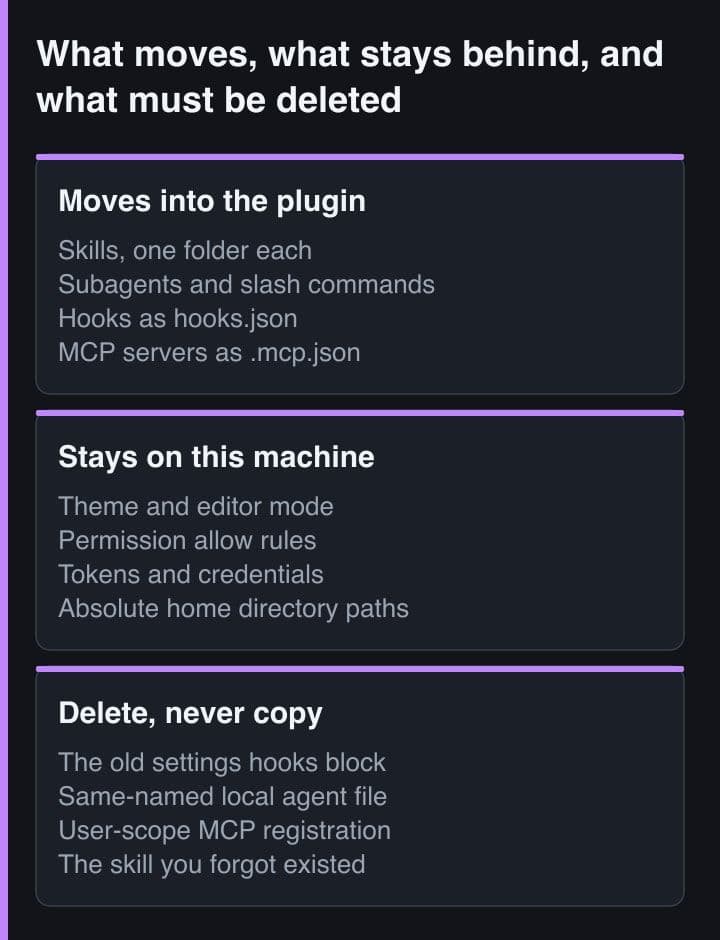
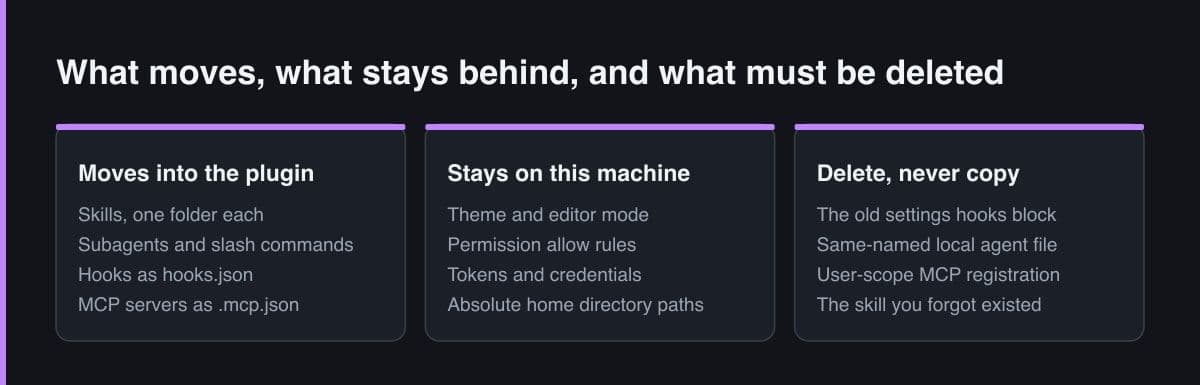
The honest outcome is two artefacts, not one
I could not get to a single bundle, and after trying I stopped wanting to. Half of what accumulated in my configuration is not shareable in principle: a status line command pointing at a script in my home directory, an effort level, a theme, permission rules that reflect how much I let an agent do unattended. Push those into a team plugin and you are pushing your working habits onto four other people.
# The team artefact: a marketplace-installed plugin, enabled in the repository's
# own .claude/settings.json so a teammate gets it by cloning and trusting the
# folder. extraKnownMarketplaces only applies AFTER the workspace trust dialog,
# so a new clone sees no plugin until that prompt is answered.
/plugin marketplace add your-org/claude-marketplace
/plugin install blog-toolkit@your-marketplace

# The personal artefact: a plugin that needs no marketplace and no install.
$ claude plugin init personal-layer
# creates ~/.claude/skills/personal-layer/ with a .claude-plugin/plugin.json
# and a starter SKILL.md. Next session it loads as personal-layer@skills-dir,
# so it can carry its own agents, hooks and MCP servers while staying entirely
# on this machine and out of everyone else's repository.
So the migration lands as a team plugin plus a thin personal layer, and the useful discovery is that the personal layer can be a plugin too, with no distribution machinery at all. claude plugin init writes a manifest and a starter SKILL.md into your personal skills directory, and on the next session it loads as name@skills-dir — no marketplace and no install step, but a real manifest, so it can still carry its own agents, hooks and MCP servers. The team half gets versioned and reviewed. The personal half gets to stay messy.
Test with --plugin-dir before you install anything. It loads a plugin straight from a directory, and a local copy takes precedence over an installed plugin of the same name for that session, so you can rehearse an upgrade without uninstalling first. Then run /reload-plugins after each edit — it re-reads skills, agents, hooks and the plugin's MCP and LSP servers without a restart.
Verify each component by its own signal
A migration that produced no error message has proved nothing. Four of the five component types fail quietly when they fail, so every check has to be positive: name the signal that appears only when the component is genuinely loaded, then go and look for it. The loop that comes before those checks is fixed.
- Run claude plugin validate on the plugin directory. It is the same check the community review pipeline runs, and --strict promotes warnings to errors. It also works on a bare skills directory, which is the fastest way to find a SKILL.md whose frontmatter no longer parses.
- Load it with claude --plugin-dir pointed at the directory rather than installing it, so the originals are still on disk when you need to compare behaviour.
- Run /reload-plugins after every edit instead of restarting the session. It re-reads plugins, skills, agents, hooks and the plugin's MCP and LSP servers.
- Open /plugin and read the Errors tab. A component that failed to load is listed there, a missing executable for instance, while a component with invalid configuration is skipped instead — and claude --debug says why.
# Then check each component by its own signal, not by the absence of an error.

/skills        # is the skill listed, and does it still activate when you
               # DESCRIBE the task rather than typing the command? A plugin
               # skill answers as /blog-toolkit:writing-blog-content, and the
               # un-deleted original still answers /writing-blog-content.

/hooks         # count the handlers per event and read the source label

/context       # Custom Agents. A leftover .claude/agents/blog-post-author.md
               # OVERRIDES the plugin's copy of the same name, so the plugin
               # version stays inert until the original is deleted.

/mcp           # per-server status: Connected, Needs authentication,
               # Failed to connect, Pending approval

$ claude mcp list          # every server and its scope
$ claude mcp get pipelines # one server's resolved entry — read this when
                           # /mcp says Connected but the tools look wrong
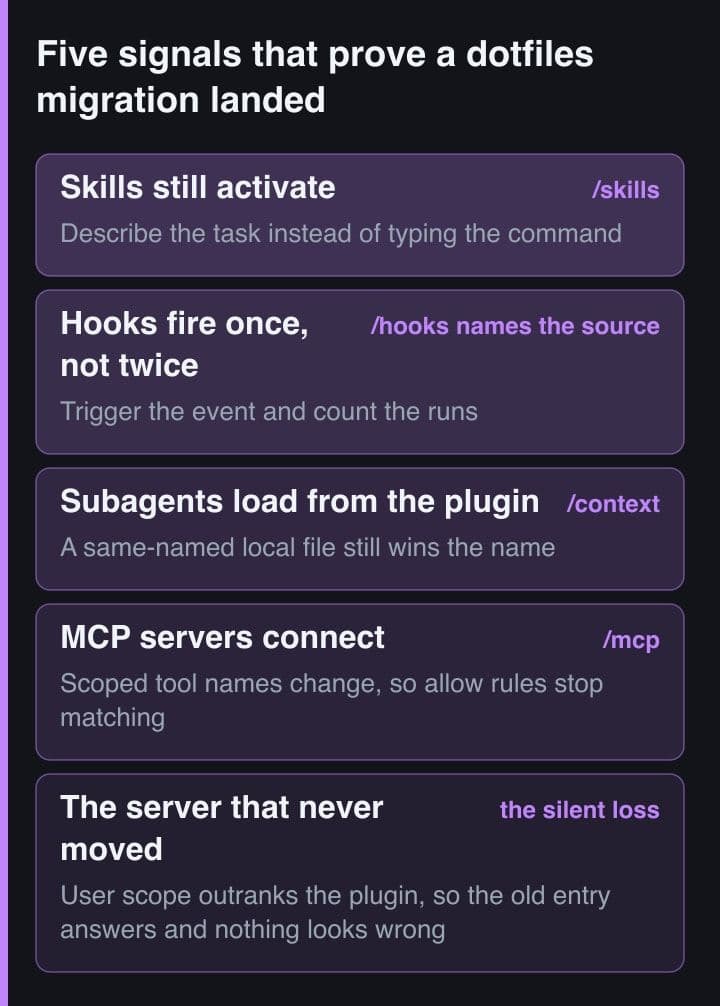
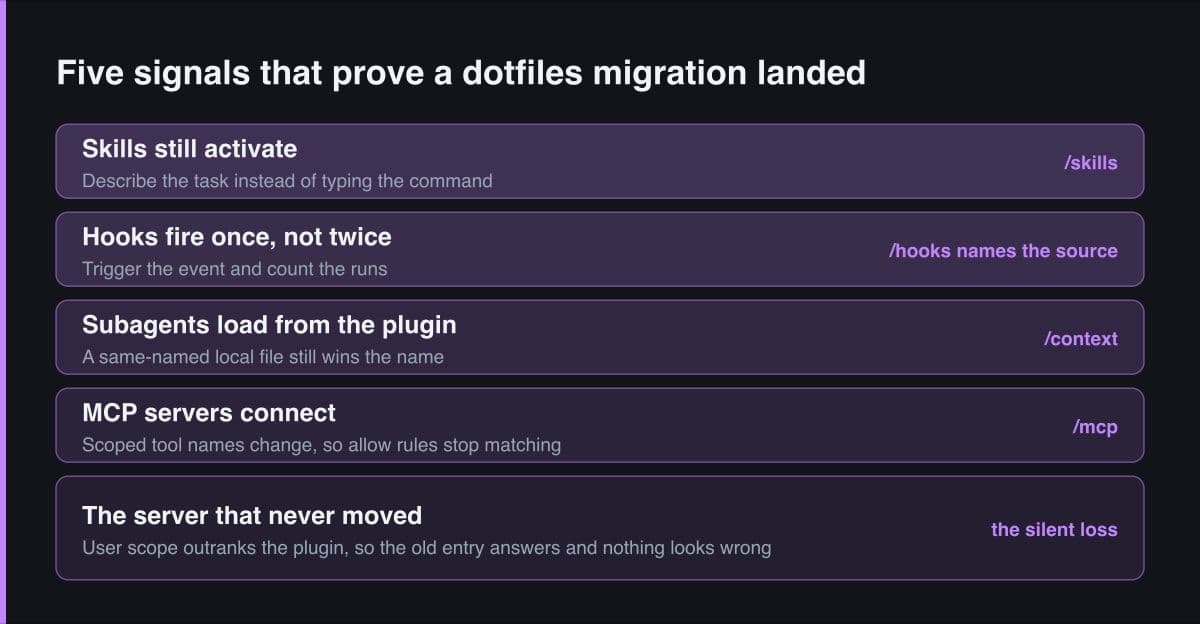
Then the components themselves, and the phrasing of the skill check matters more than it looks. Typing the slash command proves only that a file exists somewhere; describing the task in your own words is what proves the description still earns activation, and that is exactly what a copy between directories can quietly break. For the rest, /hooks gives a per-event count with a source label, /context lists the custom agents, and /mcp gives a per-server status.
The component you lose without noticing
It is the MCP server. When the same server name exists in more than one scope, Claude Code connects to it once, and the order is local, then project, then user, then anything a plugin provides — with the whole entry taken from the highest source and no merging of fields. A user-scope registration in ~/.claude.json therefore outranks the copy you carefully moved into the plugin's .mcp.json. Nothing warns you. The status reads Connected, the tools work, and the definition in use is the one you believed you had replaced.
That is a comfortable state to sit in for weeks, and it breaks the moment a teammate installs the plugin: they get the plugin's entry, you are still on your own, and the two configurations drift with no visible cause. The check is claude mcp list, which shows each server with its scope, followed by claude mcp get for the one you care about. Run it once at the end of the migration and once more after you delete the originals.
So the rule I would hand anyone doing this: the migration is not finished when the plugin loads, it is finished when the original is gone. A copy left behind is not a fallback. It is a second, invisible source of truth, and Claude Code's own precedence rules decide which of the two you are running — differently for hooks, subagents, skills and MCP servers.
Sources
- Claude Code documentation — Create plugins: the migration steps, the directory contract and the note on removing the originals
- Claude Code documentation — Plugins reference: the full directory layout, the manifest schema and the plugin environment variables
- Claude Code documentation — Hooks: where hooks can be configured, how they merge across levels, and the deduplication rule
- Claude Code documentation — Skills: where skills live, how same-named skills resolve, and the path substitution variables
- Claude Code documentation — MCP: the local, project and user scopes, and the precedence order a plugin server sits below