

Key Takeaway
A Claude Code plugin for a Next.js App Router codebase needs four files: a skill teaching the server and client boundary, a hooks.json that type-checks once per tool batch, a restricted subagent for route metadata review, and a plugin.json manifest. Choose the hook's event carefully, or the team disables it.
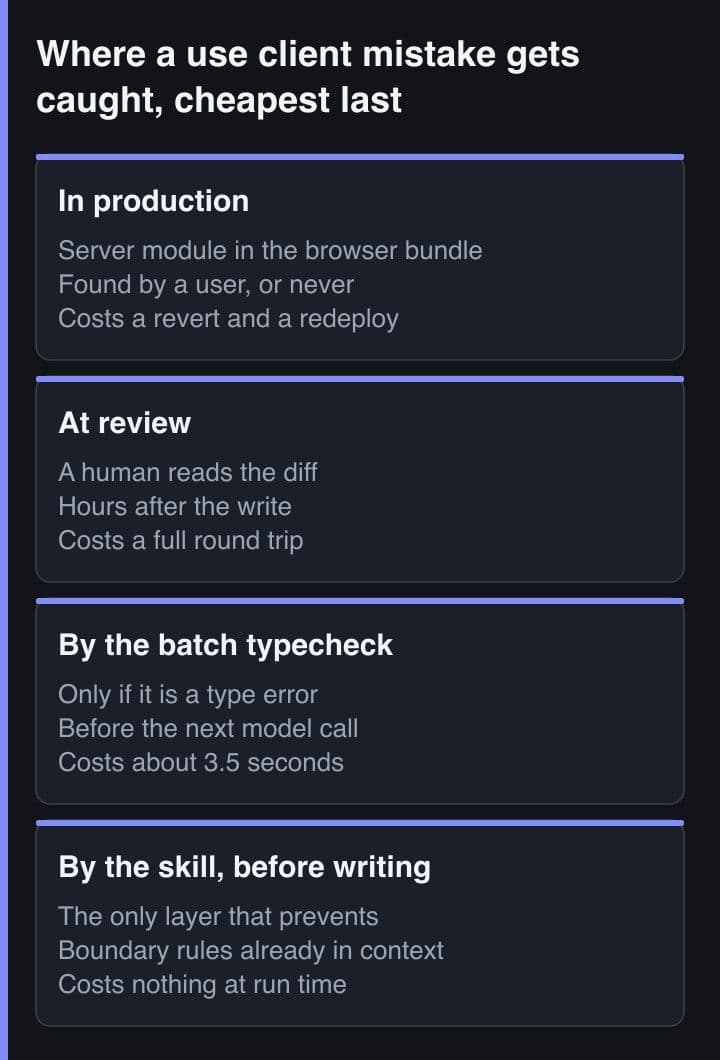
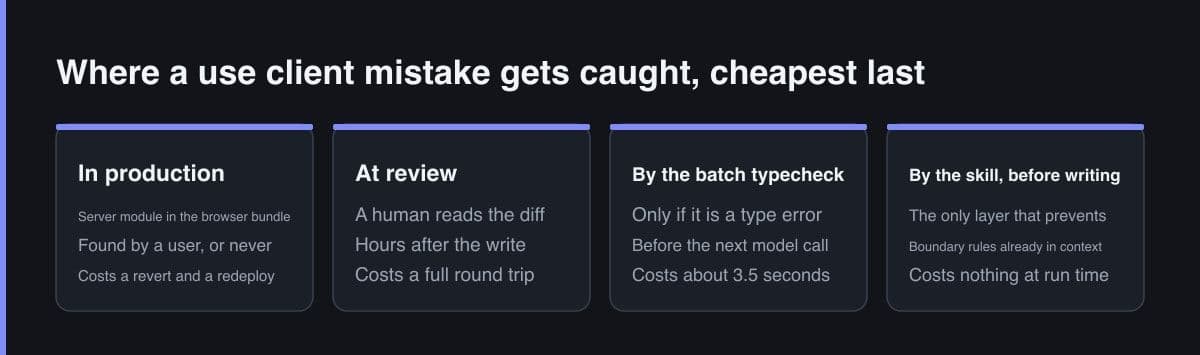
The fourth time in one week that I corrected the same thing, I stopped correcting it and wrote it down instead. An agent had put the use client directive at the top of a route file so that one button could hold state, and every module that route imported went to the browser with it. The type checker was silent. The build passed. Nothing was broken except the bundle.
This is the plugin I wrote for that stack, in full: one manifest, one skill, one hook and one subagent, on App Router plus TypeScript plus Tailwind. I have run it on this site, a repository whose blog components directory alone holds more than 550 files. The interesting part is not the four files. It is that only one of the four survived a working week unchanged.
Four things an agent gets wrong here, unprompted
None of these is exotic, and that is the point. Each one is the sensible move in some other React codebase, which is exactly why an agent reaches for it without being asked.
- It marks the route file as a client file. A page needs one interactive control, the directive lands at the top of page.tsx, and because use client declares a module-graph boundary, everything that file imports and every component it renders directly joins the client bundle with it.
- It passes a function across the boundary. A Server Component hands an onSelect callback to a client leaf. The Next.js docs are blunt about this: props passed to Client Components need to be serialisable by React, and a function is not.
- It calls useState or useEffect in a file with no directive. That file is a Server Component by default, so there is no hook to call and no client runtime to call it in.
- It imports Link from next/link. Right in almost every other Next.js repository, wrong in this one, where the next-intl navigation wrappers are what carry the locale prefix.
Not one of the four is a type error, and that distinction became the whole design of the plugin. A rule a machine can decide belongs in a hook. A rule that needs judgement has to be in the agent's context before it writes the file, which means a skill.
The skill carries the boundary, because tsc will not
Next.js does ship a checker for exactly these mistakes, and the agent never runs it. The TypeScript configuration docs describe a custom TypeScript plugin that warns on invalid route segment config values, ensures the use client directive is used correctly, and ensures client hooks such as useState appear only in Client Components. It is an IDE plugin: you turn it on in VS Code by selecting the workspace TypeScript version, and it works through the editor's language server while you type. An agent writing files through a tool call has neither an editor nor a language server.
The same page points you at tsc --noEmit for checking before a build, and notes that CLI type checking prints the native tsc diagnostics without the Next.js-specific rewrites. So the checks that would have caught all four mistakes are precisely the ones missing from the loop an agent actually runs in. The rules go in a skill instead. A skill is markdown the model loads when it judges the description relevant, so the description is written as a list of triggers rather than a summary: it is the part that stays in context, and the body is what arrives on demand.
# skills/app-router-boundaries/SKILL.md
---
name: app-router-boundaries
description: Rules for the server and client boundary in this Next.js App
  Router repo. Use before writing or editing anything under app/, and whenever
  a component needs state, an event handler, a browser API or a data fetch.
---

# The boundary in this repo

Layouts and pages are Server Components by default. Add "use client" to the
leaf that actually needs interactivity - never to the route file.

## Wrong: one button turns the whole route into a client bundle

// app/(pages)/orders/page.tsx
"use client";                     // every import below now ships to the browser
export default async function Page() { ... }

## Right: fetch on the server, hand serialisable props to a client leaf

// app/(pages)/orders/page.tsx    <- no directive, so still a Server Component
import { OrderFilter } from "./order-filter";

export default async function Page() {
  const orders = await getOrders(); // the DB URL never leaves this file
  return <OrderFilter initial={orders} />;
}

// app/(pages)/orders/order-filter.tsx
"use client";
export function OrderFilter({ initial }: { initial: Order[] }) { ... }

## Three rules that are not type errors

1. Props crossing into a Client Component must be serialisable by React. A
   function is not. Pass an id and a server action, never a callback.
2. "use client" is a module-graph boundary: everything the file imports and
   every component it renders directly joins the client bundle. Children
   passed as props do NOT - they render on the server and arrive as output.
3. React context does not exist in Server Components. A provider is a client
   file taking children, rendered as deep in the tree as it will go.

## Local conventions that override the generic advice

- Import Link, useRouter and usePathname from @/i18n/navigation. next/link
  is correct in most Next.js repos and wrong in this one: it drops the
  locale prefix, so the route 404s in one locale only.
- Any lib/ module reading process.env without a NEXT_PUBLIC_ prefix starts
  with import "server-only", so a stray client import fails the build
  instead of silently shipping an empty string.
The wrong-and-right pair does more work than any of the prose around it. A rule stated abstractly gets paraphrased into something adjacent; a rule stated as two named files, one of them labelled wrong, gets copied. Most of that file's value sits in those twelve lines.
The whole plugin, as files
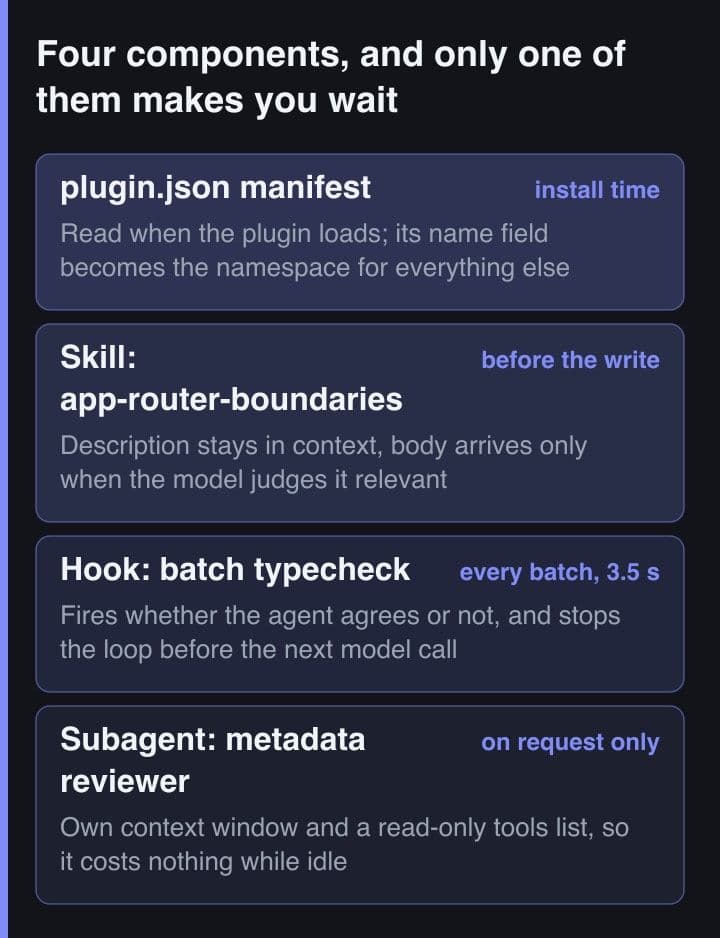
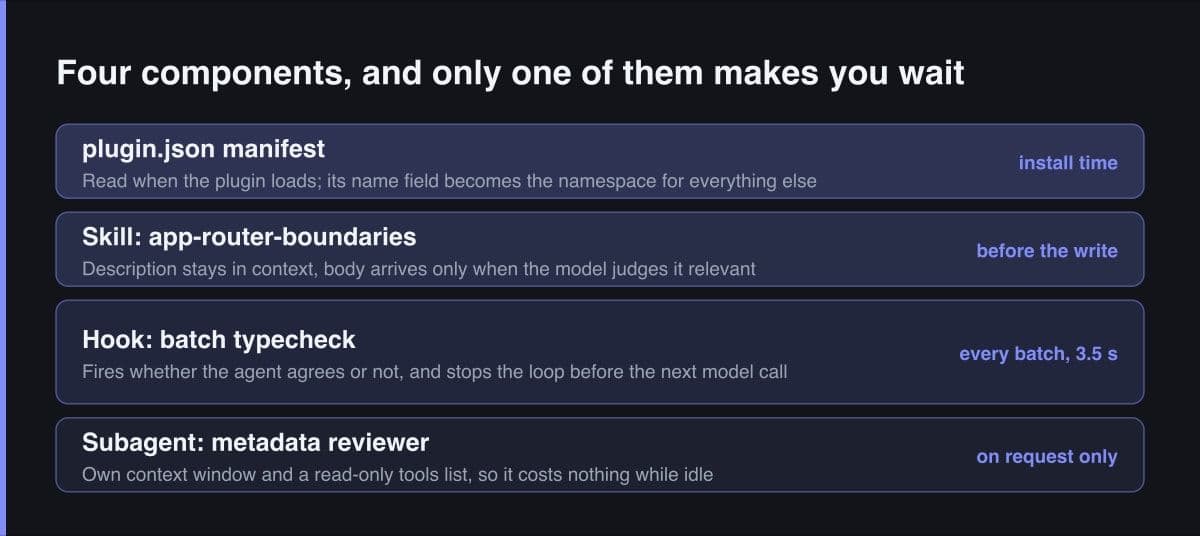
Four components, four directories, and one rule about where they go: only plugin.json belongs inside .claude-plugin. The skills, agents and hooks directories all sit at the plugin root, and the plugin docs call putting them inside .claude-plugin the common mistake. It is, and I made it first.
nextjs-stack-toolkit/
├── .claude-plugin/
│   └── plugin.json                 # the ONLY file that belongs in here
├── skills/
│   └── app-router-boundaries/
│       └── SKILL.md                # loads when the model judges it relevant
├── agents/
│   └── route-metadata-reviewer.md  # own context window, read-only tools
├── hooks/
│   ├── hooks.json                  # PostToolBatch, not PostToolUse
│   └── typecheck.sh
└── README.md

# .claude-plugin/plugin.json - "name" is the only required field
{
  "name": "nextjs-stack-toolkit",
  "displayName": "Next.js Stack Toolkit",
  "description": "App Router boundary rules, a batch typecheck gate, and a route metadata reviewer",
  "version": "0.4.0",
  "author": { "name": "Matthews Wong", "url": "https://www.matthewswong.com" },
  "license": "MIT",
  "keywords": ["nextjs", "app-router", "typescript", "tailwind"]
}
name is the only required field in the manifest, and it is also the namespace: the skill is invoked by its namespaced name, nextjs-stack-toolkit:app-router-boundaries, and the subagent resolves the same way. version is the update switch. Set it and installers receive changes only when you bump it, so the field is not decoration. A plugin shipping exactly one skill may put SKILL.md at the plugin root and skip the manifest entirely; this one has four components, so it gets the full layout.
The hook that fires on every write is the hook people disable
A full tsc --noEmit on this repository takes about three and a half seconds warm. I measured three consecutive runs at 3.83, 3.47 and 3.52 seconds of wall clock, on a project that held 556 files in its blog components directory alone when I timed it. That is a fine price to pay once. It is not a fine price to pay per write, and per write is what PostToolUse costs you: the hooks reference states that PostToolUse fires once per tool, which means it fires concurrently when Claude makes parallel tool calls. Five parallel Edits is five tsc processes on one tree at the same time.
I tried the obvious fix first and made it worse. Adding --incremental with a tsBuildInfoFile took 35.2 seconds on the first run, because it has to write build info for the whole project, and 4.19 seconds on every run after that: slower than the plain invocation, because now it reads and rewrites that file too. There is no cheap incremental win in a single-project, non-composite tsconfig.
What fixed it was the event name, not the command. PostToolBatch runs once after every tool call in a batch has resolved, before the next request goes to the model, and unlike PostToolUse it is one of the events where blocking works: exit code 2 stops the agentic loop. One run per batch instead of one per file, at the last point where blocking still saves a turn.
// hooks/hooks.json
{
  "hooks": {
    "PostToolBatch": [
      {
        "hooks": [
          {
            "type": "command",
            "command": "\"${CLAUDE_PLUGIN_ROOT}\"/hooks/typecheck.sh",
            "timeout": 60
          }
        ]
      }
    ],
    "PostToolUse": [
      {
        "matcher": "Write|Edit",
        "if": "Edit(app/**)",
        "hooks": [
          {
            "type": "command",
            "command": "\"${CLAUDE_PLUGIN_ROOT}\"/hooks/boundary-lint.sh",
            "timeout": 15
          }
        ]
      }
    ]
  }
}
The second entry is the cheap one, and it earns its keep through the if field, which holds a permission rule and is evaluated before the script is spawned, so a batch of Bash calls never pays the process-spawn cost at all. It is also the entry I later removed, for reasons that only showed up in use.
#!/usr/bin/env bash
# hooks/typecheck.sh
set -euo pipefail

payload=$(cat)

# PostToolBatch has no matcher, so it fires on read-only batches too. Decide
# from tool_calls whether this batch wrote any TypeScript at all, before
# spending a single second on tsc.
wrote=$(printf '%s' "$payload" | jq '
  [ .tool_calls[]?
    | select(.tool_name == "Write" or .tool_name == "Edit")
    | .tool_input.file_path // ""
    | select(endswith(".ts") or endswith(".tsx"))
  ] | length')

[ "$wrote" -eq 0 ] && exit 0

cd "${CLAUDE_PROJECT_DIR:-.}"

# There is no useful single-file mode: the path aliases and the generated
# .next/types both come from tsconfig, so it is the whole project or nothing.
if diagnostics=$(npx tsc --noEmit 2>&1); then
  exit 0
fi

# PostToolBatch is one of the events where blocking works - it stops the
# agentic loop before the next model call, so the agent never writes a
# second file on top of a tree that does not compile.
jq -n --arg d "$diagnostics" \
  '{ decision: "block", reason: ("tsc --noEmit failed: " + $d) }'
The if field holds exactly one permission rule. There is no and, no or, and no list syntax, so covering both .ts and .tsx means two hook handlers pointing at the same command rather than one clever pattern. Mind the depth too: a single-segment pattern like Edit(app/**) matches only the app directory in the working directory, so a monorepo package needs Edit(**/app/**).
A subagent for the metadata pass, and the field it ignores
The recurring job I wanted off the main thread was route-level SEO review: open a route, walk its parent layouts, check generateMetadata, report. It is read-heavy, mechanical, and it wants a clean context, because doing it in the main session drags half a dozen layout files into a window that is being used for something else. A subagent gets its own context window, and per the subagents reference it receives only the system prompt in its own file plus basic environment details, not Claude Code's system prompt. tools is an allowlist, so a subagent restricted this way cannot edit files, write files, or reach any MCP tool.
# agents/route-metadata-reviewer.md
---
name: route-metadata-reviewer
description: Reviews generateMetadata, canonical URLs, hreflang and JSON-LD
  for one App Router route. Use after adding or changing a page, a layout or
  a route group. Reports findings; never edits.
tools: Read, Grep, Glob
model: sonnet
maxTurns: 12
skills:
  - app-router-boundaries
---

You review route-level SEO for one App Router route at a time. You never edit
a file. You return a findings list ordered by severity, and nothing else.

Read, in this order:

1. The route's own page.tsx and layout.tsx.
2. Every parent layout up to app/[locale]/layout.tsx. A parent's
   title: { absolute: ... } cancels the root %s template for every child
   route, and that is invisible from the child file alone.
3. lib/seo.ts, for the canonical and hreflang builders this repo already has.

Check exactly these, and report nothing else:

- generateMetadata exists, is async, and awaits params before reading them.
- title is 63 characters or fewer; description is between 140 and 155.
- canonical comes from buildCanonical, not a hand-joined template string.
- languageAlternates covers en and id, both absolute.
- openGraph.images points at a file that exists under public/.
- No duplicate JSON-LD. The blog layout already injects TechArticle,
  BreadcrumbList and FAQPage, so a page must not add its own.

For each finding, quote the file and the line, say what a crawler will do
with it, and stop. Do not propose a diff.
The skills field is the part I would not ship without. It preloads the boundary skill's full content rather than only its description, so the reviewer reads a route against the same rules the writer used. Without it the reviewer invents its own standard, and two components of one plugin disagreeing about a convention is worse than shipping neither.
Three subagent frontmatter fields are ignored for plugin subagents: permissionMode, mcpServers and hooks. A definition that reads as safely sandboxed while it sits in a project agents directory becomes something else the moment the same file ships inside a plugin, because the permission mode is dropped and the tools list is all the restriction that survives. Restrict with tools and disallowedTools, and assume the session's permission mode applies.
Which of the four earned its place
After a few weeks the verdicts were not the ones I would have predicted while writing the manifest. The component I edited most is the one with no code in it, and the component I deleted is the one that looked most like engineering.
| Component | Verdict | What decided it |
|---|---|---|
| The boundary skill | Kept, rewritten twice | The only layer that can prevent a mistake rather than report one |
| The PostToolBatch typecheck | Kept, after changing events | Three and a half seconds once a batch is invisible; per write it is not |
| The metadata subagent | Kept, used twice a week | It costs nothing while idle, so frequency is the wrong test |
| The PostToolUse boundary lint | Dropped | Fired mid-edit, on files the agent was already fixing |
The one I dropped had the right job and the wrong timing. Grepping the file just written for a client hook in a file with no directive is a correct check, but an agent building a client leaf often writes the body first and the directive second, so the handler fired on a file that was right two seconds later and the model spent a turn defending work it was already finishing. Everything it caught, the batch-level check catches too, one model call later and with the whole batch in view. The question behind all four verdicts turned out to be the same one: at what point in the loop can this thing still change the outcome?
Validate it before anyone else installs it
A plugin is a dependency somebody else installs, so the last thing to write is not a feature. Four steps, in this order, every time anything in it changes.
- Load it for one session without installing anything: claude --plugin-dir ./nextjs-stack-toolkit. The flag takes a directory or a .zip archive, and it can be repeated to load a plugin alongside the plugin it depends on.
- Trigger each hook's event deliberately, by asking the agent to edit a TypeScript file, then read the debug log, which records which hooks matched, how they exited and what they printed. A hook that silently never matches looks exactly like a hook that passes.
- Run claude plugin validate ./nextjs-stack-toolkit. It reports unrecognised manifest fields as warnings rather than errors, so add --strict when you want a typo in a field name to fail the check.
- Bump version in plugin.json. If you do not, an installer keeps the copy it already has and your fix ships to nobody.
One asymmetry in the development loop is worth knowing before you lose an afternoon to it. A change to a skill's SKILL.md takes effect immediately in the running session, but changes to hooks, agents and the plugin's MCP configuration do not. Run the reload-plugins command after touching those, or you will spend that afternoon debugging the previous version of your hook.
The rule I carry out of this: put a rule in a hook only when a machine can decide it, put it in a skill when only judgement can, and choose the hook's event by asking when its answer can still change something. Four files, one of them since deleted, and the event name was the hard part.
Sources
- Claude Code docs — Plugins reference: manifest schema, directory layout and the plugin root variable
- Claude Code docs — Hooks: the event list, PostToolUse versus PostToolBatch, the if field and timeouts
- Claude Code docs — Subagents: frontmatter fields, tool restriction, and what a plugin subagent ignores
- Next.js docs — Server and Client Components: the use client boundary and serialisable props
- Next.js docs — TypeScript: what the IDE plugin checks, and tsc --noEmit