

Key Takeaway
A rolling deploy runs the previous release and the new one against one schema at the same time, for a window that a stalled rollout can extend without limit. Every migration must therefore be compatible in both directions: run it once as a release-phase job, never in application bootstrap, and never drop anything a rollback would need.
The migration had already run. The rollout had not. New pods were coming up and failing their readiness probe, old pods were still serving traffic against a schema that had changed underneath them, and the release I would have rolled back to was the one release that could not read that schema. Nothing was down. Everything was one command away from being down.
This post is about the deploy, not the SQL. Expand-then-contract is covered elsewhere on this blog and I will treat it as known here. What I want to pin down is the constraint that makes it necessary in the first place: during a rolling update the old release and the new one run simultaneously against a single schema, for a window whose length you do not control, so every statement in the migration has to be correct for both of them. The mechanics below come from the Kubernetes Deployment and Pod lifecycle documentation, the PostgreSQL advisory lock reference, and the Helm chart hooks guide.
The overlap window is a state, not a moment
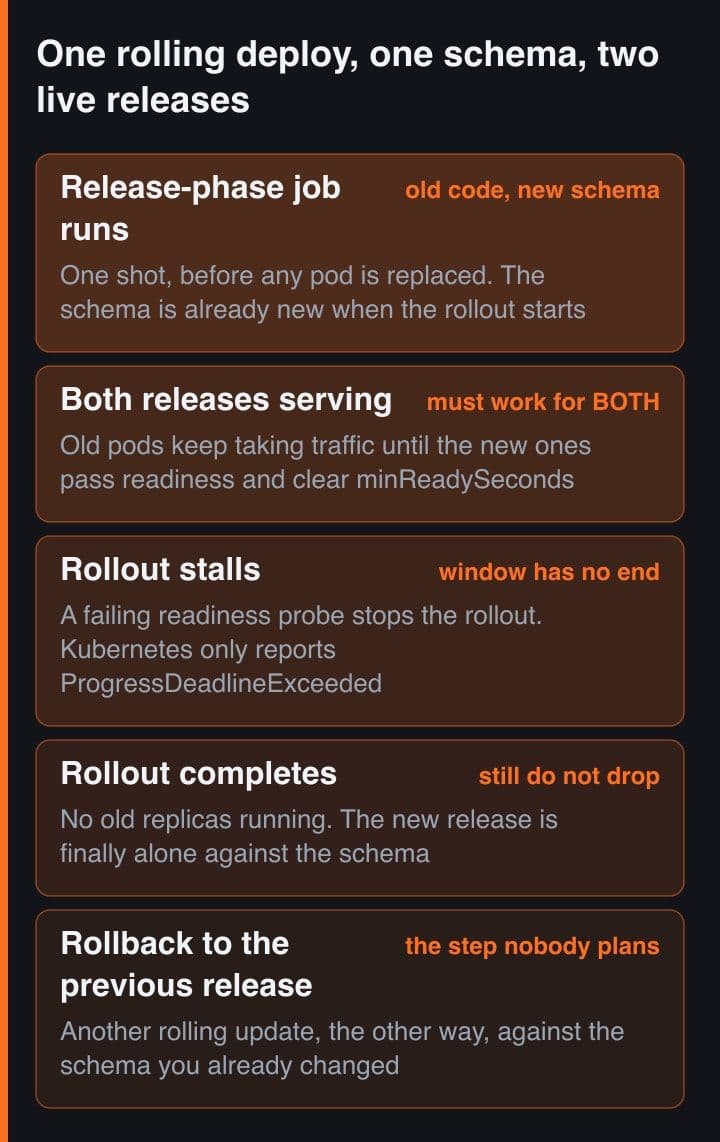
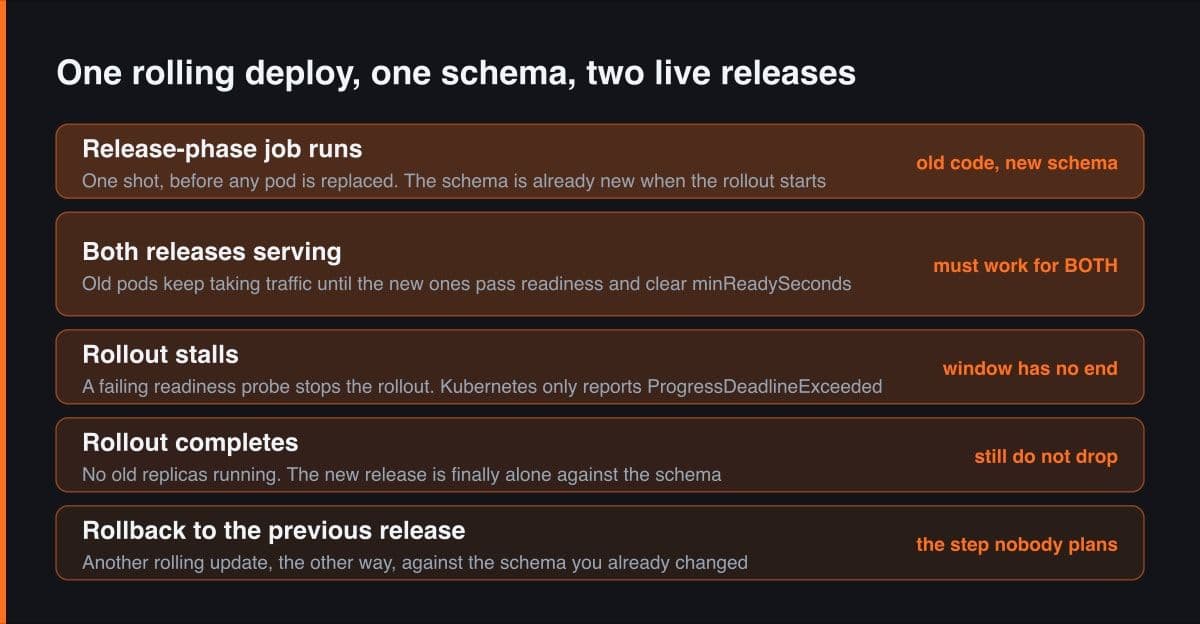
The first thing to get right is that the window is not the few seconds between two versions. It is a state the system sits in, and its length is decided by fields most teams never set. A Deployment with the RollingUpdate strategy scales the old ReplicaSet down and the new one up under two limits, maxUnavailable and maxSurge, both of which default to 25 percent. A new pod only counts towards the rollout once it is available, and a pod is available once it is ready and has stayed ready for minReadySeconds, which defaults to zero. Gate readiness on a real health check and the window becomes as long as your slowest pod takes to warm up, multiplied by the number of batches the two limits allow.
# The five fields that decide how long the old release and the new one overlap.
# None of them is about the database, and all of them constrain the migration.
apiVersion: apps/v1
kind: Deployment
spec:
  replicas: 6
  minReadySeconds: 10           # a pod is NOT available until it has been ready
                                # this long. Default 0. Raising it lengthens the window.
  progressDeadlineSeconds: 600  # default. On expiry Kubernetes only ADDS a
                                # condition - it does not roll anything back.
  revisionHistoryLimit: 10      # default. This is the list of revisions you
                                # could still roll back to, and therefore the
                                # list your schema must stay compatible with.
  strategy:
    type: RollingUpdate
    rollingUpdate:
      maxUnavailable: 1         # default is 25%
      maxSurge: 1               # default is 25%
  template:
    spec:
      terminationGracePeriodSeconds: 30   # default. The last old pod is still
                                          # querying the NEW schema for this long.
      containers:
        - name: erp-api
          readinessProbe:
            httpGet:
              path: /readyz
              port: 8080
            periodSeconds: 5    # a probe that checks the DB will fail the whole
                                # rollout on a schema it cannot read
The part that changes the design is what happens when the rollout does not finish. If new pods fail their readiness probe, the Deployment controller stops scaling the new ReplicaSet up, and the documentation is explicit that this depends on maxUnavailable. Set a progress deadline and after progressDeadlineSeconds, which defaults to 600, the controller adds a condition with reason ProgressDeadlineExceeded. It does nothing else. The docs say so in as many words: Kubernetes takes no action on a stalled Deployment other than to report a status condition. Pausing a rollout suspends the deadline check entirely, so a paused Deployment sits in the overlap state for as long as you leave it there.
There is a tail at the clean end of it too. When the last old pod is finally deleted it is granted a termination grace period, which defaults to 30 seconds, and any preStop hook runs inside that budget. So even a rollout that goes perfectly ends with the previous release still holding open connections and finishing in-flight requests against the new schema. The honest way to plan a migration is to assume the overlap lasts minutes and may last until someone notices.
The migration that runs once per replica
The most common way to break this is to run migrations from the application's own start-up path. It looks tidy, it works on a laptop with one process, and it fails the moment there is more than one replica, because every new pod runs the same migration at the same time. Moving it into an init container does not help: init containers run per Pod, so the work is now multiplied by pod count instead of by process count. What you want is a job that runs once per release, and neither of those is that.
What actually happens when two replicas start the same migration together is worth spelling out, because the double-apply is not the expensive part. The first connection takes its lock and applies the change. The second queues behind it, then either applies the same change again or fails on an error such as the column already existing. A migration that throws at start-up takes the pod with it, the pod crash-loops, the crash-looping pod never passes readiness, and a rollout with no ready pods is exactly the stalled rollout from the previous section. The bug is a race in the entrypoint; the outage is an overlap window that will not close.
If the migration must run from somewhere you cannot make single-shot, guard it with a PostgreSQL advisory lock. Advisory locks are application-defined and the server does not enforce their use, so they are a convention your migration runner keeps with itself, which is precisely what is needed here. Take a session-level lock on a constant key: pg_try_advisory_lock returns false immediately rather than waiting, so the losing replica can skip the migration and carry on instead of blocking start-up. Session-level advisory locks do not honour transaction semantics, so a rolled-back transaction still holds the lock, and pg_advisory_unlock_all is invoked implicitly at session end even when the client disconnects ungracefully. That last property is the reason a killed migration pod does not leave the lock stuck forever.
-- guarded-migrate.sql
-- ONE psql session, start to finish:
--   psql -v ON_ERROR_STOP=1 "$DATABASE_URL" -f guarded-migrate.sql
-- A session-level advisory lock dies with its session, so taking the lock in
-- one psql call and running the migration in a second one leaves you
-- completely unguarded. That was my first version of this file.

-- The key is a constant you choose once. It names the migration runner,
-- not the migration.
SELECT pg_try_advisory_lock(4021995) AS got_lock \gset

\if :got_lock
  \echo 'lock acquired, applying migrations'
  \i migrations/0042_add_amount_cents.sql
  SELECT pg_advisory_unlock(4021995);
\else
  -- The loser must NOT fail. A non-zero exit here crash-loops the pod, the pod
  -- never passes readiness, and the rollout stalls in the overlap state.
  \echo 'another process holds the migration lock, skipping'
\endif

-- pg_try_advisory_lock returns false immediately rather than waiting, and
-- pg_advisory_unlock_all runs implicitly at session end - even on an ungraceful
-- disconnect - so a pod killed mid-migration cannot strand the lock.
Do not run the migration through a transaction-pooling connection pooler. A session-level advisory lock is only meaningful while the session is yours for the whole job, and transaction pooling hands your statements to whichever backend is free. Point the migration at the database directly.
Run it once, before any pod is replaced
The pattern that removes the whole class of problem is a release-phase job: one container, run to completion, before the rollout starts. In Helm that is a pre-upgrade hook, which the documentation describes as executing on an upgrade request after templates are rendered but before any resources are updated. When the hook resource is a Job, Helm waits until it runs to completion, and if the hook fails the release fails. It is a blocking operation, which is the point.
# templates/migrate-job.yaml
# pre-upgrade runs after the templates are rendered but BEFORE any resource is
# updated, and Helm blocks on a Job hook until it runs to completion. If it
# fails, the release fails - and not one pod has been replaced.
apiVersion: batch/v1
kind: Job
metadata:
  name: "{{ .Release.Name }}-migrate"
  annotations:
    "helm.sh/hook": pre-install,pre-upgrade
    "helm.sh/hook-weight": "-5"     # sorted ascending; the default weight is 0
    "helm.sh/hook-delete-policy": before-hook-creation,hook-succeeded
spec:
  backoffLimit: 0                   # a migration that failed wants a human,
                                    # not a blind retry against a half-applied schema
  template:
    spec:
      restartPolicy: Never
      containers:
        - name: migrate
          # the tag being upgraded TO. The migration belongs to the incoming
          # release, not the one still serving traffic.
          image: "registry.example.com/erp-api:{{ .Values.image.tag }}"
          command:
            ["psql", "-v", "ON_ERROR_STOP=1", "-f", "guarded-migrate.sql"]
Read what that buys you in terms of the overlap window. A migration that fails now produces zero new pods, so there is no version skew at all to reason about, only a release that did not happen. A migration that succeeds is finished before the first new pod is scheduled, so the window opens with the schema already in its final state and only one variable left: whether the old release can live with it. Give the hook an explicit weight, because Helm sorts hooks by weight in ascending order and assigns zero by default, and set a delete policy or a Job TTL, because hook resources are not tracked as part of the release and completed jobs otherwise accumulate.
The same shape exists without Helm. Any mechanism that runs one container to completion and refuses to proceed on failure will do: a platform release phase, a CI job that waits on the migration before applying the new image, or a plain Job you apply and wait on. What matters is that it is one execution per release, not one per replica, and that the rollout is downstream of its exit code.
Compatible in both directions, not just forwards
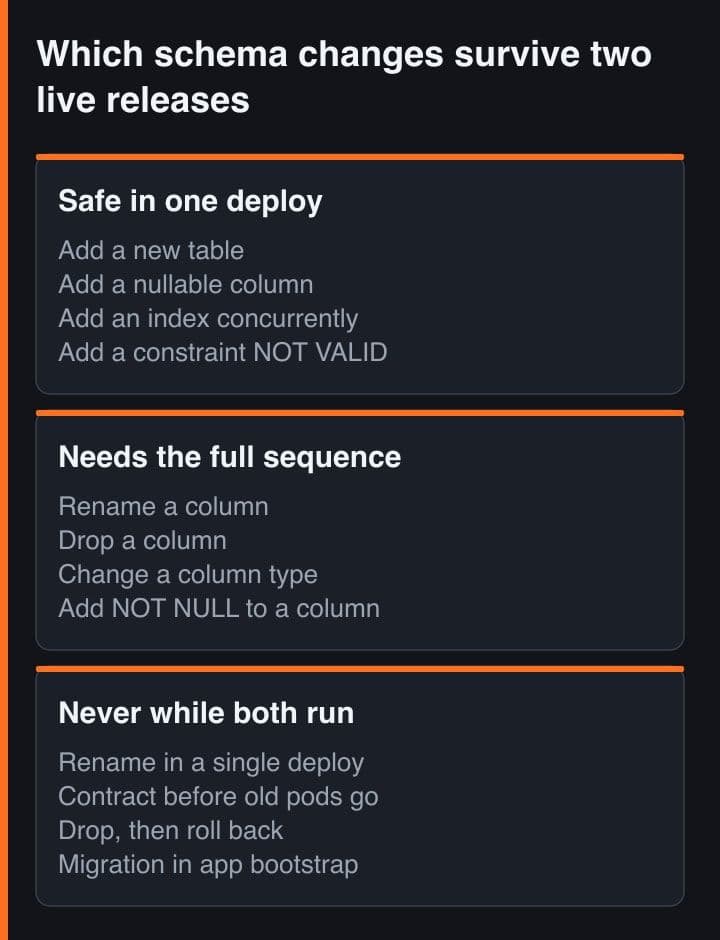
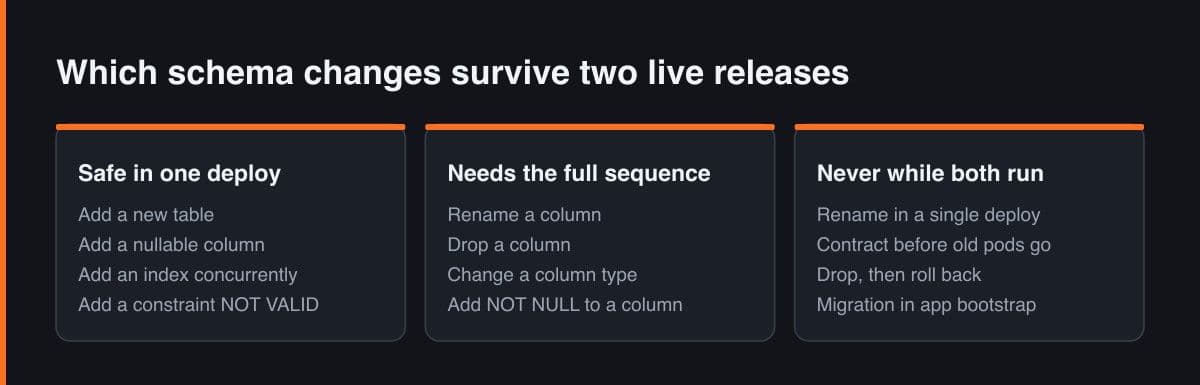
A migration is not safe or unsafe on its own. It is compatible, or not, with the specific pair of releases that will be running while it lands. So there are two questions per change, and most reviews only ask the first. Can the new release run against the new schema? And can the previous release, which is still serving traffic and which a rollback would bring back in full, also run against the new schema? The table below is how I sort a change set before writing any SQL.
| Change | What the previous release does with it | One deploy? | What it needs instead |
|---|---|---|---|
| Add a new table | Never queries it, never notices | Yes | Nothing |
| Add a nullable column | Its mapped column list omits the new name | Yes | Nothing |
| Add NOT NULL to a column | Its inserts omit the column and start failing | No | Default and backfill first, constrain last |
| Rename a column | Selects a column that no longer exists | No | Add, dual-write, switch reads, drop |
| Drop a column | Still lists it in every generated SELECT | No | Stop writing it one release, drop it the next |
| Change a column type | Reads a value its mapping rejects | No | New column, dual-write, switch reads, drop |
| Add a unique constraint | Keeps writing the duplicates it was allowed to write | No | Deduplicate, build the index concurrently, then enforce |
Only the first two rows are single-deploy changes, and that ratio is the finding. The interesting question is what backwards compatible actually means in practice, because compatible with every release ever shipped is not a workable target. It means compatible with the revision you could roll back to, and Kubernetes stores that revision history in the old ReplicaSets it keeps around: ten by default, and once an old ReplicaSet is deleted you lose the ability to roll back to it. So the target is the immediately previous release, and you keep that target easy by deploying often enough that the previous release is never more than one schema step behind.
The backfill is a job, not a deploy step
Filling a new column for existing rows is the step people staple onto the migration, and it is the one thing in this whole sequence that must not be attached to a deploy at all. A backfill can run for longer than any sensible rollout window, so blocking the release phase on it means the overlap window lasts exactly as long as the backfill does. It also needs to be stoppable halfway through, and a release phase is a bad place to be interruptible. The migration adds the column; a separate job fills it; a later deploy reads it.
# Deliberately NOT a Helm hook. A hook would block the release for as long as
# the backfill runs, which is the exact thing this design is avoiding. Apply it
# after the migration release has settled and let it run on its own clock.
apiVersion: batch/v1
kind: Job
metadata:
  name: backfill-amount-cents
spec:
  backoffLimit: 6
  ttlSecondsAfterFinished: 86400    # tidy itself away a day after it finishes
  template:
    spec:
      restartPolicy: Never
      containers:
        - name: backfill
          image: registry.example.com/erp-api:2026.9.3
          command: ["node", "scripts/backfill-amount-cents.js"]
          env:
            - name: BATCH_ROWS
              value: "20000"
            - name: PAUSE_MS
              value: "200"        # room for autovacuum and the replicas
Two properties make that job safe to leave running. It is batched over a bounded key range with each batch in its own transaction, so it can be stopped, restarted and resumed from where it left off without holding anything open, and it records its own progress rather than recomputing it. And the code on both sides of it has to tolerate a half-filled column for the whole duration, which is a property of the application, not of the job. That is the real reason the backfill sits between two deploys instead of inside one: the release that requires the column to be complete is the release you ship after the job has finished, and until then nothing may depend on it.
-- The job's resume point lives in the database, not in the pod's memory.
-- Deleting the Job or losing the node must not restart the work.
CREATE TABLE IF NOT EXISTS backfill_progress (
  job_name   text PRIMARY KEY,
  last_id    bigint NOT NULL,
  updated_at timestamptz NOT NULL DEFAULT now()
);

-- One batch, one transaction: write the rows AND record the checkpoint
-- together, so the data and the resume point can never disagree, whatever
-- kills the pod between batches.
BEGIN;
  UPDATE invoices
     SET amount_cents = ammount_cents
   WHERE id  > :last_id
     AND id <= :last_id + :batch_rows
     AND amount_cents IS NULL;

  INSERT INTO backfill_progress (job_name, last_id)
  VALUES ('amount_cents', :last_id + :batch_rows)
  ON CONFLICT (job_name) DO UPDATE
     SET last_id = EXCLUDED.last_id, updated_at = now();
COMMIT;
Rollback is the constraint, and it runs backwards
A rollback is not an undo. Running kubectl rollout undo starts another rolling update in the opposite direction, which means the overlap state happens a second time, with the same two releases, against the schema you already changed. The schema does not roll back with the pods, and nothing in the deploy tool pretends otherwise. That single fact makes a destructive migration and a rollback mutually exclusive: if the migration dropped a column, the previous release cannot come back, and you have traded your fastest recovery mechanism for one deploy's worth of tidiness.
# What rollout undo does, and the much more important thing it does not do.
kubectl rollout history deployment/erp-api
# REVISION  CHANGE-CAUSE
# 41        image erp-api:2026.9.2
# 42        image erp-api:2026.9.3   (current)

kubectl rollout undo deployment/erp-api                    # back to revision 41
kubectl rollout undo deployment/erp-api --to-revision=41   # or name it

# This is another rolling update, not an undo. While it runs, 2026.9.2 and
# 2026.9.3 are BOTH live again - against the schema that 2026.9.3 migrated.
# Not one byte of the database is touched by either command above.
#
# So the real check happens before the migration is written, not after it runs:
kubectl rollout history deployment/erp-api --revision=41
# If THAT revision cannot run against the schema you are about to create,
# you have no rollback. Change the migration.
So the rule I now hold to is that the contract step never ships in a release I might want to undo. The drop waits until the release that stopped using the column has been the only one running for a full cycle, and by then the undo target no longer needs the column either. Treat reversibility as a property of the migration rather than of the pipeline, and check it the same way every time: look at what you would roll back to before you write the change.
Before writing the migration, run kubectl rollout history on the Deployment and look at the revision one line above current. That is the code your rollback brings back. If it cannot run against the schema you are about to create, the migration is the thing to change, not the rollback plan.
A rename, deploy by deploy
Here is the canonical rename from the deploy side, which is the view the pattern write-ups tend to leave out. The SQL is the easy half. What matters on a rolling deploy is what is true of the running code at every step, including the code you are trying to replace, and whether you can still walk backwards from where you are standing.
| Step | Previous release | New release | Roll back? |
|---|---|---|---|
| Deploy 1: add the column, write both | Reads and writes the old column, ignores the new one | Writes both, reads the old | Yes, nothing reads the new column |
| Backfill job, between deploys | Unchanged, still serving | Unchanged, still serving | Yes, stop the job |
| Deploy 2: read the new column | Writes both, reads the old | Reads the new, writes both | Yes, both columns are current |
| Deploy 3: stop writing the old column | Reads the new, writes both | Reads and writes the new only | Yes, the old column is still there |
| Deploy 4: drop the old column | Reads and writes the new only | Reads and writes the new only | No, and that is the whole point |
Notice that the previous release column and the new release column never disagree about a name in the same row. That is the invariant the four deploys exist to hold, and it is checkable by reading the table rather than by reasoning about SQL. Notice also where the no appears: only in the last row, and only after the previous release has already been brought up to the new shape. If your sequence puts a no anywhere earlier, you have not split the deploys finely enough.
What changed for me is the question I ask first. It used to be whether the migration was safe, which is a question about SQL and has no answer on its own. Now it is which two releases will be running while this lands, and can both of them live with it. Everything else falls out of that: the job runs once because a per-replica migration stalls the rollout that defines the window, the backfill sits outside the deploy because it is longer than the window, and the drop waits because the window opens again the moment you roll back.
Sources
- Kubernetes Documentation - Deployments: rolling update strategy, maxUnavailable and maxSurge defaults, minReadySeconds, progressDeadlineSeconds, revision history and rollout undo
- Kubernetes Documentation - Pod Lifecycle: readiness probes, pod termination flow and the default termination grace period
- PostgreSQL Documentation - Explicit Locking, section 13.3.5 on advisory locks and their session and transaction levels
- PostgreSQL Documentation - Advisory Lock Functions: pg_try_advisory_lock, pg_advisory_unlock and pg_advisory_unlock_all
- Helm Documentation - Chart Hooks: the pre-upgrade hook, hook weights, waiting on a Job to completion and hook delete policies