

Key Takeaway
On a PaaS, an environment variable's safety is decided by when it is read. Anything prefixed NEXT_PUBLIC_ is inlined into the client bundle at build time and is a published constant, not a secret. Genuine secrets must be injected at runtime, scoped per environment, kept out of build logs, and rotatable with an overlap window.
The first time I got this wrong, nothing broke. A key I had put behind a NEXT_PUBLIC_ prefix during a rushed prototype went out to production, sat in the client bundle for weeks and worked perfectly the whole time. It was also readable by anyone who opened a network tab, and rotating it meant a rebuild, a redeploy, and the knowledge that every bundle already served still carried the old value.
This post is about the three environments a small team actually runs on a managed PaaS — preview, staging and production — all configured through the same dashboard, with the same input box for every value. The behaviour described here comes from the Next.js environment-variables guide, Docker's build documentation and GitHub's security reference for Actions, all linked at the end. It is defensive throughout: how to stop a value leaking, not how to go looking for one.
Ask when the value is read, not where it is stored
Every argument about secrets on a PaaS collapses into a single question: at what moment is this value read? Read at build time, it becomes part of an artefact — a JavaScript bundle, an image layer, a log line — and it survives exactly as long as that artefact does. Read at runtime, it is handed to a process that is already running, and changing it is a restart rather than a rebuild.
The platform dashboard hides that distinction, because both kinds appear in one list with the same padlock icon beside them. That interface is most of why teams get this wrong. Two variables sitting next to each other can have completely different lifetimes: one is frozen into a file a browser has already cached, the other is read fresh on every request. Nothing on the screen tells you which is which. Only the code does.
NEXT_PUBLIC_ is a published constant, not a secret
Next.js is explicit about what the prefix does. To make a value accessible in the browser it inlines that value at build time into the JavaScript bundle delivered to the client, replacing every reference to process.env with a hard-coded value. The prefix is not a permission setting. It is a compiler instruction, and once the build has run the value is a string literal in a file on a CDN.
// Right: a value you are content for anyone to read out of the bundle.
// next build replaces the reference with the literal string, everywhere.
setupAnalytics(process.env.NEXT_PUBLIC_ANALYTICS_ID);
//   compiles to -> setupAnalytics("PLACEHOLDER-PUBLIC-ID");

// Wrong: same prefix, private value. The prefix is the entire decision,
// and it ships this key to every browser that loads the page.
const payments = new Payments(process.env.NEXT_PUBLIC_PAYMENTS_KEY);

// Not a fix: dynamic lookups are not inlined. On the client this is simply
// undefined -- you have hidden the value from yourself, not from anyone else.
const name = "NEXT_PUBLIC_ANALYTICS_ID";
setupAnalytics(process.env[name]);
The documentation states the consequence plainly: after being built, your app will no longer respond to changes to these environment variables. It even names the case that catches teams out — build one Docker image and promote it through several environments, and every NEXT_PUBLIC_ value stays frozen at whatever the build machine held. So rotating one is a rebuild and a redeploy, and even that does not recall the bundles you have already served. Treat the prefix as publication, and put nothing behind it that you would mind seeing quoted back at you.
Runtime injection, and the module-scope trap
A server-only variable is not automatically a runtime variable. If you read process.env at module scope in a component or route that is statically rendered, the value is captured when the page is prerendered — which on a PaaS is on the build machine, in the build environment, with the build environment's values. The build succeeds, the page renders, and the deployment's own configuration is never consulted.
// app/dashboard/page.tsx

// Wrong: evaluated once, while the page is prerendered. On a PaaS that is
// the build machine, so the deployment's own value is never consulted.
const apiKey = process.env.INTERNAL_API_KEY;

// Right: opt into dynamic rendering first, then read. cookies() and
// headers() do the same thing; connection() is the one with no side effect.
import { connection } from "next/server";

export default async function Page() {
  await connection();
  const apiKey = process.env.INTERNAL_API_KEY;
  return <Panel token={apiKey} />;
}

// The acceptance test for "injected at runtime": can this exact artefact be
// deployed to staging and to production and read two different values?
Next.js documents the fix as opting into dynamic rendering before reading. Awaiting connection, or using cookies, headers or any other request-time API, moves the read into the request itself, and the docs give the reason it matters: it is what allows a single image to be promoted through several environments with different values. That is the property you are buying with runtime injection, and it makes a clean acceptance test. If the same artefact cannot go to staging and to production and read two different values, the value is not being injected at runtime, whatever the dashboard says.
The module-scope read fails silently. No error, no warning in the build output, and it works perfectly in development because the dev server reads the file on every request. You find it in production, when a freshly rotated credential keeps getting rejected while the dashboard insists the new value is set.
One value shared by three environments cannot be rotated
Scoping is the cheap control most teams skip because it is tedious rather than difficult. If preview, staging and production all hold the same API key, you do not have one credential used three times — you have one credential with three times the exposure and no way to rotate it in isolation. Revoking it takes down all three at once, so nobody schedules that, and it stays live for years.
- Issue a separate credential at the vendor for each environment, not just a separate variable on the platform. Two names pointing at one key is not scoping, it is bookkeeping.
- Point staging at the vendor's test or sandbox account wherever one exists, so a staging leak has nothing real to reach.
- Treat preview as the widest surface, not the safest. It builds on every pull request, and far more people can trigger a preview build than should be able to read production.
- Never copy a production value into another environment to reproduce a bug. That single act converts a scoped setup back into a shared one, and it is never undone afterwards.
The test I use is whether I can revoke a value without telling anybody. If revoking staging's database credential needs a warning in the team channel first, then it is production's credential wearing a different name, and the scoping exists only in the naming convention.
Build logs are where secrets actually leak
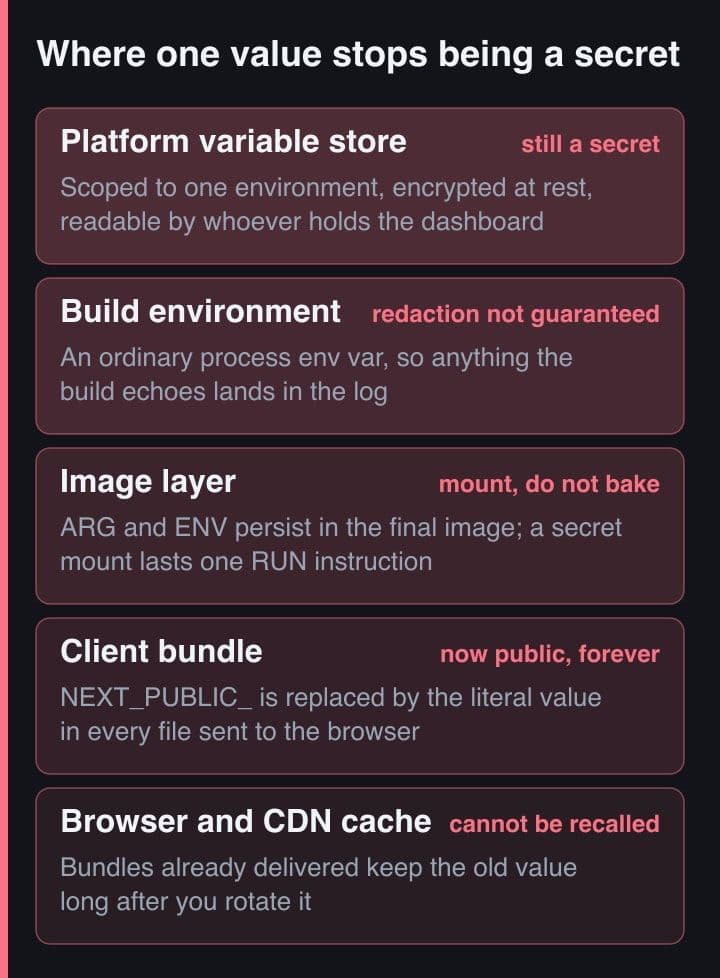
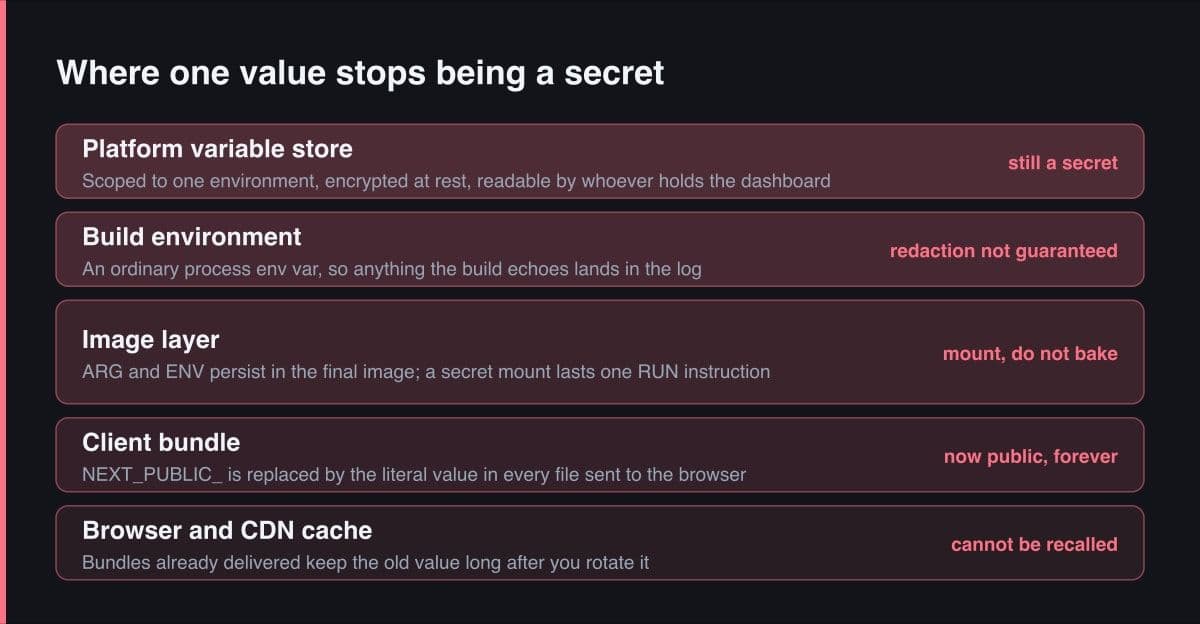
Almost every real leak I have watched happen was self-inflicted and dull. A debugging step that printed the whole environment. A shell script running under set -x. A CLI that echoed its own arguments back when it failed to parse them. Nobody attacked anything: the build printed the value into a log that everyone on the project could read, and it sat there.
Platforms do redact known secret values from logs, and GitHub's own wording on how far that goes is worth reading before you rely on it. Because a secret value can be transformed in many ways, automatic redaction is not guaranteed. Structured data is called out specifically — wrapping a secret in a blob of JSON, XML or YAML significantly reduces the chance it is redacted, because redaction largely relies on finding an exact match for the value. A base64-encoded copy is a different string, so it has to be registered as a secret too. And it is not always obvious how a tool you did not write sends its errors to standard error, which is how secrets end up in error logs.
# Wrong: the token arrives as a build argument, so it persists in the
# final image -- in its metadata and its history, not just this layer.
ARG REGISTRY_TOKEN
RUN echo "//registry.npmjs.org/:_authToken=$REGISTRY_TOKEN" > .npmrc \
 && npm ci

# Right: mounted for the duration of one RUN, present in no layer.
# The default path is /run/secrets/<id>. required=true matters: it
# defaults to FALSE, so an unpassed secret leaves the file missing and
# npm ci quietly carries on against the public registry instead.
RUN --mount=type=secret,id=registry_token,required=true \
    npm config set "//registry.npmjs.org/:_authToken=$(cat /run/secrets/registry_token)" \
 && npm ci \
 && rm -f .npmrc

# The value never becomes an ARG or an ENV. env= reads it from the
# builder's own environment rather than a file on disk.
#   docker build --secret id=registry_token,env=REGISTRY_TOKEN .
For a credential the build genuinely needs — a private registry token, a licensed package, a source map upload key — the answer is a secret mount. Docker's guidance is that build arguments and environment variables are inappropriate for passing secrets to a build precisely because they persist in the final image, and a secret mount instead makes the value available for the duration of one instruction and puts it in no layer. Read the required option carefully: it defaults to false, so a mount whose secret was never passed leaves the file simply absent and the command carries on without it. Setting it to true converts a silent misconfiguration into a failed build, which is the trade you want.
A rotation that needs everything to change at once never happens
Secrets go unrotated for years, and the reason is rarely negligence. It is that the procedure demands a synchronised change: revoke the old key and every consumer breaks until the new one is in place everywhere. That needs a maintenance window, so it gets scheduled, then moved, then quietly dropped. Design the overlap in from the start and the scheduling problem disappears.
- Issue a second credential at the vendor while the first is still valid. If the vendor permits only one active key, you have chosen an outage rather than a rotation, and that is worth discovering before you adopt the vendor rather than during an incident.
- Set the new value in one environment at a time and deploy — preview, then staging, then production — watching that environment specifically rather than the aggregate error rate.
- Confirm the old credential has stopped being used, from the vendor's own last-used timestamp rather than from your recollection of which services hold it.
- Revoke the old credential first, and only then delete it from the platform store, so that a rollback during the window is a paste rather than a re-issue.
GitHub's guidance is to rotate periodically to reduce the window during which a compromised secret is valid, and to review registered secrets and remove the ones no longer needed. The second half earns less attention than it deserves: an unused secret still sitting in a store is exposure with no remaining benefit. The one value with no overlap window available to it is the inlined public constant, because bundles already delivered cannot be recalled — plan that rotation as publishing a new value and revoking the old one at the vendor, in that order.
Write the rotation runbook on the day you add the secret, not the day you need it. The test is whether a teammate can run it end to end without asking you a question. If it depends on your memory it is not a runbook, and it will not be run at three in the morning by whoever is actually on call.
Who can read a production value is an access decision
A dashboard that shows every value in plaintext to every project member has made an access-control decision on your behalf, and convenience was the only argument in its favour. Prefer stores that are write-only after the first save, where the interface shows a variable's name and never its value again. That costs you one paste from a password manager and removes an entire category of accident: the shared screen, the recorded call, the screenshot pasted into a ticket.
The audit question is sharper than the policy question. Ask who has read the production database password in the last ninety days. If the store keeps no read log, the honest answer is that anyone with dashboard access could have, at any time, and nobody would know — which is a fact about the architecture rather than a gap in the paperwork. Two things follow from accepting it. Fewer people should hold production dashboard access than hold repository access. And the credentials a pipeline uses should carry the least privilege the job needs, which is the same advice GitHub gives about its own default workflow token.
The first hour after a leak
Rotate first, investigate second. The instinct is to reconstruct what happened before touching anything, and it is backwards, because rotation is the only step that stops the clock. GitHub's own guidance on removing sensitive data from a repository leads with exactly that: if the sensitive data is a secret, revoke or rotate it as the first step, because once it is revoked it can no longer be used for access, and that alone may be enough to resolve the problem.
Only then work out the blast radius — what that credential could reach, which logs would show it being used, and what else lived in the same store and should now be treated as exposed. Assume a secret committed to git is compromised permanently. Rewriting history does not undo it: the commit survives in any fork, and a colleague who pulls after your rewrite and pushes brings it straight back. GitHub is blunt about the ordering, saying its support will only help remove sensitive data where the risk cannot be mitigated by rotating the affected credentials. History rewriting is tidying up. Rotation is the fix.
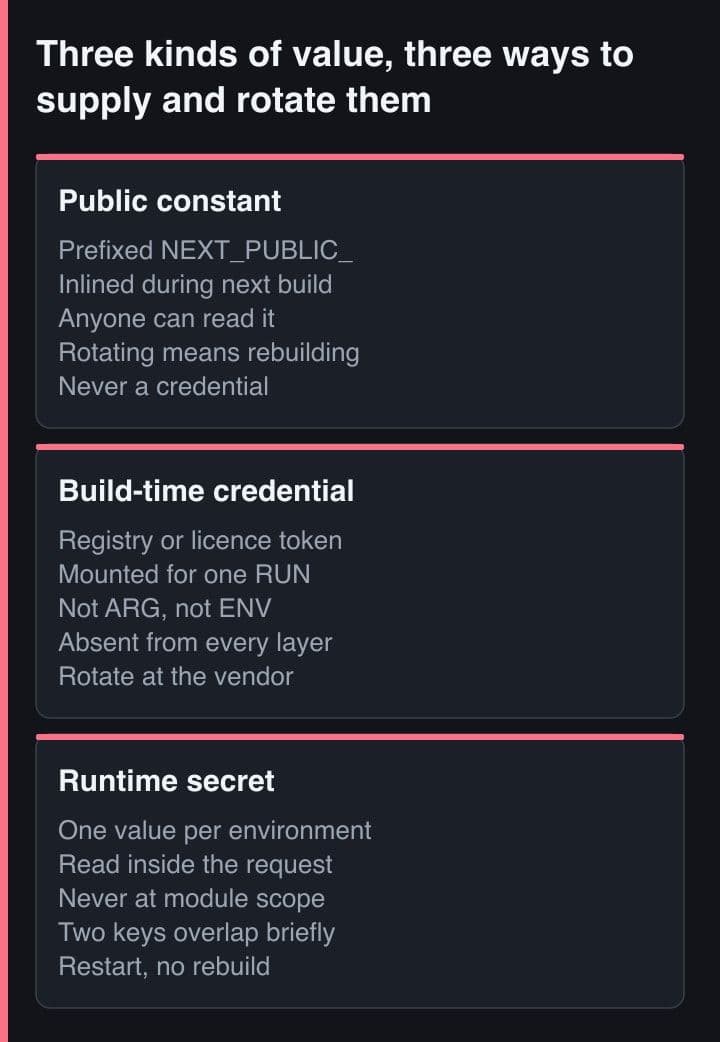
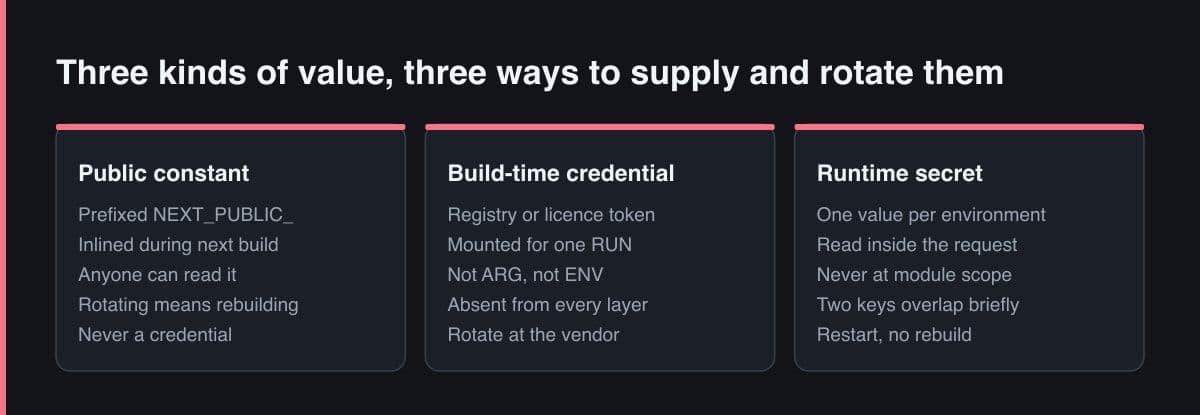
Before setting any variable on a platform dashboard I now answer one question with three possible answers. If the value is read by the browser it is public, so name it that way and never put a credential behind the prefix. If it is read by a running server it belongs to exactly one environment, is read inside the request, and has a rotation runbook written before it is needed. If it is read by the build, it is mounted for one instruction and appears in no layer and no log. Everything else in this post is a consequence of getting that classification right on the day the value is created.
Sources
- Next.js — Environment Variables: bundling for the browser, runtime values and load order
- Docker — Build secrets: why build arguments and environment variables are inappropriate for secrets
- Docker — Dockerfile reference: the RUN secret mount and its target, env and required options
- GitHub Docs — Secure use reference for Actions: the limits of log redaction, rotation and least privilege
- GitHub Docs — Removing sensitive data from a repository: rotate first, and why forks keep the commit