

Key Takeaway
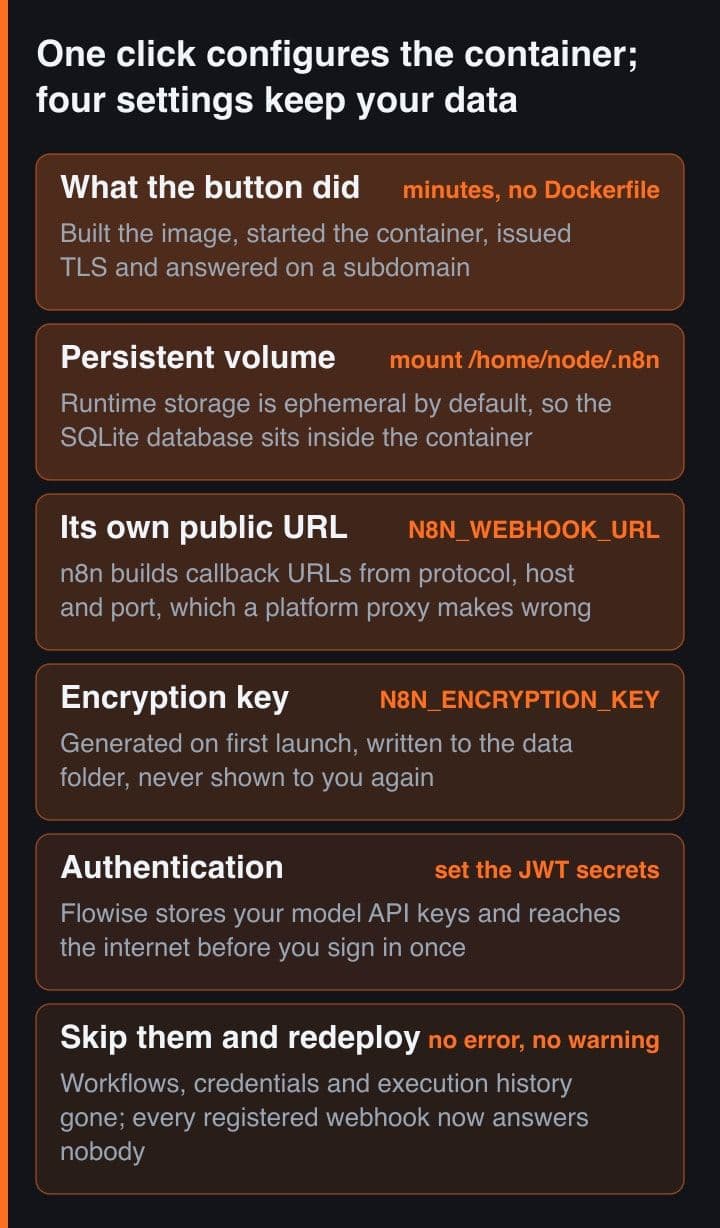
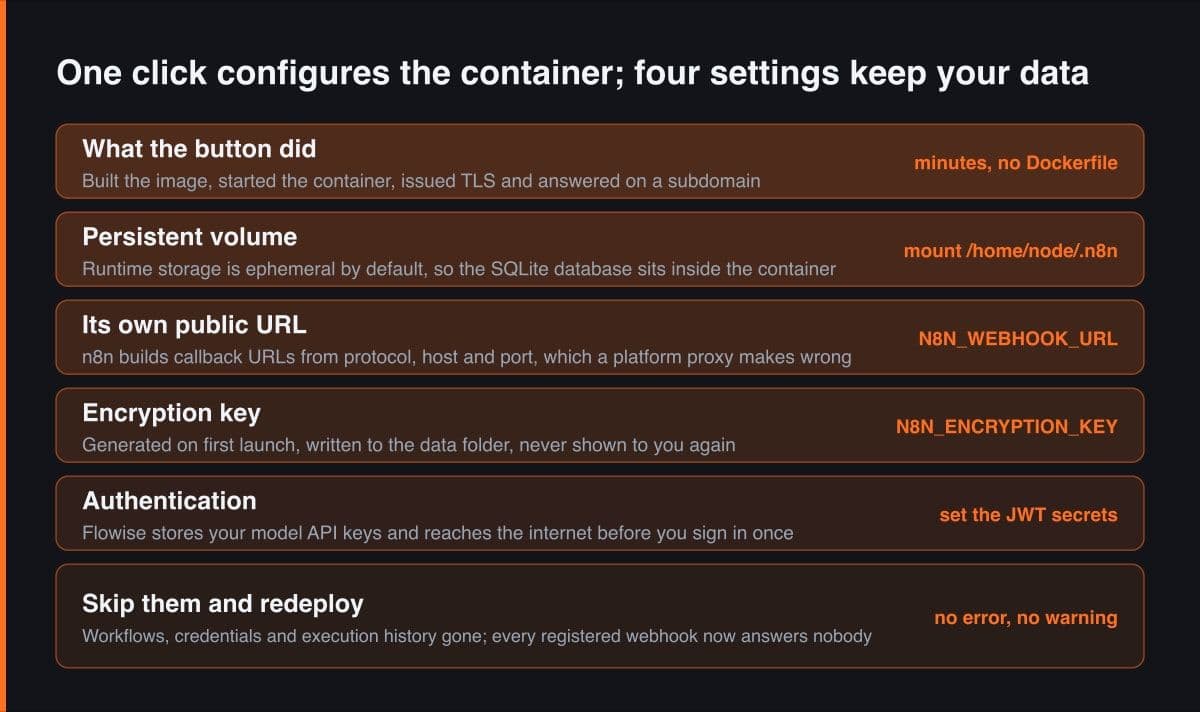
A one-click n8n or Flowise deploy gives you a running container and a public URL, nothing more. You still attach the persistent volume, set the public webhook address, pin the encryption key before first boot, and put authentication in front of the editor. Skip one and the next redeploy quietly loses your credentials.
The one-click template list on an Indonesian PaaS reads like a solo builder's wish list: Supabase, PostgreSQL, Redis, Uptime Kuma, and then the two entries that interest me most, n8n for workflow automation and Flowise for building LLM flows. Billed in rupiah, paid over QRIS or bank transfer, no credit card anywhere. One click and both answer on a subdomain with TLS already terminated.
That click is genuinely the easy part, and it is not the part that decides whether the instance is still there next month. This post covers the four things the button does not do for you, with every environment variable name checked against n8n's and Flowise's own documentation rather than against a tutorial: the persistent volume, the public URL, the encryption key, and authentication.
A one-click deploy gives you a container, not a home for its data
Start with the platform's own wording, because it is the whole problem in one sentence: services get ephemeral runtime storage by default, and anything that must survive a redeployment needs a persistent volume attached. n8n and Flowise both fall on the wrong side of that default. Neither one ships with a separate database service, and both write their state into a directory inside the container as though it will still be there tomorrow.
# Every piece of durable n8n state lives in one directory, and the image runs
# as the "node" user, so that directory is /home/node/.n8n — not /root/.n8n.
#   docs.n8n.io/deploy/host-n8n/install-options/install-with-docker

docker volume create n8n_data

docker run -d --name n8n -p 5678:5678 \
  -v n8n_data:/home/node/.n8n \
  n8nio/n8n

# On a one-click platform you do exactly this through the UI: attach a
# persistent volume and give it /home/node/.n8n as the mount path. The
# platform's own docs are blunt about the default — runtime storage is
# ephemeral, and anything that must survive a redeploy needs a volume.
#
# Flowise is the same shape at a different path. Its published compose file
# mounts ~/.flowise onto /home/node/.flowise, again because the container
# runs as the non-root "node" user:
#   github.com/FlowiseAI/Flowise/blob/main/docker/docker-compose.yml
n8n's own Docker Compose example makes the same omission deliberately and says so out loud: with no database service defined, n8n falls back to its built-in SQLite database, stored inside the container unless you mount a volume for it. Attaching one is a single field in a deploy panel. Getting the mount path wrong is the expensive version of that field, because a volume mounted where the process never writes looks exactly like a volume that is working.
The platform in question is Helipod, which prices in rupiah, takes QRIS and bank transfer with no credit card, and carries n8n and Flowise among its one-click templates alongside Supabase, PostgreSQL, Redis and Uptime Kuma. Everything below applies to any container platform, not only this one: helipod.io
What n8n loses when a container restarts without a volume
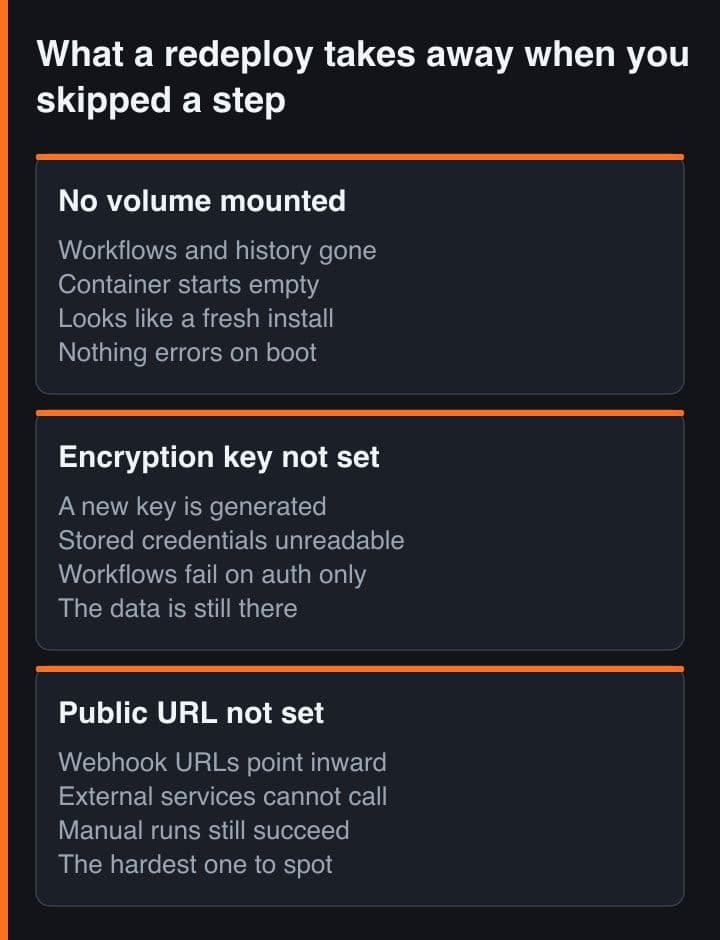
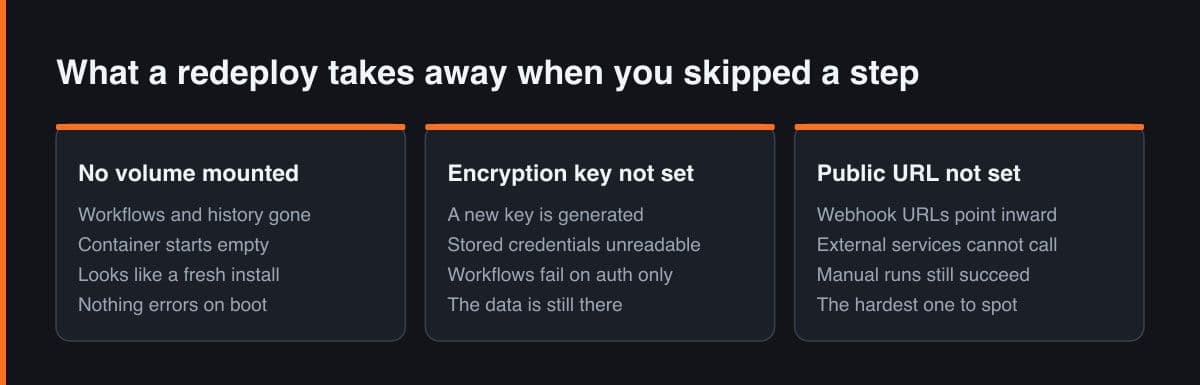
SQLite is the default database, and n8n uses it to save credentials, past executions and workflows. The data directory holds more than that one file: the encryption key, the instance logs, and the assets the source-control feature needs. That is the whole instance in one folder, which is convenient once you mount it and total when you do not.
| What sits in the n8n data directory | What a restart without a volume costs you |
|---|---|
| SQLite database, workflow definitions | Every workflow you built, back to an empty canvas |
| SQLite database, stored credentials | Every saved API key and OAuth token, encrypted and gone |
| SQLite database, execution history | The run log you debug a failing workflow from |
| Settings file, generated encryption key | The key itself, so even a restored database stays unreadable |
| Instance logs and source-control assets | Local diagnostics and the keys the Git integration signs with |
The restart is the part that catches people out, because it is not always something you did. n8n's Docker image restarts the process automatically after a heap exhaustion, so a container without a volume can empty itself while nobody is deploying anything. Treat the persistent volume as the first field you fill in, not a hardening step for later.
n8n has to be told the URL the outside world uses
n8n builds its webhook URL by combining N8N_PROTOCOL, N8N_HOST and N8N_PORT, and the documentation is explicit about why that breaks behind a reverse proxy: n8n runs internally on port 5678 while the proxy exposes it to the web on port 443. Every managed platform is a reverse proxy. Leave the defaults alone and the editor hands you a callback address on localhost, which you can copy into a payment gateway or a GitHub App quite happily and then spend an afternoon wondering why nothing arrives.
# n8n composes its webhook URL from N8N_PROTOCOL + N8N_HOST + N8N_PORT.
# The defaults are http, localhost and 5678 — so those are the values it
# hands to an external service if you never override them.

# Wrong: the editor shows http://localhost:5678/webhook/abc and no payment
# gateway, GitHub App or WhatsApp Business callback can ever reach it.
N8N_HOST=localhost
N8N_PROTOCOL=http
N8N_PORT=5678

# Right: the container still listens on 5678, but n8n now advertises the
# address the outside world actually uses.
N8N_HOST=n8n.example.com
N8N_PROTOCOL=https
N8N_WEBHOOK_URL=https://n8n.example.com/
N8N_EDITOR_BASE_URL=https://n8n.example.com/
N8N_PROXY_HOPS=1

# WEBHOOK_URL is the name most tutorials still use. It is deprecated from
# n8n 2.35.0 as an alias of N8N_WEBHOOK_URL and logs a warning at startup,
# so configure a new instance with the new name.
#
# Flowise's equivalent is one variable, used for the links inside password
# reset and workspace invite emails:
APP_URL=https://flowise.example.com
The fix is to state the public base URL explicitly and tell n8n how many proxies sit in front of it. Watch the variable name while you do it: N8N_WEBHOOK_URL replaces WEBHOOK_URL, which is deprecated from n8n 2.35.0 and logs a warning at startup. Most guides still show the old name, so an instance configured from a tutorial starts life with a deprecation warning in its logs. Flowise has a smaller version of the same requirement in APP_URL, which is what its password-reset and workspace-invite emails link to.
The encryption key is generated once and never shown to you
This is the failure that costs the most and surfaces the latest. With N8N_ENCRYPTION_KEY unset, n8n generates a random key on first launch, saves it into the data folder, and uses it to encrypt every credential before it reaches the database. Nothing in the interface ever shows you that value. Redeploy without the folder, or restore a database next to a freshly generated key, and every stored credential becomes ciphertext you own and cannot read.
# Generate both keys BEFORE the first boot and paste them into the platform's
# secret variables. Setting them afterwards does not recover anything.
openssl rand -hex 32     # for n8n
openssl rand -hex 32     # for Flowise

# n8n: left unset, n8n generates a random key on first launch and writes it
# into the settings file inside the data folder. In queue mode the same value
# must be set on every worker.
N8N_ENCRYPTION_KEY=paste_the_first_hex_string_here

# Flowise: same failure, different name. The docs name the symptom exactly —
# "Credentials could not be decrypted" — and its cause: the encryption key
# was regenerated, or the path it was stored at changed.
FLOWISE_SECRETKEY_OVERWRITE=paste_the_second_hex_string_here

# Flowise puts no format restriction on that value. Hex from openssl is
# simply easier to copy between a password manager and a deploy panel than a
# passphrase somebody types twice and mistypes once.
Flowise fails the same way and publishes the error string, which is unusually helpful of it. Its docs note that the encryption key is sometimes regenerated or its stored path changed, that the result is a credentials could not be decrypted error, and that setting FLOWISE_SECRETKEY_OVERWRITE keeps the same key in use every time. Two variables, generated once, kept in a password manager, pasted into the platform's secret variables. That is the entire mitigation.
Set both keys before the first boot. The n8n wording is precise: you can supply a custom key if it is not yet in the settings file. Once n8n has generated its own, changing the variable does not re-encrypt anything, it makes the stored credentials unreadable instead. That is why rotating the key is a separate opt-in feature whose documentation opens by telling you to take a full database backup first.
Flowise writes to four paths, and only two of them share a folder
Flowise's defaults are the trap a single volume mount does not solve. The SQLite database lands in a .flowise folder under the container user's home directory, and uploaded files in a storage subfolder of it, which is tidy enough. The encryption key and the logs default somewhere else entirely, under the server package inside the application directory. Mount a volume at the database path alone and you keep every chatflow while losing the key that decrypts the credentials attached to them.
# Flowise writes four separate things to four separate defaults, and those
# defaults do not all sit under one folder.
#
#   DATABASE_PATH        your-home-dir/.flowise
#   BLOB_STORAGE_PATH    your-home-dir/.flowise/storage
#   SECRETKEY_PATH       Flowise/packages/server         (somewhere else)
#   LOG_PATH             Flowise/packages/server/logs    (somewhere else)
#
# Mount a volume at the database path only and you keep every chatflow while
# losing the key that decrypts the credentials attached to them. Point all
# four at the mount, then mount once.

DATABASE_TYPE=sqlite
DATABASE_PATH=/home/node/.flowise
BLOB_STORAGE_PATH=/home/node/.flowise/storage
SECRETKEY_STORAGE_TYPE=local
SECRETKEY_PATH=/home/node/.flowise
LOG_PATH=/home/node/.flowise/logs- Point DATABASE_PATH, BLOB_STORAGE_PATH, SECRETKEY_PATH and LOG_PATH at the same mounted directory, so one volume covers all four.
- Check the container user before copying a mount path from anywhere: Flowise's published compose file mounts onto a .flowise folder under /home/node because the image runs as the non-root node user, while older guides still show a path under /root.
- Leave SECRETKEY_STORAGE_TYPE at local unless you are genuinely running AWS Secrets Manager, which is what the other value expects to find.
The user detail matters more than it looks, because a mount at a path the process never touches raises no error at all. Flowise starts, works, and writes its real state to the ephemeral layer beside your empty volume. The only way to catch that is to create one credential, redeploy on purpose, and check it still decrypts, which is a two-minute test worth doing while you have nothing to lose.
Flowise reaches the public internet before you have signed in once
A Flowise instance is a store of other people's API keys, your model provider key and your vector database key among them, sitting behind a web UI. From v3.0.1 it authenticates properly, with a Passport.js based system and JWTs held in HTTP-only cookies, and the older FLOWISE_USERNAME and FLOWISE_PASSWORD pair is the deprecated route kept so an existing install can authenticate once while claiming the new admin account. Most tutorials have not caught up, which is how instances end up on the deprecated path, or on none at all.
# Flowise, from v3.0.1, authenticates with Passport.js and JWTs held in
# HTTP-only cookies. Its docs warn that leaving these unset falls back to
# default values, which raises the chance of an attacker forging a valid
# token and impersonating a user. EXPRESS_SESSION_SECRET defaults to the
# literal string "flowise".
#   docs.flowiseai.com/configuration/authorization/app-level
JWT_AUTH_TOKEN_SECRET=first_openssl_rand_hex_32_output
JWT_REFRESH_TOKEN_SECRET=second_openssl_rand_hex_32_output
EXPRESS_SESSION_SECRET=third_openssl_rand_hex_32_output
TOKEN_HASH_SECRET=fourth_openssl_rand_hex_32_output
SECURE_COOKIES=true
NUMBER_OF_PROXIES=1      # or the rate limiter sees only the proxy's IP

# FLOWISE_USERNAME and FLOWISE_PASSWORD still appear in most tutorials.
# That is the deprecated path, kept so an existing install can authenticate
# once while claiming the new admin account.

# n8n's side of the same problem, from its user-management page:
#   N8N_USER_MANAGEMENT_JWT_SECRET   generated on start if left unset
#   N8N_MFA_ENABLED                  true by default
#   N8N_SECURE_COOKIE                true, so cookies need HTTPS
The sharper point is what happens when you set nothing. Flowise's own documentation recommends configuring your own JWT and secret token variables, because otherwise default values are used and that raises the chance of an attacker forging a valid token and impersonating a user. EXPRESS_SESSION_SECRET's documented default is the literal string flowise. Four random values plus NUMBER_OF_PROXIES, set at deploy time, close it. n8n's counterpart is N8N_USER_MANAGEMENT_JWT_SECRET, also generated on start if you leave it alone, which is one more reason its data folder is not optional.
Where a small plan actually bites
Neither project publishes a minimum memory figure and I am not going to invent one. What the n8n documentation does say is that it puts no restriction on how much data a node can fetch and process, which is exactly the property that turns a generous-looking workflow into heap exhaustion on a small container. It also lists what inflates a run: JSON payload size, binary file size, node count, the Code node specifically, and manual executions, because a manual run makes a second copy of the data for the frontend.
# The line to grep for in the logs of a small plan:
#   Allocation failed - JavaScript heap out of memory
#
# n8n's Docker image restarts the process automatically after that, so the
# symptom a user reports is a workflow that "sometimes fails" rather than an
# instance that is visibly down. Watch restart counts, not just uptime.

# Give V8 a ceiling under the container's limit before buying more RAM.
# The number below is an example — keep it under whatever the plan grants.
NODE_OPTIONS=--max-old-space-size=768

# Stop execution history growing until the volume becomes the problem.
# These are n8n's own defaults, worth knowing before changing them.
EXECUTIONS_DATA_PRUNE=true
EXECUTIONS_DATA_MAX_AGE=336            # hours, so fourteen days
EXECUTIONS_DATA_PRUNE_MAX_COUNT=10000  # 0 means no limit
Flowise publishes a production recommendation rather than a floor, and it reads as calibration rather than as a requirement: queue mode with two load-balanced main servers starting from four vCPU and eight gigabytes of RAM each, plus four workers of the same size. That describes a busy shared deployment, not one builder's chatflows, but it does tell you which direction the pressure comes from. On a one or two gigabyte plan, run the two services separately, batch large jobs into smaller runs, and expect the Code node to be where the ceiling shows up first.
Before you trust a new instance, break it on purpose. Save one credential, run one workflow, then redeploy using the platform's own button and check whether the credential still decrypts. That single test catches the missing volume, the wrong mount path and the unset encryption key at the same time, at the one moment when losing all three costs you nothing.
One-click templates are worth using, they are just mis-sold by the phrase. What the button reliably does is build, start, route and encrypt the transport, which is the part that used to cost an afternoon of nginx config. What it cannot know is that this particular container keeps a database, a secret and a public identity. So four decisions stay yours on every stateful template: mount the volume, publish the real URL, pin the encryption key, and set the auth secrets before the first request arrives.