

Key Takeaway
Helipod is an Indonesian Platform-as-a-Service that builds a Next.js repository into a container with no Dockerfile, bills in Rupiah through QRIS rather than an international credit card, and issues a free helipod.app subdomain with SSL. Its published plans start at Rp 123,750 a month, and its documented ceiling per pod is four vCPU.
The question that decides a hosting choice in Indonesia is rarely about features. It is whether you can pay at all. A developer holding a BCA debit card and a GoPay balance cannot sign up for most of the platforms that make Next.js deployment pleasant, because those platforms want an international credit card and a dollar-denominated invoice. Helipod is built around answering that question with a QR code.
This is a documentation-and-arithmetic review, not a six-month operations report. I read Helipod's pricing page, its Helipack feature pages and its own deployment guides, checked the published figures against each other, and cross-checked the Next.js behaviour it describes against the Next.js documentation. Where a claim is Helipod's rather than mine, I say so.
What Helipod is underneath the dashboard
Helipod is a managed Kubernetes control plane wearing a deployment dashboard, and its own introductory article says exactly that: your application runs on a cluster that Helipod's team configures and operates. Ingress, TLS, health checks, restart policy and an image registry are decisions already made on your behalf. The company behind it is registered in Jakarta, and the platform lists Indonesia, Singapore, Malaysia, Thailand, the Philippines, Vietnam and India as the areas it serves. A first deploy looks like this:
- Create a project, choose GitHub or GitLab, then pick a repository and a branch.
- Helipack scans the repository, reads package.json and the lock file, and names the framework it found.
- Add environment variables under the Variables tab, or press Deploy Now and add them afterwards.
- Helipod builds an image, pushes it to an internal registry and rolls it out behind a health check.
- Open the project canvas and take the URL, which is your project name under helipod.app with SSL already valid.
Nothing in that list is a command, and that is the entire proposition. It is worth being precise about what it removes, though: not Docker, which is still very much there, but the part where you write the Dockerfile, keep certbot renewing, and remember which nginx server block owns port 3000.
Helipack writes the Dockerfile you did not
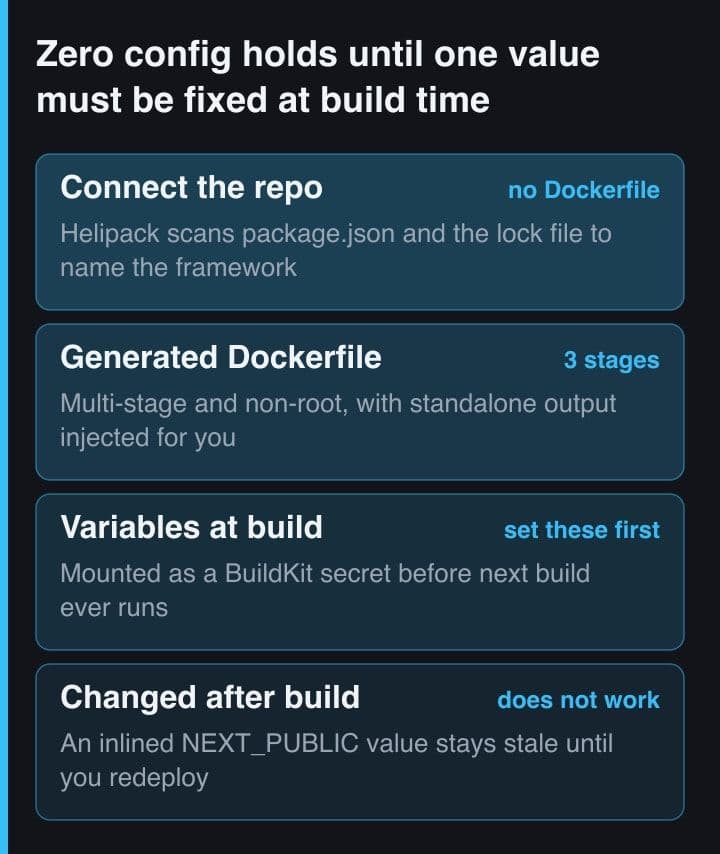
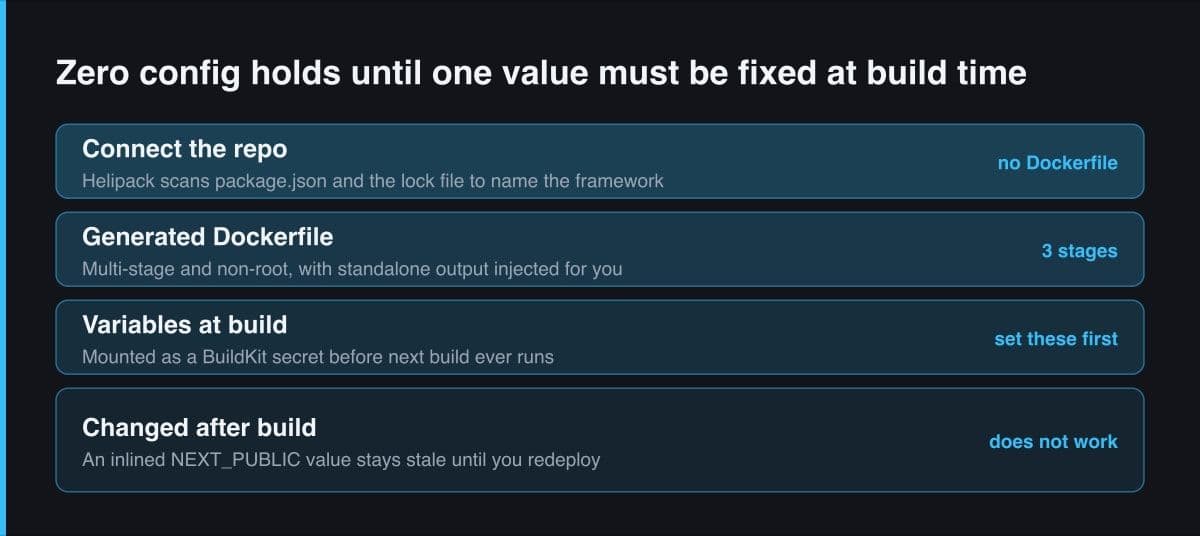
Helipack is Helipod's internal build engine and the most interesting thing on the platform. It detects the framework from package.json, composer.json, requirements.txt, go.mod and the config files, works out the package manager from the lock file — npm, yarn, pnpm or bun — and generates a multi-stage Dockerfile. For a Next.js repository it patches your Next.js config to add standalone output mode if you have not set it yourself, then builds against that. Helipod publishes the Dockerfile it produces, which is unusually open, and it repays a careful read:
# The Dockerfile Helipod publishes as its own Next.js output, abridged.
# Read it once: it tells you what your build may and may not rely on.
FROM node:20-alpine AS base
RUN apk add --no-cache libc6-compat tini git
WORKDIR /app

FROM base AS deps
COPY package.json package-lock.json ./
RUN --mount=type=cache,target=/root/.npm \
    npm ci --prefer-offline --no-audit --no-fund
# The lock file is copied on its own, so this layer is rebuilt only when
# dependencies change. Do not gitignore the lock file — you lose the cache.

FROM base AS builder
COPY --from=deps /app/node_modules ./node_modules
COPY . .
ENV NEXT_TELEMETRY_DISABLED=1
ENV NODE_OPTIONS="--max-old-space-size=4096"
RUN --mount=type=cache,target=/root/.npm \
    --mount=type=secret,id=build_env,dst=/app/.env \
    npm run build
# Your dashboard Variables arrive here as a BuildKit secret mounted at
# /app/.env — readable by next build, never baked into an image layer.

FROM node:20-alpine AS runner
WORKDIR /app
ENV NODE_ENV=production
RUN addgroup --system --gid 1001 nodejs && \
    adduser --system --uid 1001 nextjs
COPY --from=builder --chown=nextjs:nodejs /app/.next/standalone ./
COPY --from=builder --chown=nextjs:nodejs /app/.next/static ./.next/static
COPY --from=builder --chown=nextjs:nodejs /app/public ./public
USER nextjs
EXPOSE 3000
ENV PORT=3000 HOSTNAME=0.0.0.0
ENTRYPOINT ["/sbin/tini", "--"]
CMD ["node", "server.js"]
# Only the standalone output, .next/static and public are carried forward.
# No node_modules in the runtime image, and nothing you wrote outside those
# three paths exists once the pod is running.
Two lines matter more than the rest. The build secret mounted at /app/.env is how your dashboard Variables reach next build without ending up in an image layer, which is the correct way to do it. And the runner stage carries exactly three things forward: the standalone output, the static folder and public. The Next.js documentation describes the same shape — standalone produces a folder that runs without installing node_modules, plus a minimal server.js, and it notes that public and the static folder are not copied automatically because a CDN is expected to serve them. Helipack copies them for you.
The detected set is Node.js, PHP, Python and Go: Next.js, Nuxt, Remix, Astro, Express and NestJS; Laravel and Symfony; Django, FastAPI and Flask; Gin and Echo. Rust, Ruby and Java are not detected at all, and Helipod's own FAQ tells you to bring your own Dockerfile for them. That is a fair answer, but it means the zero-config promise has a language boundary, and it is worth checking which side of it you are on before you plan a migration.
The build-time variable a runtime dashboard hides
Here is the trap, and it is not Helipod's fault. A deployment dashboard presents environment variables as a runtime setting: a tab, a text field, a Save button, a Restart button. Next.js does not treat all of them that way. Any variable prefixed NEXT_PUBLIC_ is inlined into the JavaScript bundle when next build runs, so the value the browser receives was frozen at build time and no longer lives in the environment at all.
The Next.js documentation is explicit: after being built, your app will no longer respond to changes to these environment variables. Editing a NEXT_PUBLIC_ value in the Variables tab and restarting the pod changes nothing, because the old value is already compiled into the bundle you are serving. You need a fresh build, which on Helipod means a redeploy. Set every build-time variable before the first deploy, and treat a change to one as a code change.
The related failure is documented by Helipod and worth knowing before you meet it. Helipack patches your config to add standalone output, and against a config file too complex to patch it gives up with an error saying standalone was not found. The fix is to set it yourself and commit it — which is what I would do on the first deploy anyway, because a build that depends on someone else's regex rewriting my config is a build I cannot reproduce locally.
helipack.json is the escape hatch worth learning first
Zero config is a good default and a bad ceiling. The escape hatch is one file, helipack.json, in the repository root, and every key in it overrides a Helipack default. This is most of the surface worth knowing for a Node service:
// helipack.json, repository root. Every key overrides a Helipack default.
{
  "run": {
    "port": 3000,
    "before": "npx prisma migrate deploy",
    "after": "node scripts/warm-cache.js"
  },
  "health": {
    "path": "/api/health",
    "duration": 30
  },
  "packages": {
    "apk": ["ffmpeg"]
  },
  "env": {
    "TZ": "Asia/Jakarta",
    "NODE_ENV": "production"
  }
}
Three of those keys carry sharp edges. run.before is a gate rather than a hint: if the command exits non-zero the deployment is failed and the pod never starts, so a step that may legitimately fail needs an explicit || true appended to it. health.duration is the grace period before health checks begin and it defaults to 15 seconds, which is not enough for a cold start that warms a cache or loads a model — raise it, or watch the pod get restarted underneath you. And build.dockerfile lets you point at your own Dockerfile and switch generation off entirely, which is the exit path if you outgrow the detection. When a value is set in more than one place, the order is:
- Variables set in the dashboard, which win outright.
- The env block in helipack.json, which is committed to the repository and must therefore never hold a secret.
- Helipack's per-framework defaults, which apply when nothing above them says otherwise.
That ordering is useful rather than incidental. You can commit sane development defaults next to the code and override only the production values in the dashboard, without a second config file and without a conditional in the application.
Rupiah pricing, and the arithmetic behind the plans
Pricing is published in Rupiah and metered per day, and the plans are that same rate sold in thirty-day bundles. The column that matters most is the last one, because a plan's vCPU and RAM figures are a pool spread across your pods, while each individual pod is capped at four vCPU, eight GB of RAM and thirty GB of storage — with the container image counted inside that storage allowance.
| Plan | Regular price per month | Pooled vCPU / RAM | Storage and custom domains |
|---|---|---|---|
| Nano | Rp 123,750 | 1 vCPU / 1 GB | 15 GB, 2 domains |
| Micro | Rp 250,500 | 2 vCPU / 2 GB | 30 GB, 5 domains |
| Starter | Rp 672,000 | 5.5 vCPU / 5.5 GB | 80 GB, 10 domains |
| Pro | Rp 1,366,500 | 11 vCPU / 11 GB | 170 GB, 20 domains |
| Business | Rp 2,785,500 | 22 vCPU / 22 GB | 350 GB, 50 domains |
The daily rates published beside those plans are Rp 150 per 0.125 vCPU, Rp 200 per 128 MB of RAM, Rp 75 per GB of storage and Rp 100 per custom domain. Multiply Nano out — eight CPU units, eight RAM units, fifteen GB and two domains — and it comes to Rp 4,125 a day, which is exactly Rp 123,750 over thirty days. The same arithmetic lands on the published figure for Micro and for Starter too. So a plan is not a discount on pay-as-you-go pricing: it is thirty days of it at an identical rate. The site was separately advertising half off the one-month bundle when I looked, which is a promotion rather than a list price, and the table above is the list price.
Billing is prepaid credit rather than an invoice. You top up from the billing panel by QRIS, bank transfer, virtual account or a direct e-wallet, from Rp 10,000 upwards, the QR code expires after ten minutes, and the balance is drawn down daily. QRIS is the fact that makes the whole platform relevant: one national QR standard accepted by every Indonesian wallet and bank means GoPay, OVO, Dana or ShopeePay is enough, with no card and no exchange rate to explain to an accountant. It also makes topping up an uptime task. Nothing I read states what happens to a running pod when the balance reaches zero, so I would keep several weeks of buffer and a calendar reminder rather than find out empirically.
What I could not confirm, and the region question
This is the part a vendor page will not tell you, so here it is. Four things about Helipod were still unresolved after reading everything it publishes:
- Where your pod physically runs. The homepage carries an Indonesian flag and the company sits in Jakarta, and Helipod's pricing page offers its separate VPS product in Jakarta, Singapore or Germany, but it names no region for app containers. Helipod's own comparison table in its introductory article of 28 April 2026 marks a server in Indonesia as coming soon, and its comparison articles of May 2026 said apps then ran only in Germany, with Indonesia and Singapore still to come. Latency to Indonesian users is therefore a thing to measure, not assume.
- Which numbers are current. The pricing page and the marketing articles disagree with each other: the introductory article still lists plan names that no longer appear on the pricing page, quotes storage as free where the pricing page charges Rp 75 per GB per day, and describes a ceiling of six vCPU per pod where the pricing page says four. Treat the pricing page as canonical and the blog as history.
- How deep the documentation goes. The docs sitemap lists sixteen pages. They cover concepts, deployments, health checks and production readiness competently, but there is no reference section — no exhaustive environment variable list, no CLI command reference, no regions page. The most detailed technical material is on the marketing blog, which is a strange place to keep a schema.
- What the platform does under load. Helipod says it builds a medium project in three to five minutes and that HPA scales pods on CPU. Both are plausible, and neither is something I measured, so neither belongs in your capacity plan as a number.
# Two ways to read the Dockerfile Helipack wrote for you.
# 1. Deployments -> Build logs in the dashboard, where it is printed.
# 2. On a local build, ask Helipack to leave it on disk:
export HELIPACK_KEEP_DOCKERFILE=1
# ...then build. The file is kept as .helipack.Dockerfile in the repo root.

# Nothing published states which datacentre your pod lands in, so measure it
# from the network your users are on — a phone tether in Semarang, not your
# office fibre. Run it a dozen times before you trust the number.
curl -s -o /dev/null \
  -w "dns %{time_namelookup}  tls %{time_appconnect}  ttfb %{time_starttransfer}  total %{time_total}\n" \
  https://your-project.helipod.app/
Before committing anything to a platform that publishes no region for its app containers, deploy a hello-world pod and time it from the network your users are actually on. Time to first byte from a phone on cellular data in Surabaya is the number that matters, and it is a five-minute test that will outlive any marketing claim about proximity.
Which workloads I would still keep on a VPS
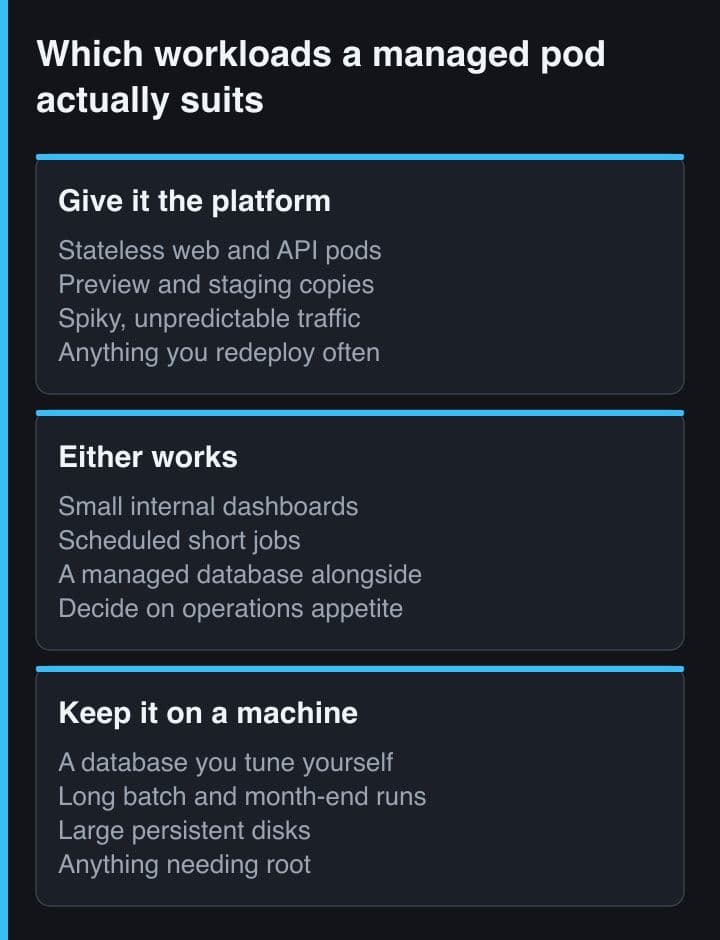
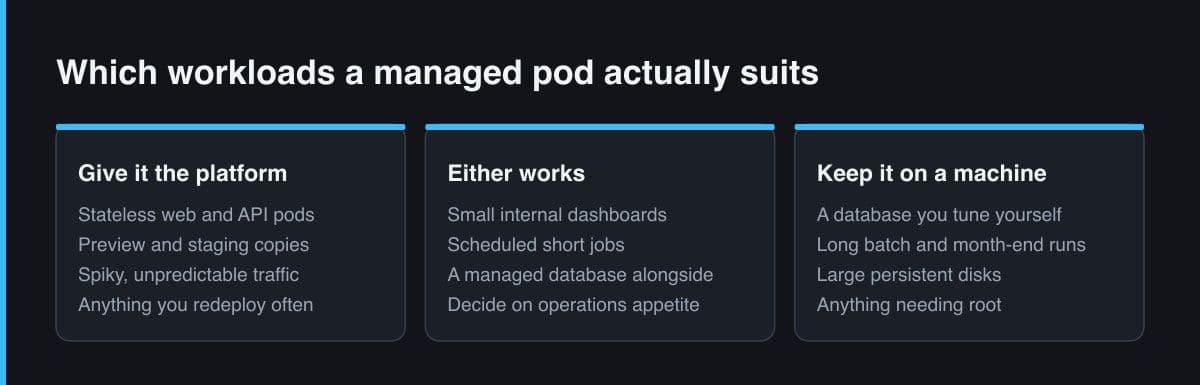
The honest boundary is not about capability, it is about who holds the pager. On a managed platform you trade the ability to fix things yourself for never having to. Four kinds of workload where I would not make that trade:
- A database you have to tune. Helipod will run PostgreSQL, MySQL, MongoDB or Redis as a service, and for a side project that is fine. For anything where you would edit shared_buffers, schedule a vacuum window or restore a base backup under time pressure, you want the host.
- Anything that needs the machine itself. A container has no systemd, no kernel modules, no firewall of your own and no crontab on the host. Scheduled jobs exist as a service type, but a workload that assumes a machine wants a machine.
- Storage-shaped work. The runtime filesystem is ephemeral by default and persistent volumes have to be asked for explicitly, inside a per-pod storage ceiling that also counts the image. Anything that grows — user uploads, generated PDFs, a media cache — belongs on object storage before it belongs on a pod.
- Anything where a prepaid balance is an unacceptable dependency. A client-facing production system whose availability is coupled to a top-up somebody has to remember is a risk you are choosing on the client's behalf, and they deserve to be told about it.
For everything else — a Next.js front end, an API, a staging environment, a preview per branch, an internal tool nobody wants to administer — the trade is a good one, and the argument for a VPS gets weaker every time a certificate needs renewing at three in the morning.
My rule after reading all of it: Helipod is the right answer when the binding constraint is payment or attention, and the wrong answer when it is control. QRIS billing and a Dockerfile you never write solve two real problems that no dollar-denominated platform solves for an Indonesian developer. Settle your build-time variables before the first deploy, read the Dockerfile Helipack generated so you know what your image actually contains, and measure the latency yourself instead of trusting a flag on a landing page.
Sources and further reading
- Helipod pricing — plans in Rupiah, per-day resource rates and per-pod ceilings
- Helipod — the Helipack build engine, framework detection and generated Dockerfiles
- Helipod — deploying Next.js, the generated Dockerfile and its troubleshooting notes
- Helipod — the complete helipack.json configuration reference
- Next.js documentation — environment variables and build-time inlining
- Helipod blog — Helipod vs Render, including where Helipod's app servers ran, 13 May 2026