

Key Takeaway
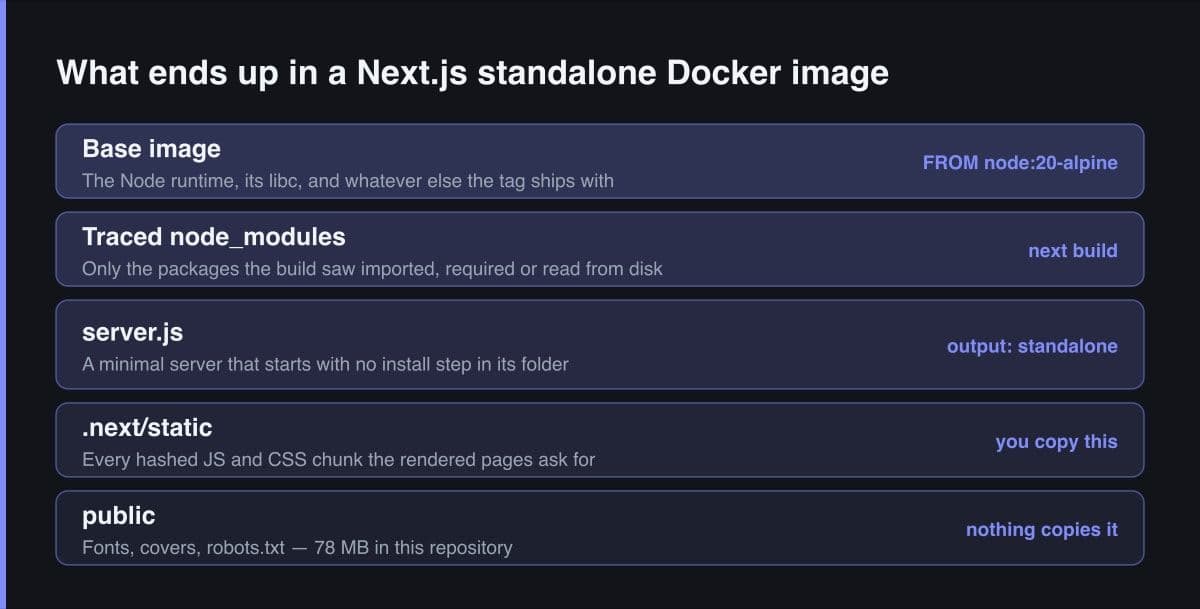
Setting output to standalone makes Next.js trace every route's real dependencies and copy only those, plus a minimal server.js, into .next/standalone. Tracing deliberately skips public and .next/static, so a multi-stage Dockerfile has to copy both by hand before the runner stage becomes the published image.
The first standalone image I built started cleanly, answered 200 on every route, and rendered the site as unstyled black text on a white page. Nothing had failed. The health check was green, the logs were empty, and every request for a stylesheet was a 404. I had copied .next/standalone into the runner stage and stopped there, which is exactly the mistake the Next.js documentation warns about in one sentence that is very easy to read past.
This post is about what output standalone actually produces, why the result is small, and the places where it quietly is not enough on its own. The Dockerfile at the end is the one this site runs on a self-hosted VPS behind nginx, on Next.js 15.5. Every claim about tracing behaviour is checked against the Next.js output documentation rather than remembered.
What output standalone actually produces
Standalone is a build output mode, not a runtime flag. During next build, Next.js writes a .next/standalone folder holding a minimal server.js and the subset of node_modules the traced pages need. The documentation is unambiguous about the consequence: that folder can be deployed on its own without installing node_modules, and server.js can be used instead of next start.
// next.config.ts
const nextConfig = {
  output: "standalone" as const,
};

export default nextConfig;

// Terminal, after the build. No install happens inside .next/standalone —
// the traced node_modules subset is already sitting there.
//   next build
//   node .next/standalone/server.js
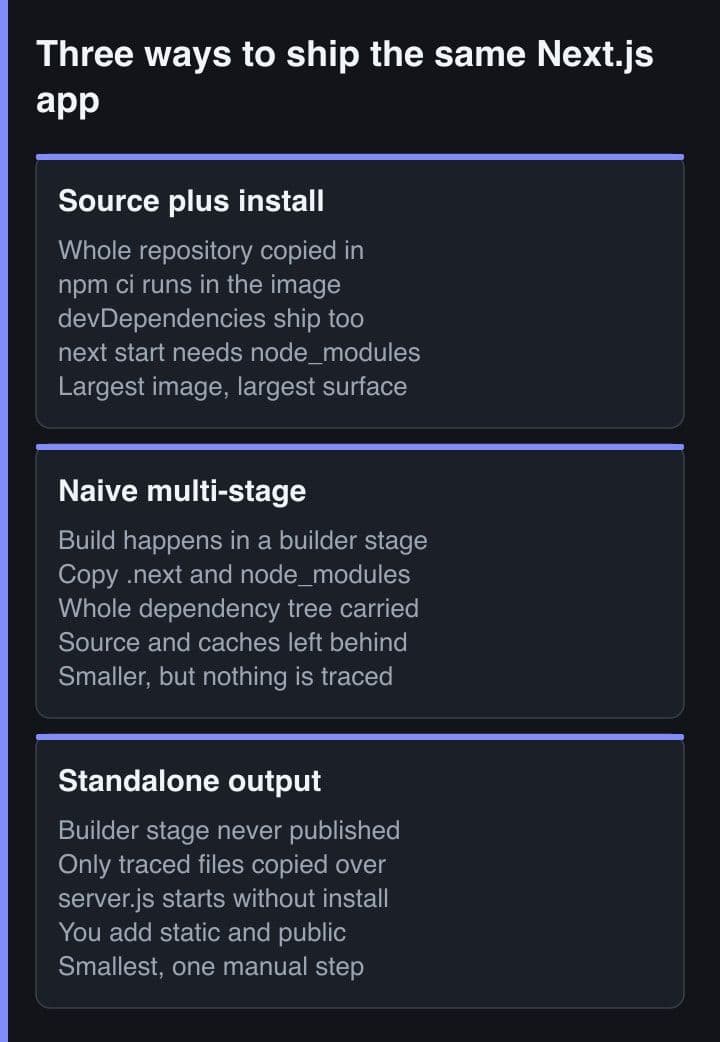
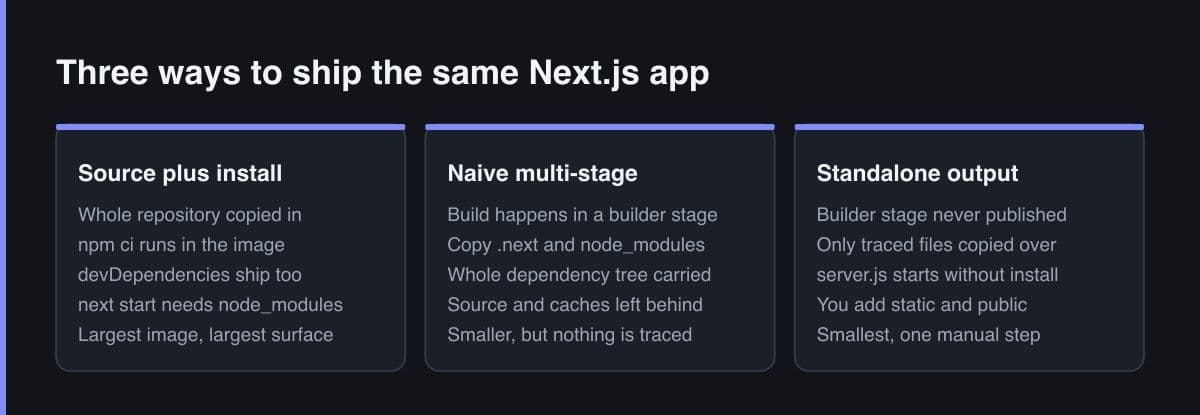
The saving is not compression and it is not a smaller runtime. It is that the build already knows which files your routes touch, so it can leave the rest behind. On this repository node_modules is 821 MB across 38,161 files, measured with du and find on 4 September 2026. That is a development install rather than a production one, but it is exactly the tree a Dockerfile without tracing copies forward into the published image.
The standalone folder is self-sufficient, which gives you a one-second test. After a build, run node .next/standalone/server.js from the repository root with no install step in that folder. If a module is missing from the trace, it fails here in the same way it would fail in the container, before you have spent a Docker build finding out.
How file tracing decides what ships
Tracing is static analysis, and knowing that predicts both what it gets right and how it fails. The documentation states that during next build Next.js uses the vercel nft package to statically analyse import, require and fs usage to determine every file a page might load. The production server is traced too, into a file called next-server.js.nft.json in the .next directory.
- import — resolved through the module graph, the case tracing gets right every time
- require — including conditional ones, as long as the argument is a literal string
- fs usage — how a package that reads its own data files at runtime keeps them
Everything on that list is something an analyser can see by reading code without running it. A path assembled at runtime is not, which is the whole class of failure covered further down. Tracing is also why a monorepo needs care: the documentation notes that the project directory is the tracing root by default, so files outside it are excluded unless outputFileTracingRoot says otherwise.
The two directories tracing never copies
This is the most common standalone deployment failure and it has a one-line cause. The documentation says the minimal server does not copy the public or .next/static folders by default, as these should ideally be handled by a CDN instead, although they can be copied into standalone/public and standalone/.next/static manually, after which server.js serves them automatically.
The symptom is not an error message. The container starts, the health check passes, HTML is returned, and every hashed asset the page asks for is missing. If you have a CDN in front of the app and an assetPrefix pointing at it, the default is correct and you should leave it alone. If you are self-hosting behind nginx and serving your own assets, which is the common case, two COPY lines fix it permanently.
# Wrong: the container starts, the health check passes, and every request
# for /_next/static/... is a 404. No error is printed anywhere.
COPY --from=builder /app/.next/standalone ./
CMD ["node", "server.js"]

# Right: tracing copies neither of these, so you copy them yourself.
# .next/static goes INSIDE the unpacked .next, not next to it.
COPY --from=builder /app/public ./public
COPY --from=builder --chown=nextjs:nodejs /app/.next/standalone ./
COPY --from=builder --chown=nextjs:nodejs /app/.next/static ./.next/static

# The same two copies locally, straight from the Next.js docs, for reproducing
# the fixed behaviour before you spend a Docker build on it:
#   cp -r public .next/standalone/ && cp -r .next/static .next/standalone/.next/
Copy .next/static into the unpacked .next, not beside it. The standalone folder unpacks so that server.js lands at the working directory root, which makes the destination ./.next/static. A copy to ./static builds, starts and produces exactly the same silent unstyled page as forgetting the line entirely, which is why this one costs an afternoon rather than a minute.
Three stages, and only one of them ships
The Docker documentation describes a multi-stage build as multiple FROM statements, each beginning a new stage, letting you selectively copy artefacts from one stage to another and leave behind everything you do not want in the final image. For a Next.js build the split falls out naturally into deps, builder and runner, and only the runner becomes the published image.
deps exists purely so a source edit does not invalidate the npm ci layer, which is a build-time saving and changes no published byte. builder holds the full dependency tree and the entire source tree, and none of it is shipped. runner starts from a fresh base and receives exactly three copies. Here is the complete file, the one this site deploys, with one unrelated block about V8 heap sizing removed.
# ---- deps: the only stage that ever runs npm ci ------------------------
FROM node:20-alpine AS deps
WORKDIR /app
# Lock file first, source later, so editing a component reuses the cached
# install layer. This is a build-TIME saving; it changes no published byte.
COPY package.json package-lock.json ./
RUN npm ci

# ---- builder: full dependency tree, full source, nothing published -----
FROM node:20-alpine AS builder
WORKDIR /app
COPY --from=deps /app/node_modules ./node_modules
COPY . .
ENV NEXT_TELEMETRY_DISABLED=1
# Needs output: standalone in next.config.ts. Without it .next/standalone is
# simply not written and the runner's COPY fails with "not found".
RUN npm run build

# ---- runner: the only stage that becomes the published image -----------
FROM node:20-alpine AS runner
WORKDIR /app
ENV NODE_ENV=production
ENV NEXT_TELEMETRY_DISABLED=1
# server.js reads both. The official Next.js Docker example sets HOSTNAME
# explicitly rather than relying on the default, and so does this.
ENV PORT=3000
ENV HOSTNAME=0.0.0.0

RUN addgroup --system --gid 1001 nodejs && adduser --system --uid 1001 nextjs

# public/ is only ever read at runtime, so root ownership is harmless here.
COPY --from=builder /app/public ./public
# standalone unpacks to the working directory: server.js lands at /app/server.js
# with its traced node_modules and .next/server beside it.
COPY --from=builder --chown=nextjs:nodejs /app/.next/standalone ./
# Not traced either. Owned by the runtime user because .next is written to.
COPY --from=builder --chown=nextjs:nodejs /app/.next/static ./.next/static

USER nextjs
EXPOSE 3000
CMD ["node", "server.js"]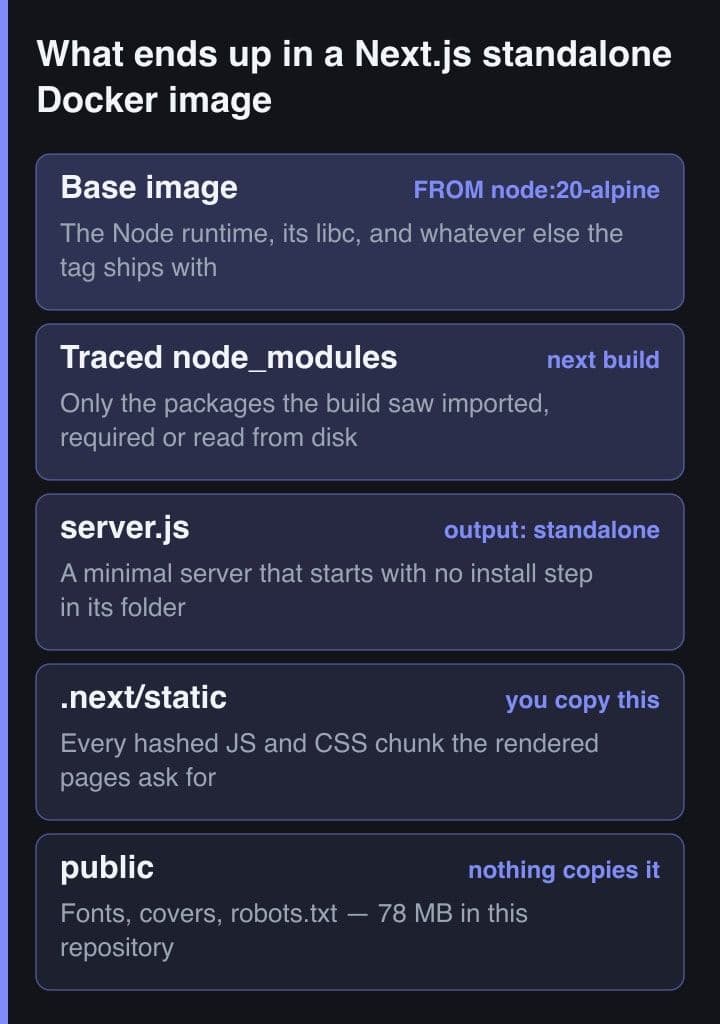
The base image decides more than the rest of it
Everything above operates on your code. The base image is a decision about somebody else's, and on a small application it usually moves the final number further than all the other work combined. The official node images are documented per variant, and the trade is not only about size.
| Tag | What it is | The trade |
|---|---|---|
| node:20 | Based on buildpack-deps, with a large number of common Debian packages | The biggest, and the documented answer if you are unsure what you need |
| node:20-slim | Debian without the buildpack-deps package set | Keeps glibc, so native modules behave as they do on a Debian laptop |
| node:20-alpine | Alpine Linux with musl libc, and no git or bash in the image | Around 25% smaller than slim, paid for in glibc compatibility |
The nodejs docker-node README is direct about the cost. Alpine images are around 25% smaller than the Debian-based slim images, but Alpine uses musl libc rather than the GNU C library, and generally applications written for Debian will not run under Alpine. It also records that musl builds for amd64 sit in Node's Experimental support tier, and that musl builds for other architectures, including arm64, are not tested before release.
That is the honest caveat for anything with a native module. This site runs on node:20-alpine and has never had a problem, but the only native code in its runtime path is sharp, which arrives with Next.js and publishes musl builds of its own — the linuxmusl packages are listed in sharp's optional dependencies in this lock file. The official Next.js Docker example takes the other side of the trade and uses a Debian slim tag. Neither choice is wrong; make it deliberately rather than copying whichever tag your last project used.
Running as a non-root user without breaking the cache
The runner creates a system group and user and switches to them before CMD. It costs nothing, and it removes the most boring class of container problem from the table. The detail that trips people is ownership: files copied by root are owned by root, and the runtime user then cannot write where Next.js expects to.
public is only read at runtime, so root ownership there is harmless. .next is different — the on-disk prerender and image caches live under it, and any revalidating route needs to write there. The official Next.js Docker example handles this by creating .next and giving it to the runtime user before the standalone copy lands, with a comment naming the prerender cache as the reason. It also uses the node user that the base image already ships, rather than adding one.
# Create .next and hand it to the runtime user BEFORE the standalone copy
# lands, so the on-disk prerender and image caches are writable at runtime.
RUN mkdir .next
RUN chown node:node .next

COPY --from=builder --chown=node:node /app/.next/standalone ./
COPY --from=builder --chown=node:node /app/.next/static ./.next/static
USER node
When tracing misses a file
Because the analyser reads code rather than runs it, a dependency reached through a path built at runtime is invisible to it. The file is not copied, the image builds and starts cleanly, and the first request that needs the module fails. The documentation acknowledges this plainly: there are cases where Next.js might fail to include required files, or might incorrectly include unused ones.
The escape hatch is outputFileTracingIncludes, with outputFileTracingExcludes for the opposite problem. Each takes an object whose keys are route globs matched with picomatch against the route path, and whose values are glob patterns resolved from the project root. The documentation's own example of a common include is the sharp package, which is exactly the shape of thing static analysis cannot find: a prebuilt native binary that no import statement ever names.
// next.config.ts
const nextConfig = {
  output: "standalone" as const,

  outputFileTracingIncludes: {
    // Every server-traced route gets the native binary.
    "/*": ["node_modules/sharp/**/*"],
    // One route that reads a data file through a path built at runtime.
    "/api/invoice": ["./templates/**/*.hbs"],
  },
};

export default nextConfig;
Two limits are worth knowing before reaching for it. These options apply to server traces, so Edge Runtime routes and fully static pages are unaffected by them. And the documentation advises keeping patterns as narrow as possible to avoid oversized traces, which is a polite way of saying that a wildcard at the repository root undoes the entire feature you turned on.
Measure before and after, one change at a time
Every megabyte figure in a post about image size, including the two in this one, is a fact about somebody else's dependency tree. The only numbers worth acting on are the ones your own build prints, and they are cheap to obtain.
# The number, before and after each single change.
docker image ls matthewswong-portfolio:latest

# Which instruction is carrying the weight. --no-trunc prints the whole
# command, so you can tell WHICH copy is large instead of guessing.
docker history --no-trunc --format "{{.Size}}  {{.CreatedBy}}" matthewswong-portfolio:latest

# Open the builder stage — it is never published, so this is the only way
# to see the traced output next to the tree it was traced from.
docker build --target builder -t portfolio-builder .
docker run --rm portfolio-builder du -sh /app/node_modules /app/.next/standalone /app/.next/static

# What the same measurement says on this repository, run 2026-09-04:
#   du -sh node_modules             ->  821M
#   find node_modules -type f | wc  ->  38161 files
# du -sh public -> 78M- Record what docker image ls reports for the current image, before changing anything at all.
- Make exactly one change — the standalone switch, or the base image, never both in the same build.
- Rebuild, then read docker history with the no-trunc flag to see which instruction moved.
- If a layer surprises you, build with the target flag and look inside the stage that never ships.
Doing two changes together is how people end up crediting standalone with a saving that actually came from swapping Debian for Alpine, and then keeping a musl caveat they never needed to accept. The order also matters for a second reason: if the base image swap alone gets you where you need to be, the tracing work is still worth doing, but you will know what each one bought.
docker history attributes size to instructions, so it tells you which COPY is expensive, not which package is. When one copy dominates and it is not node_modules, the answer is usually public — static assets are not traced, not touched by the build, and grow quietly. The public folder in this repository is 78 MB, measured on 4 September 2026, most of it generated cover images.
Standalone is worth the two extra COPY lines, but treat it as what it is: a build output that knows your dependency graph, not a size setting. Write the three stages, copy public and .next/static yourself, choose the base image on purpose rather than by habit, and trust the number your own build prints over the one you read in any article, including this one.
Sources
- Next.js documentation — output, file tracing and outputFileTracingIncludes
- Next.js documentation — how to self-host your Next.js application
- Docker documentation — multi-stage builds
- nodejs/docker-node — image variants, Alpine and the musl support tier
- vercel/next.js — the official with-docker example Dockerfile