ERP
Epson TM-T82 Cash Drawer, Auto Cutter and Status Bytes
August 202611 min read
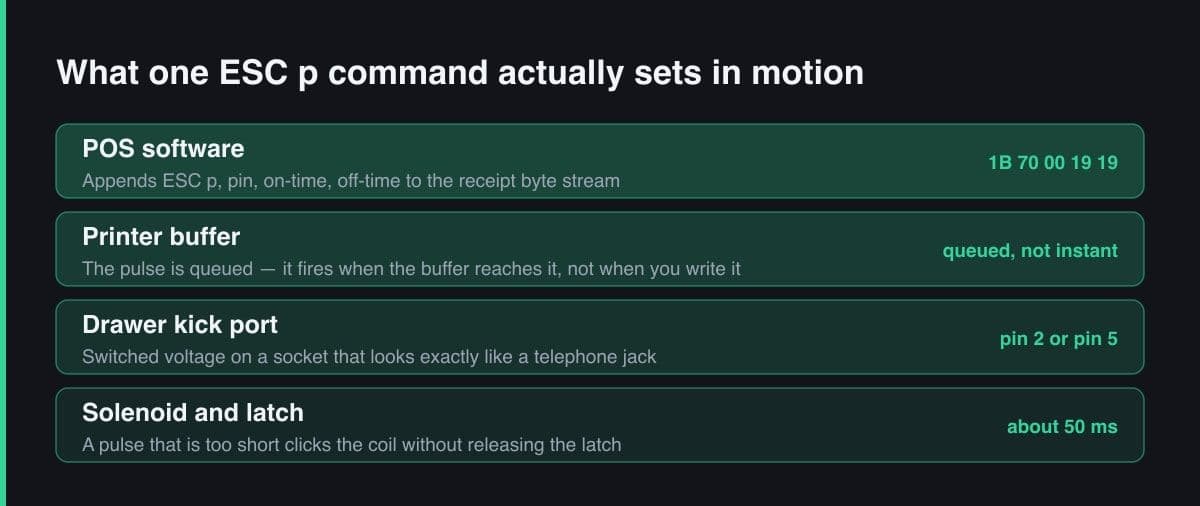
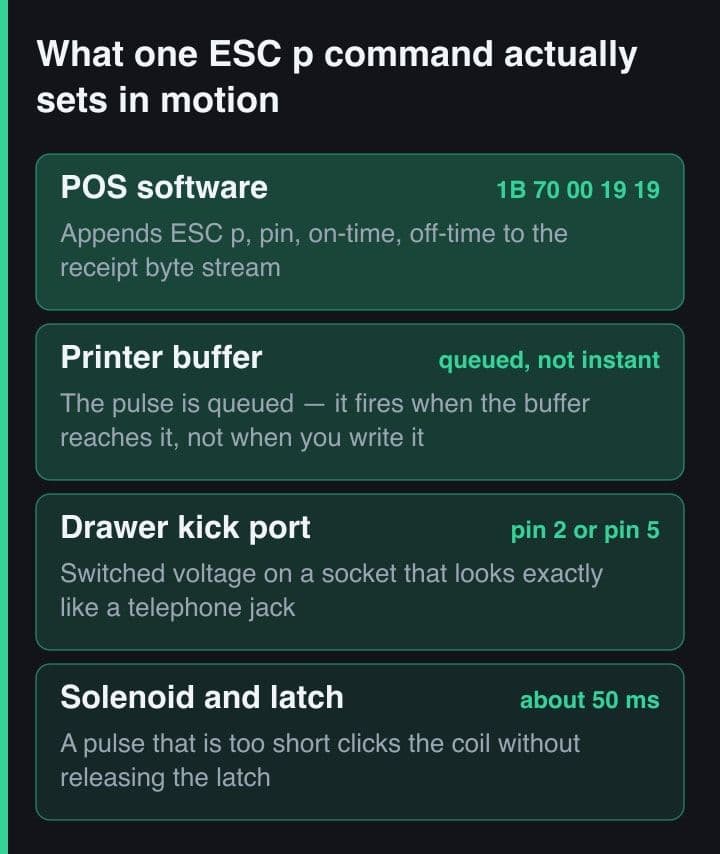
The drawer is a solenoid wired to the printer's drawer kick port, and it opens when the printer sends a voltage pulse down that cable. Software asks for the pulse with the ESC p command, choosing the pin and the on and off durations in two-millisecond units. There is no separate cash drawer driver.
Almost always the pulse duration or the pin. A pulse that is too short makes the solenoid click without releasing the latch, and heavier drawers need longer than lighter ones — around fifty milliseconds is a safe starting point. The other common cause is a drawer wired to pin 5 while the software pulses pin 2.
The blade sits several millimetres above the print head, so a plain cut command cuts paper that still has your last printed line above the blade. Use the feed-and-cut form of GS V, which advances a set number of dots first. Measure that distance once by printing numbered lines and counting how many disappear.
Query real-time status with DLE EOT. Unlike most ESC/POS commands it is answered immediately by the firmware, even while a job is printing, and it returns a byte of flags covering printer state, offline cause, errors and the roll paper sensor. Poll it once per sale rather than continuously.
At minimum queued, sent, confirmed and drawer-pulsed. Explicit states matter because these actions are physical and can partially succeed: sent but unconfirmed means a reprint is safe, confirmed with no drawer pulse points at wiring rather than software, and an old queued job means the printer is offline and nobody has noticed.
Key Takeaway
On a TM-T82 the cash drawer opens through the printer, using the ESC p pulse command on the drawer kick port; the auto cutter needs a feed before it cuts; and DLE EOT returns real-time status even while a job is printing. Those three commands cover almost every operational failure a POS will hit.
A receipt printer is the only device in a small shop that touches money physically. It opens the drawer, it produces the customer's evidence of payment, and it is the thing the cashier blames when either fails. The three ESC/POS features below are what turn a printer from a text output device into part of the cash-handling process — and each has one detail that is not obvious until it has embarrassed you in front of a queue.
Everything here is from Epson's ESC/POS command reference and from wiring these printers into real counters. Where the behaviour differs across firmware I have said so rather than pretending there is one answer.
There is no cash drawer driver. The drawer is a solenoid with a 24 volt coil, connected to the printer's drawer kick port with what looks like a telephone cable, and it opens when the printer sends a voltage pulse down that cable. Your software's only job is to ask the printer for that pulse, which is what ESC p does.
ESC p m t1 t2      generate pulse on the drawer kick connector
   m  = 0  -> pin 2      m = 1 -> pin 5
   t1 = ON  time in 2 ms units
   t2 = OFF time in 2 ms units

// 50 ms on, 50 ms off on pin 2 — the setting that opens every
// 24 V drawer I have wired to a TM-T82 so far.
const kickDrawer = Buffer.from([0x1b, 0x70, 0x00, 0x19, 0x19]);

// The pulse is a QUEUED command: it fires when the print buffer
// reaches it, not when your process writes it. Put it AFTER the
// receipt bytes if you want the drawer to open with the paper,
// BEFORE them if the cashier should reach for cash first.
The parameters matter more than they look. The two timing bytes set how long the pulse stays on and off in two-millisecond units, and a pulse that is too short will click the solenoid without releasing the latch — the classic symptom of a drawer that opens on some machines and not others with identical software. Around fifty milliseconds is a safe starting point; some heavier drawers want more.
The drawer kick port is not a data port. It carries switched voltage on a connector that is physically identical to a telephone socket, and plugging a phone line, a network cable or a second printer into it can damage hardware. Label the cable at install time — every technician who has worked a counter has seen this mistake at least once.
The auto cutter sits several millimetres above the print head. That gap is the single most common cause of a receipt whose last line is cut in half, and it explains why the cut command has two forms.
GS V m            cut, no feed        m = 0 full, 1 partial
GS V m n          feed n dots, then cut   m = 65 full, 66 partial

// Wrong: the last three lines are still under the print head,
// above the blade, so the cut lands in the middle of the total.
buffer.push(GS, 0x56, 0x01);

// Right: feed the gap between head and blade first. On TM-class
// printers that gap is why "GS V B n" exists at all.
const FEED_DOTS_TO_BLADE = 0x64;   // ~100 dots, tune per model
buffer.push(GS, 0x56, 0x42, FEED_DOTS_TO_BLADE);
The exact feed distance is model-specific and worth measuring once rather than copying from a forum. Print a ruler of numbered lines, cut, and count how many disappeared — that number, converted to dots, is your constant, and it belongs in a named configuration value rather than sprinkled through the code.
Most ESC/POS commands are queued: they execute when the printer's buffer reaches them. That is useless for asking whether the printer is out of paper, because your question would sit behind the receipt you are worried about. DLE EOT is different — it is a real-time request that the firmware answers immediately, even mid-job, and it returns a single byte of flags.
DLE EOT n        transmit real-time status  (0x10 0x04 n)
   n = 1  printer status      n = 2  offline cause
   n = 3  error cause         n = 4  roll paper sensor status

// Real-time means the printer answers immediately, even while a
// long receipt is still printing — this is the only status query
// that is not stuck behind your own buffered job.
const askPaper = Buffer.from([0x10, 0x04, 0x04]);

// One reply byte. Bits 5 and 6 both set means the roll is out;
// bits 2 and 3 mean "near end" — the warning you want to surface
// to the cashier BEFORE the next customer, not during.
function paperState(reply: number): "ok" | "near-end" | "out" {
  if ((reply & 0x60) === 0x60) return "out";
  if ((reply & 0x0c) === 0x0c) return "near-end";
  return "ok";
}
In practice I query two things. Roll paper sensor status tells me whether the roll is out or near the end, which is the difference between a warning and a stopped counter. Printer status tells me whether a cover is open or the printer is offline, which is what turns a mysterious silent failure into a message a cashier can act on.
Poll status once per sale, not once per second. Querying constantly adds traffic to a serial link that is also carrying receipts, and the only moment the answer changes your behaviour is just before you print. A near-end warning shown between customers is useful; the same warning mid-transaction is noise.
Four complaints come back repeatedly, and in each case the code was innocent. Knowing the pattern saves a site visit.
The general lesson is that this class of hardware fails physically and reports almost nothing by itself. Your application has to ask, and it has to record the answer, or every incident becomes a story rather than a log line.
Because these actions are physical and can partially succeed, they deserve explicit states rather than a boolean. The transitions below are the smallest set that has covered every real dispute I have had to investigate.
SALE_CLOSED
   -> PRINT_QUEUED      row written to print_jobs, id = payment id
   -> PRINT_SENT        bytes handed to the transport
   -> PRINT_CONFIRMED   DLE EOT 1 says online, no error, after send
   -> DRAWER_PULSED     only reached for cash payments

// The states that matter operationally are the ones you can be
// stuck in. PRINT_SENT with no confirmation is the reprint case;
// PRINT_CONFIRMED with no DRAWER_PULSED is the "drawer never
// opened" complaint, and it is a wiring fault, not a POS bug.
The value of writing it out this way is that each stuck state maps to a concrete instruction for staff: printed but unconfirmed means reprint is safe, confirmed but no drawer pulse means check the cable, queued and old means the printer is offline and the shift needs a manual record.
Every counter I install now gets the same short routine before it takes a single customer. It has caught a wrong drawer pin, a mismatched baud rate and a blade jam that would each have surfaced during the first rush.
The drawer pulse, the cutter feed and the real-time status byte are three small pieces of ESC/POS that carry most of the operational weight of a point-of-sale system. They are cheap to implement and expensive to skip: every one of them is a failure a cashier will see before you do, in front of a customer, with a queue forming behind them.