Software Development
Epson TM-T82: Windows Driver vs Raw ESC/POS Printing
August 202611 min read
A driver renders your document into a bitmap the width of the paper and streams it as dots, which is many times more data and much slower. Raw ESC/POS sends the exact command bytes the printer executes, typically one to three kilobytes for a whole receipt, and it is the only path that can also cut the paper and pulse the cash drawer.
Yes, and it is usually the best first step. Sending a job with the RAW datatype tells the spooler to pass your bytes through untouched instead of rendering anything, so you keep queue management, sharing and permissions while removing the rasterisation cost. On Linux the equivalent is the raw option to lp.
OPOS or POS for .NET makes sense in Windows-only estates that must support many printer brands behind one standard device interface. The ePOS SDK and ePOS-Print make sense when a browser or mobile app must print to a network TM printer without installing anything locally. Both trade flexibility for a heavier dependency.
Measure the byte count of a single job. A text-based ESC/POS receipt is roughly one to three kilobytes; the same receipt rendered as a bitmap is tens or hundreds of kilobytes. If your receipts take several seconds and produce large jobs, a driver is drawing them as an image.
Generate the ESC/POS bytes alongside the existing driver path, dump both to files, compare the printed output on paper, then switch one shop at a time behind a feature flag. Nothing in the sale flow changes, and a bad result can be rolled back for that shop without touching the others.
Key Takeaway
A Windows driver renders a receipt as a bitmap and hides the printer behind the spooler; raw ESC/POS sends the exact bytes the printer executes. The driver wins for office reports and shared queues, raw wins for point-of-sale speed, cash drawer control and predictable failures.
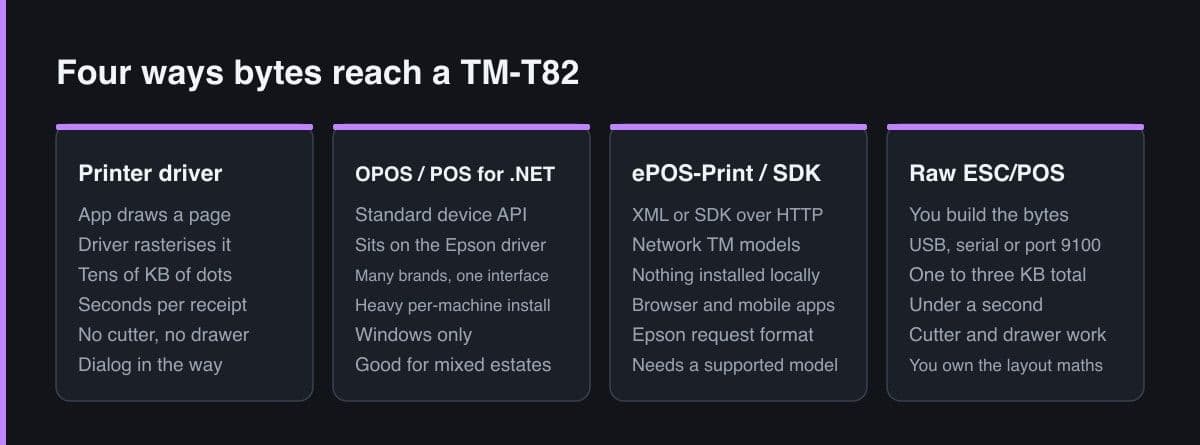
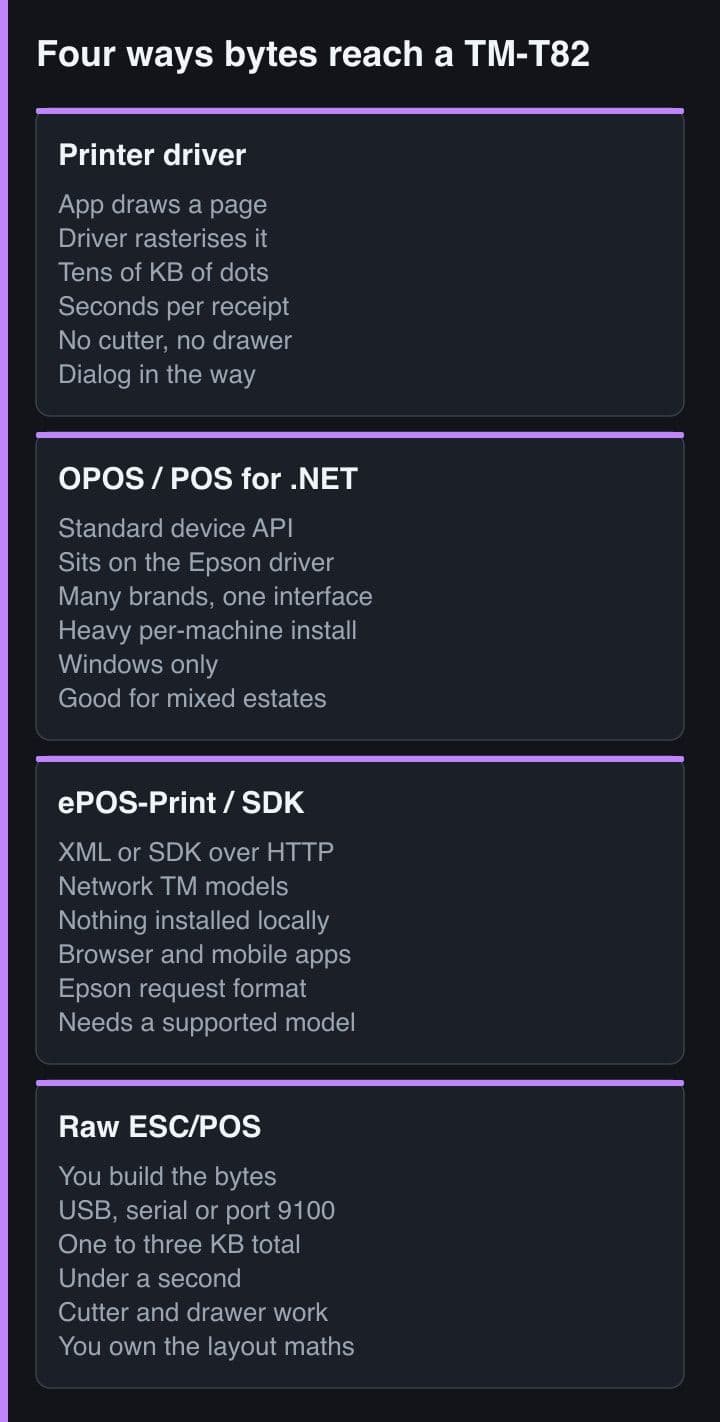
There are four legitimate ways to get text out of an Epson TM-T82, and teams usually pick one by accident — whichever appeared first in a search result — then live with the consequences for years. The consequences are real: a difference of several seconds per sale, whether the cash drawer can open at all, and whether a failed print is something your code can see.
This is the comparison I wish I had at the start, followed by the code for the two paths that matter most in practice.
Every option below ends with the same ESC/POS bytes reaching the print head. What differs is who generates them, how many layers sit in between, and how much of the printer's behaviour you can reach.
| Approach | How it works | Best for | What it costs |
|---|---|---|---|
| Printer driver (GDI or CUPS) | Your app draws a page; the driver rasterises it to the paper width and streams dots | Occasional printing, office documents, letting non-developers use the printer | Slowest by far, no drawer or cut control from the document, a print dialog in the way |
| OPOS or POS for .NET | A standardised device API on top of the Epson Advanced Printer Driver | Windows-only estates that must support many printer brands behind one interface | Heavy install, per-machine configuration, and a hard dependency on Windows |
| ePOS-Print and the ePOS SDK | Epson's own XML or SDK calls sent over HTTP to a network-capable TM printer | Browser and mobile apps that must print without installing anything locally | Requires a supported network model and ties you to Epson's request format |
| Raw ESC/POS | You build the byte array and write it to a USB device, serial port or TCP port 9100 | Purpose-built point of sale, kitchen tickets, anything measured in receipts per minute | You own the layout maths, the code page and the retry logic — no framework does it for you |
The honest summary is that the driver optimises for generality and raw optimises for a receipt. A point-of-sale system is not a general printing problem, which is why nearly every POS product ends up on the bottom row.
Understanding the cost requires knowing what happens between your document and the paper. A GDI-class driver treats the receipt as a page image.
None of that is a defect. It is exactly right for printing an invoice on A4. It is simply the wrong shape for a device whose entire job is short bursts of monospaced text and two or three control commands.
If your receipts are slow and you cannot say whether you are sending text or a bitmap, you are almost certainly sending a bitmap. Measure the byte count of one receipt: text receipts are one to three kilobytes, rasterised ones are tens or hundreds of kilobytes.
There is a middle path many teams miss: you can send raw ESC/POS through the operating system's print queue instead of bypassing it. On Windows this is the RAW datatype, on Linux it is the raw option to lp. You keep queue management, sharing and permissions, but the spooler passes your bytes through untouched instead of rendering anything.
# Windows: hand raw bytes to the spooler with the RAW datatype.
# The queue still owns the port, so sharing and permissions keep working.
Add-Type -AssemblyName System.Drawing
$job = [System.IO.File]::ReadAllBytes("C:\pos\receipt.bin")
# RawPrinterHelper.SendBytesToPrinter uses OpenPrinter + StartDocPrinter
# with pDatatype = "RAW", then WritePrinter. Nothing renders the page.

# Linux / CUPS: the same idea, one line.
lp -d TM-T82 -o raw receipt.bin

# No queue at all: talk to the device node.
cat receipt.bin > /dev/usb/lp0
This is usually the right first migration. It removes the rasterisation cost and unlocks drawer and cut commands, without asking a shop's IT arrangement to change at all. Only move to a direct device or socket connection when you need the last hundred milliseconds or you are printing from a service with no desktop session.
For a purpose-built POS, the shortest path is to open the transport yourself. Over USB or serial that is a device node; over Ethernet it is a TCP connection to the printer's raw print port.
// Node: raw TCP to an Ethernet TM printer. One socket, one receipt, close.
import { Socket } from "node:net";

const PRINTER_PORT = 9100;          // the raw print port on TM Ethernet models
const CONNECT_TIMEOUT_MS = 3000;

export function printRaw(host: string, payload: Buffer): Promise<void> {
  return new Promise((resolve, reject) => {
    const socket = new Socket();
    socket.setTimeout(CONNECT_TIMEOUT_MS);
    socket.once("timeout", () => socket.destroy(new Error("printer timeout")));
    socket.once("error", reject);
    socket.connect(PRINTER_PORT, host, () => {
      // end() flushes then FINs — the printer treats the close as end of job.
      socket.end(payload, () => resolve());
    });
  });
}
Two details make the difference between a working implementation and a flaky one. Open the connection per receipt and close it — the close is what many TM firmware builds treat as end of job. And never keep a socket open across sales hoping to save the handshake: a half-open connection to a printer that was power-cycled will accept writes and print nothing.
The decision is almost mechanical once you answer these.
In my own POS work the answer has been the same every time: raw bytes, through a queue where a shop already had one, straight to the port where they did not.
Keep both paths behind one interface in your code — a printer transport with a single send method. Swapping a USB shop for a network shop then becomes configuration, not a rewrite, and you can unit test the byte generation without any printer attached.
If you inherit a system that prints receipts through a driver, the sequence that works is: generate the same receipt as ESC/POS bytes alongside the existing path, dump both to files, compare them by eye on paper, then flip a feature flag per shop. Nothing in the sale flow changes, and you can roll back one shop without touching the others.
The measurable outcome is usually the same: receipts drop from several seconds to under one, the drawer starts opening from software, and support calls about stuck print queues disappear because there is no longer a queue to get stuck.
The Windows driver is not wrong, it is general. Raw ESC/POS is not clever, it is specific. A point-of-sale application is one of the few places where specificity clearly wins, and the cost of that specificity is one afternoon spent learning a small command language you will then use for years.