Software Development
Build 58mm ESC/POS Receipts in Flutter With esc_pos_utils
August 202611 min read
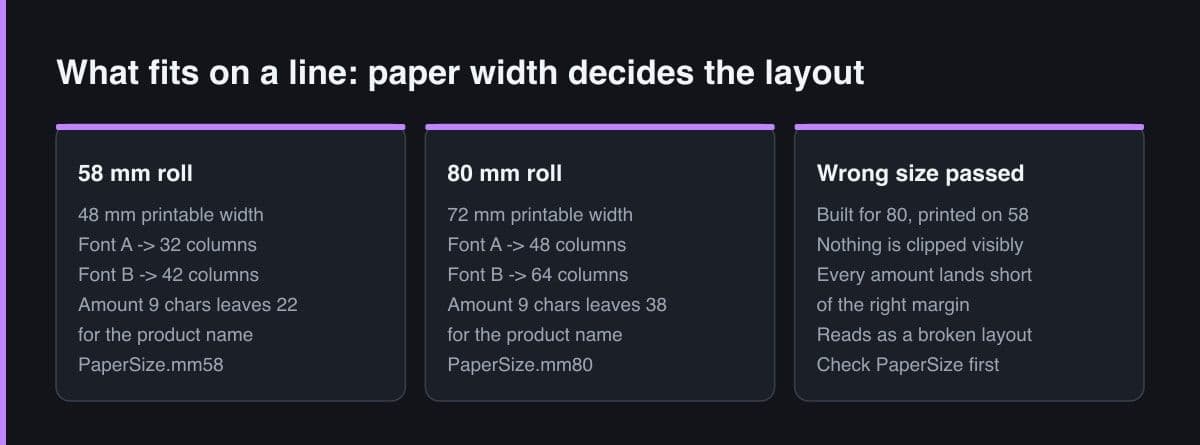
About 32 columns in Font A and roughly 42 in Font B, because a 58 mm roll gives around 48 mm of printable width. An 80 mm roll gives 72 mm, which is 48 and 64 columns respectively. Those numbers are the size of your canvas, and every layout decision is arithmetic inside them.
Row widths are expressed in twelfths, so the widths of the columns in a row must sum to 12. A name-quantity-amount line is typically a 7-1-4 split. The generator converts those proportions into the real column count implied by the paper size, which is what lets one builder serve both 58 mm and 80 mm printers.
Send numbers over the wire and format on the device, with one pinned format rather than a locale-aware formatter. A device set to English would otherwise group digits differently from one set to Indonesian, printing two different-looking totals for the same sale, and pre-formatted server strings often carry characters the printer's code page cannot render.
Both are possible, and the native command is much better. esc_pos_utils_plus exposes qrcode and barcode helpers that emit native ESC/POS commands, which print fast and crisply. The same code sent as a raster bitmap is slow, drains a battery printer, and depends on your dithering.
Make the builder a pure function from a sale to a list of bytes, then commit the expected byte list as a golden fixture. Any accidental layout or encoding change fails the test instead of surprising a shop. Add property-style checks that the longest plausible product name still leaves the amount intact within the column budget.
Key Takeaway
On 58 mm paper you get about 32 Font A columns, and esc_pos_utils_plus expresses layout as rows of PosColumn widths summing to 12. Building receipts through a class that returns bytes — and never touches the printer — makes the whole layout unit-testable with golden byte fixtures.
The hard part of receipt printing in Flutter is not the Bluetooth. It is that a receipt is a layout problem solved with arithmetic, on a canvas one third the width of a counter printer, in a language of columns rather than pixels. Get the arithmetic wrong and every receipt in the shop is subtly crooked.
This article is about the content half of the job: how to structure a receipt builder in Dart so it is readable, reusable across paper sizes, and testable without any hardware attached.
Everything starts with paper width. A 58 mm roll gives roughly 48 mm of printable width, which at the usual character cell yields about 32 columns in Font A and around 42 in Font B. An 80 mm roll gives 72 mm, 48 columns and 64 respectively. Those numbers are not styling advice; they are the size of your canvas.
The generator asks for a paper size rather than a column count and derives the rest, which is convenient until someone passes the wrong one. A receipt built for 80 mm and printed on 58 mm is not clipped in an obvious way — it is quietly misaligned, with amounts that no longer land at the right margin.
58 mm roll  ->  48 mm print width  ->  Font A  = 32 columns
                                        Font B  = 42 columns

80 mm roll  ->  72 mm print width  ->  Font A  = 48 columns
                                        Font B  = 64 columns

// esc_pos_utils_plus asks for the paper size, not the column count,
// and derives the rest — which is why passing the wrong PaperSize
// produces a receipt that is subtly, consistently misaligned.
final generator = Generator(PaperSize.mm58, profile);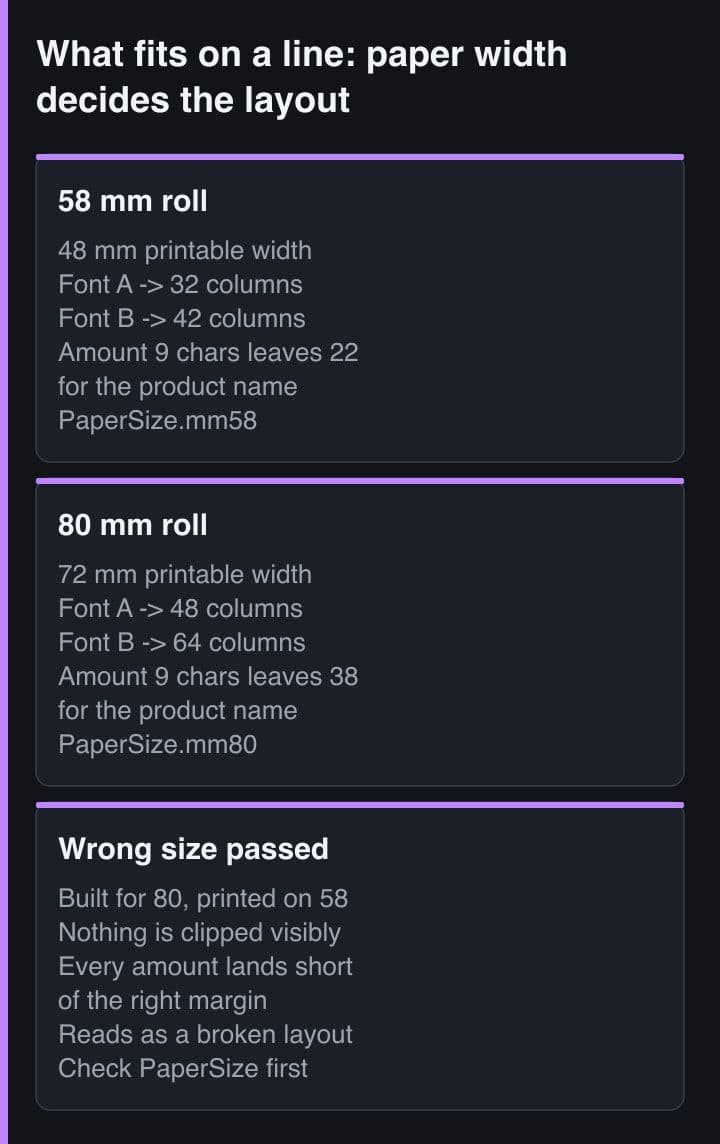
The single most useful refactor in a Flutter POS is separating the thing that builds a receipt from the thing that sends it. Once the builder is a pure function from a sale to a list of integers, you can print to a file, compare against a fixture, and run the whole layout in CI.
/// A receipt builder that returns bytes and touches no hardware.
/// Everything about this class is unit-testable on a laptop.
class ReceiptBuilder {
  ReceiptBuilder(this._generator);
  final Generator _generator;

  List<int> build(Sale sale) => [
        ..._header(sale),
        ..._lines(sale),
        ..._totals(sale),
        ..._footer(sale),
        ..._generator.feed(3),
        ..._generator.cut(),
      ];

  List<int> _lines(Sale sale) => sale.items
      .expand((item) => [
            ..._generator.row([
              PosColumn(text: item.name, width: 7),
              PosColumn(
                text: item.qty.toString(),
                width: 1,
                styles: const PosStyles(align: PosAlign.center),
              ),
              PosColumn(
                text: rupiah(item.lineTotal),
                width: 4,
                styles: const PosStyles(align: PosAlign.right),
              ),
            ]),
          ])
      .toList();
}

// PosColumn widths always sum to 12. That grid — not pixels — is how
// esc_pos_utils_plus expresses layout, and it maps onto whatever column
// count the paper size implies.
Note the row API. PosColumn widths always sum to twelve, so a name-quantity-amount line is a 7-1-4 split regardless of paper size, and the generator converts that proportion into the real column count. Thinking in twelfths is what lets one builder serve both 58 mm and 80 mm hardware honestly.
Give the builder the paper size as a constructor argument and instantiate it per printer, not per app. Shops mix hardware — an 80 mm unit on the counter and a 58 mm portable for deliveries — and a single global generator is how the delivery receipts end up misaligned.
Working inside 32 columns is genuinely tight. These four rules have survived every layout I have shipped.
The one exception is the header. A shop name centred and double-size is worth the columns because it is the only line that has to work from a distance.
Currency formatting looks like a display concern and is really a printing constraint: the width of the string decides how much room the item name gets. Keep one function, use it for the receipt and the screen, and treat its output width as an input to your layout.
/// Rupiah formatting belongs in one place, and it is a printing
/// concern as much as a display concern: the string width decides
/// the column arithmetic.
String rupiah(int amount) {
  final digits = amount.abs().toString();
  final buffer = StringBuffer();
  for (var i = 0; i < digits.length; i++) {
    if (i > 0 && (digits.length - i) % 3 == 0) buffer.write('.');
    buffer.write(digits[i]);
  }
  return (amount < 0 ? '-' : '') + buffer.toString();
}

// rupiah(1250000) -> "1.250.000"   9 characters
// On a 32-column receipt that leaves 22 columns for the item name
// plus one separating space. Budget it explicitly, never hopefully.
Formatting on the device also avoids a subtle failure I have seen twice: a server sending a pre-formatted amount string with a non-breaking space or a currency symbol that the printer's code page cannot render. Send numbers over the wire, format at the edge.
Never let a locale-aware formatter choose the separator at print time. A device set to English will produce different grouping to one set to Indonesian, and the same sale will print two different-looking totals on two tills in the same shop. Pin the format explicitly.
The generator exposes QR codes and barcodes as native printer commands rather than as images, which matters on a battery-powered 58 mm printer: a native QR is fast and crisp, while the same code sent as a bitmap is slow and depends on your dithering.
// QR codes and barcodes are native commands, not images. Use them.
...generator.qrcode('https://toko.example/r/8f2c1a', size: QRSize.size6),
...generator.barcode(Barcode.code128('SR-2026-0818'.codeUnits)),

// A logo, if you truly need one, is a raster image and costs real time
// on a 58 mm battery printer. Downscale it first and print it once at
// the top, never as a repeating decoration.
final logo = decodeImage(await rootBundle
    .load('assets/logo_mono.png')
    .then((d) => d.buffer.asUint8List()));
...generator.image(logo!);
A raster logo is the one thing worth arguing about with a client. It is the slowest operation the printer performs, it drains the battery measurably, and on thermal paper it fades faster than text. If the shop insists, print it once at the top, in a monochrome image prepared at the exact target width, never scaled at runtime.
Once the builder returns bytes, testing it is trivial and unusually valuable. A committed fixture of the exact byte list turns any accidental layout change into a failing test rather than a complaint from a shop three weeks later.
test('receipt fits 32 columns and ends with a cut', () {
  final bytes = ReceiptBuilder(generator).build(sampleSale);

  // Golden test: the exact byte list is committed as a fixture, so any
  // accidental layout change shows up as a diff instead of as a
  // complaint from a shop three weeks later.
  expect(bytes, equals(goldenReceiptBytes));
});

test('long product names never push the amount off the line', () {
  final line = itemLine('Nasi Goreng Spesial Telur Mata Sapi', '150.000');
  expect(line.length, lessThanOrEqualTo(32));
  expect(line.endsWith('150.000'), isTrue);
});
Pair the golden test with a couple of property-style checks: the longest plausible product name still leaves the amount intact, and every line stays inside the column budget. Those two tests have caught more real defects for me than any amount of manual printing.
A receipt builder is a small, pure, well-specified piece of code, and treating it that way is what makes thermal printing boring in the good sense. Keep it away from the Bluetooth layer, think in twelfths, pin your currency format, and let a golden fixture defend the layout you spent an afternoon getting right.